# Matplotlib
> Source: https://aiwiki.ai/wiki/matplotlib
> Updated: 2026-10-04
> Categories: AI Tools & Products, Data Science, Machine Learning
> License: CC BY 4.0 (https://creativecommons.org/licenses/by/4.0/) - attribute to "AI Wiki (aiwiki.ai)"
> Cite as: AI Wiki. "Matplotlib." aiwiki.ai, 4 Oct 2026. https://aiwiki.ai/wiki/matplotlib
> From AI Wiki (https://aiwiki.ai), the free encyclopedia of artificial intelligence. Reuse freely with attribution.
Matplotlib is the foundational open-source [data visualization](https://aiwiki.ai/wiki/data_visualization) library for [Python](https://aiwiki.ai/wiki/python), created by John D. Hunter in 2003, that produces static, animated, and interactive plots and serves as the de-facto plotting standard underneath nearly the entire scientific Python and [machine learning](https://aiwiki.ai/wiki/machine_learning) stack. Built on top of [NumPy](https://aiwiki.ai/wiki/numpy), it is the base layer for higher-level libraries such as [seaborn](https://aiwiki.ai/wiki/seaborn) and the [pandas](https://aiwiki.ai/wiki/pandas) `.plot()` interface, and it is the standard tool for visualizing training curves, embeddings, and confusion matrices in [data science](https://aiwiki.ai/wiki/data_science) and ML. Hunter's 2007 paper describing the library, "Matplotlib: A 2D Graphics Environment," has been cited more than 22,500 times, making it one of the most-cited works in all of scientific computing.[1][11]
## Who created Matplotlib and when?
John D. Hunter (1968-2012) conceived Matplotlib in 2002 while working as a postdoctoral researcher in neurobiology at the University of Chicago. He needed a way to visualize electrocorticography (ECoG) data from epilepsy patients and found the existing tools insufficient. Hunter originally developed Matplotlib as a patch to IPython that enabled interactive MATLAB-style plotting from the Python command line. Version 0.1 was released in 2003.[1]
The name "Matplotlib" is a portmanteau of "MATLAB," "plot," and "library," reflecting its origins in emulating the plotting commands of MATLAB. As the official Matplotlib documentation puts it, the library "has its origins in emulating the MATLAB graphics commands, it is independent of MATLAB, and can be used in a Pythonic, object oriented way." Although it drew inspiration from MATLAB's interface, Matplotlib was built to be fully independent and to support a Pythonic, object-oriented programming style.[2]
Hunter continued to lead the project until his death on August 28, 2012, at the age of 44 from complications related to colon cancer. Michael Droettboom was nominated as Matplotlib's lead developer shortly before Hunter's death, and Thomas Caswell later joined the leadership team. The Python Software Foundation created its Distinguished Service Award specifically for Hunter, presenting him with the inaugural honor in 2012. The SciPy Conference established the annual John Hunter Excellence in Plotting Contest in 2013 in his memory.[3]
## Is Matplotlib free and open source?
Yes. Matplotlib is released under a permissive BSD-style license and is free to use, modify, and redistribute, including in commercial software. It is fiscally sponsored by NumFOCUS, a nonprofit that supports open-source scientific computing projects, which states that Matplotlib "is a NumFOCUS fiscally sponsored project" eligible for tax-deductible donations. As of 2026, the latest stable release is version 3.10.9 (released April 23, 2026), with the 3.11 development series underway.[2][12]
## Architecture and Core Concepts
Matplotlib's architecture is built around a hierarchy of objects that provide fine-grained control over every element of a visualization. Understanding this hierarchy is essential for effective use of the library.
### The Figure, Axes, and Axis Hierarchy
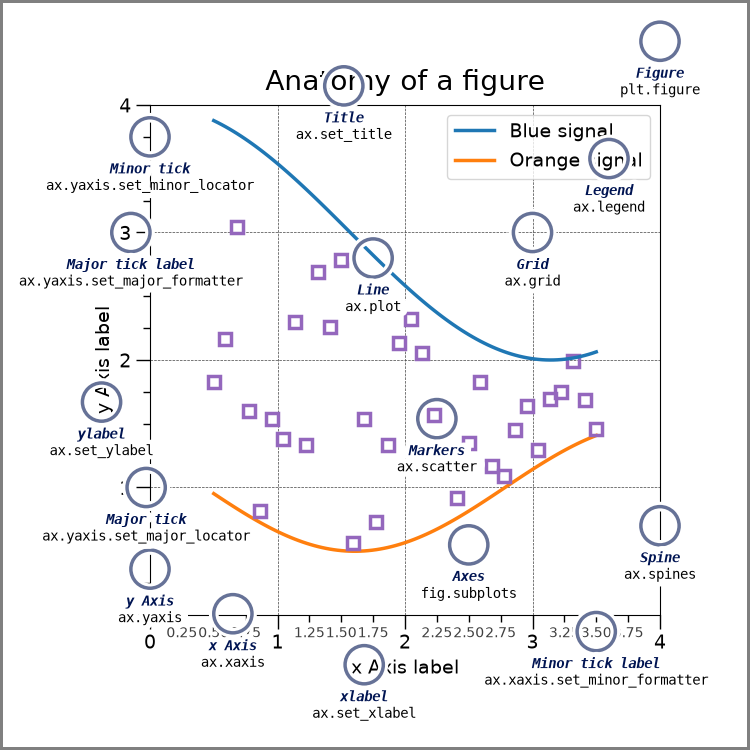
At the top of Matplotlib's object hierarchy sits the **Figure**, which serves as the outermost container for all plot elements. A Figure can hold one or more **Axes** objects (individual plots), along with titles, legends, colorbars, and other annotations. Each Axes object contains a plotting region with data space, and typically includes two **Axis** objects (or three for 3D plots) that control tick marks, tick labels, and axis limits.[4]
| Component | Description | Key Methods |
|-----------|-------------|-------------|
| Figure | Top-level container holding all plot elements | `figure()`, `savefig()`, `suptitle()` |
| Axes | Individual plot area within a Figure | `plot()`, `scatter()`, `set_title()`, `set_xlabel()` |
| Axis | Controls scale, tick locations, and tick labels | `set_ticks()`, `set_ticklabels()`, `set_lim()` |
| Artist | Base class for all visible elements on a Figure | `set_visible()`, `set_alpha()`, `set_zorder()` |
Every visible element on the Figure is an **Artist**. This includes the Figure itself, Axes, Axis objects, Text objects, Line2D objects, Patch objects, and collection objects. When the Figure is rendered, all Artists are drawn to a backend canvas.[4]
### How does the pyplot interface differ from the object-oriented interface?
Matplotlib offers two primary ways to create visualizations:
**Pyplot Interface:** The `matplotlib.pyplot` module provides a state-based interface modeled after MATLAB. The official documentation describes it as "a state-based interface to matplotlib" that "provides an implicit, MATLAB-like, way of plotting" by keeping track of the last Figure and Axes created and adding new Artists to the object it thinks the user wants. It automatically manages Figures and Axes, keeping track of the "current" figure and axes. This interface is convenient for quick, simple plots and interactive exploration. For example, calling `plt.plot(x, y)` will create a Figure and Axes if none exist, or draw on the current Axes if one is already active.[5]
**Object-Oriented Interface:** The explicit, object-oriented (OO) approach creates Figure and Axes objects directly and calls methods on them. This interface provides full control and is recommended for complex visualizations, reusable code, and applications that embed Matplotlib in larger programs. The OO interface underlies the pyplot interface and gives access to all customization options.[5]
Most tutorials and documentation now recommend the OO interface for anything beyond simple exploratory plots because it makes the code clearer about which Axes is being modified, especially when working with multiple subplots.
## Common Plot Types
Matplotlib supports a wide range of plot types for different data visualization needs. The following table summarizes the most commonly used plot types along with their primary functions and typical use cases.
| Plot Type | Function | Use Case |
|-----------|----------|----------|
| Line Plot | `plot()` | Trends over time, continuous data |
| Scatter Plot | `scatter()` | Relationships between two variables, correlations |
| Bar Plot | `bar()`, `barh()` | Comparing categorical data |
| Histogram | `hist()` | Data distribution, frequency analysis |
| Box Plot | `boxplot()` | Statistical distribution, outlier detection |
| Heatmap | `imshow()`, `pcolormesh()` | Matrix data, correlations, 2D densities |
| Pie Chart | `pie()` | Proportional composition |
| Area Plot | `fill_between()`, `stackplot()` | Cumulative trends, ranges |
| Error Bar Plot | `errorbar()` | Measurements with uncertainty |
| Violin Plot | `violinplot()` | Distribution shape and density |
| Contour Plot | `contour()`, `contourf()` | 3D data on a 2D plane, topographic-style maps |
| 3D Surface Plot | `plot_surface()` | Functions of two variables |
| Stem Plot | `stem()` | Discrete data sequences |
| Quiver Plot | `quiver()` | Vector fields |
### Line and Scatter Plots
Line plots are the most fundamental visualization in Matplotlib, created using `ax.plot()`. They connect data points with lines and are ideal for showing trends in continuous data, such as time series. Scatter plots (`ax.scatter()`) display individual data points without connecting lines, making them useful for identifying correlations, clusters, and [outliers](https://aiwiki.ai/wiki/outliers) between two variables.
### Bar Plots and Histograms
Bar plots (`ax.bar()` for vertical, `ax.barh()` for horizontal) compare discrete categories. Grouped and stacked bar plots allow comparison of multiple series. Histograms (`ax.hist()`) bin continuous data into intervals and display their frequency, helping analysts understand data distributions. Parameters like `bins`, `density`, and `cumulative` control the histogram's appearance and behavior.
### Heatmaps and Box Plots
Heatmaps use color intensity to represent values in a matrix and are created using `ax.imshow()` or `ax.pcolormesh()`. They are frequently used for correlation matrices, [confusion matrices](https://aiwiki.ai/wiki/confusion_matrix), and spatial data. Box plots (`ax.boxplot()`) show the median, quartiles, and potential outliers in a dataset, providing a concise statistical summary.
### 3D Plotting
Matplotlib supports 3D plotting through the `mpl_toolkits.mplot3d` module. By creating an Axes with `projection='3d'`, users can generate 3D scatter plots, line plots, surface plots, wireframe plots, and bar plots. These are particularly useful for visualizing functions of two variables and high-dimensional data in [machine learning](https://aiwiki.ai/wiki/machine_learning).
## What is Matplotlib used for in machine learning?
Matplotlib plays a central role in the [machine learning](https://aiwiki.ai/wiki/machine_learning) workflow, from initial data exploration through [model evaluation](https://aiwiki.ai/wiki/model_evaluation) and results communication. It is the rendering backend behind most of the diagnostic plots that data scientists and ML engineers produce every day: loss and learning curves, confusion matrices, ROC curves, feature-importance bars, and embedding scatter plots.
### Data Exploration and Preprocessing
Before building models, data scientists use Matplotlib to understand their data through distribution plots, scatter matrices, and correlation heatmaps. Visualizing feature distributions helps identify skewness, outliers, and the need for transformations. Pair plots and scatter matrices reveal relationships between features that inform [feature engineering](https://aiwiki.ai/wiki/feature_engineering) decisions.
### Training Visualization
**Learning Curves:** Matplotlib is the standard tool for plotting learning curves that show training and validation performance as a function of [training set](https://aiwiki.ai/wiki/training_set) size or training epochs. These curves help diagnose whether a model suffers from high bias ([underfitting](https://aiwiki.ai/wiki/underfitting)) or high variance ([overfitting](https://aiwiki.ai/wiki/overfitting)). Libraries like [scikit-learn](https://aiwiki.ai/wiki/scikit-learn) provide utilities such as `LearningCurveDisplay` that generate these plots using Matplotlib as the backend.[6]
**Loss Curves:** During [neural network](https://aiwiki.ai/wiki/neural_network) training, plotting training and validation loss over epochs is standard practice. Frameworks like [TensorFlow](https://aiwiki.ai/wiki/tensorflow) and [PyTorch](https://aiwiki.ai/wiki/pytorch) often rely on Matplotlib (or tools built on it, like TensorBoard) for these visualizations.
### Model Evaluation
**Confusion Matrices:** Matplotlib's `imshow()` function is commonly used to display confusion matrices as color-coded heatmaps. [Scikit-learn](https://aiwiki.ai/wiki/scikit-learn) provides `ConfusionMatrixDisplay` to streamline this process, rendering the matrix with labeled axes and color bars that show classification performance across all classes.[6]
**ROC and Precision-Recall Curves:** Receiver Operating Characteristic (ROC) curves and precision-recall curves are plotted with Matplotlib to evaluate classifier performance at different thresholds. The area under these curves (AUC) provides a single metric summarizing model quality.
**Feature Importance:** For tree-based models like [random forests](https://aiwiki.ai/wiki/random_forest) and [gradient boosting](https://aiwiki.ai/wiki/gradient_boosting), Matplotlib bar plots display the relative importance of each feature, guiding feature selection and model interpretation.
### Notable Scientific Uses
Matplotlib has been used in high-profile scientific achievements. NASA used it for data visualization during the 2008 landing of the Phoenix spacecraft on Mars.[3] The Event Horizon Telescope collaboration used Matplotlib to produce visualizations during the effort that yielded the first-ever image of a black hole in 2019.[2]
## Customization and Styling
One of Matplotlib's greatest strengths is its deep customization system, which allows users to control virtually every visual element of a plot.
### rcParams
Matplotlib stores its default configuration in a dictionary-like object called `matplotlib.rcParams`. This contains hundreds of settings controlling fonts, colors, line widths, figure sizes, and more. Users can modify these parameters at runtime to apply consistent styling across all plots in a script or notebook. Settings changed via `rcParams` at runtime take precedence over style sheets, which in turn take precedence over `matplotlibrc` configuration files.[7]
### Style Sheets
Matplotlib ships with a collection of built-in style sheets that change the overall look of plots with a single line of code. Popular built-in styles include `ggplot` (emulating R's ggplot2 aesthetic), `seaborn` (cleaner statistical graphics style), `bmh` (Bayesian Methods for Hackers), `fivethirtyeight`, and `dark_background`. Users can apply a style with `plt.style.use('style_name')` or create custom `.mplstyle` files for consistent branding or publication requirements.[7]
### Colormaps
Colormaps map numerical values to colors and are critical for heatmaps, contour plots, and other color-coded visualizations. Matplotlib includes over 150 built-in colormaps organized into categories:
| Category | Examples | Best For |
|----------|----------|----------|
| Sequential | `viridis`, `plasma`, `inferno`, `magma` | Ordered data from low to high |
| Diverging | `coolwarm`, `RdBu`, `seismic` | Data with a meaningful center point |
| Qualitative | `tab10`, `Set2`, `Pastel1` | Categorical or unordered data |
| Cyclic | `twilight`, `hsv` | Data that wraps around (angles, phases) |
The default colormap was changed from `jet` to `viridis` in Matplotlib 2.0 because `viridis` is perceptually uniform, meaning equal steps in data produce equal steps in perceived color change. The `viridis`, `inferno`, `plasma`, and `magma` family was designed in the CAM02-UCS perceptual colorspace to maintain a constant change in lightness across the entire range, avoiding the misleading artifacts of the older `jet` rainbow scheme. Users can also create custom colormaps using `ListedColormap` and `LinearSegmentedColormap`.[7][13]
## Subplots and Layout Management
Creating multi-panel figures is a common requirement in scientific visualization and data analysis.
### Basic Subplots
The simplest way to create multiple plots is with `plt.subplots(nrows, ncols)`, which returns a Figure and an array of Axes objects. This function supports parameters for sharing axes (`sharex`, `sharey`), controlling figure size (`figsize`), and adjusting spacing.
### GridSpec
For more complex layouts where subplots span multiple rows or columns, Matplotlib provides `GridSpec`. This class defines a grid of cells that can be sliced like a [NumPy](https://aiwiki.ai/wiki/numpy) array to create subplots of varying sizes. `GridSpec` supports nested layouts through `GridSpecFromSubplotSpec`, enabling hierarchical figure arrangements. The `subplot_mosaic()` function (introduced in version 3.3) offers a more intuitive ASCII-art-based syntax for defining complex layouts.[8]
### Constrained and Tight Layout
Matplotlib provides automatic layout engines to prevent overlapping labels and titles. `tight_layout()` adjusts subplot parameters to fit within the figure area, while `constrained_layout` (enabled via `fig.set_layout_engine('constrained')`) provides more sophisticated spacing that accounts for colorbars, legends, and suptitles.
## Animation
Matplotlib supports creating animated visualizations through the `matplotlib.animation` module. The two main classes are `FuncAnimation`, which repeatedly calls a function to update the plot frame by frame, and `ArtistAnimation`, which uses a pre-built list of Artist objects for each frame.
Animations can be saved in multiple formats including GIF (via the Pillow writer), MP4 and other video formats (via FFmpeg), and HTML for embedding in web pages. The `save()` method on animation objects handles export, with parameters for frame rate, resolution, and codec selection.[9]
## Integration with the Python Ecosystem
Matplotlib integrates tightly with the broader [Python](https://aiwiki.ai/wiki/python) scientific computing stack, sitting at the base of what is often called the SciPy stack.
### NumPy and Pandas
Matplotlib is built on [NumPy](https://aiwiki.ai/wiki/numpy) and accepts NumPy arrays as input for all plotting functions. [Pandas](https://aiwiki.ai/wiki/pandas) DataFrames and Series have built-in `.plot()` methods that use Matplotlib as the default backend, enabling one-line visualizations directly from data structures. This integration makes it straightforward to go from data manipulation to visualization without format conversion.
### Jupyter Notebooks
Matplotlib integrates seamlessly with Jupyter Notebooks through magic commands. The `%matplotlib inline` command renders static plots directly in notebook cells. For interactive features like zooming and panning, the `ipympl` package (installed separately) provides a widget-based backend activated with `%matplotlib widget`. This makes Jupyter Notebooks a powerful environment for iterative data exploration and analysis.[10]
### Scikit-learn and Deep Learning Frameworks
[Scikit-learn](https://aiwiki.ai/wiki/scikit-learn) uses Matplotlib for all its built-in plotting utilities, including `ConfusionMatrixDisplay`, `RocCurveDisplay`, `LearningCurveDisplay`, and `DecisionBoundaryDisplay`. Deep learning frameworks like [TensorFlow](https://aiwiki.ai/wiki/tensorflow) and [PyTorch](https://aiwiki.ai/wiki/pytorch) commonly use Matplotlib for training progress visualization and model diagnostics.
## How does Matplotlib compare to seaborn, Plotly, and other libraries?
Several visualization libraries have been built on top of Matplotlib or developed as alternatives, each targeting different use cases. Because Matplotlib is the base rendering layer, several of the most popular libraries are wrappers that ultimately draw through it.
| Library | Relationship to Matplotlib | Strengths | Best For |
|---------|---------------------------|-----------|----------|
| [Seaborn](https://aiwiki.ai/wiki/seaborn) | Built on top of Matplotlib | Statistical plots, attractive defaults, [Pandas](https://aiwiki.ai/wiki/pandas) integration | Statistical data exploration |
| [Plotly](https://aiwiki.ai/wiki/plotly) | Independent | Interactive plots, web-ready, dashboards | Interactive web visualizations |
| [Altair](https://aiwiki.ai/wiki/altair) | Independent (Vega-Lite based) | Declarative grammar, concise syntax | Reproducible statistical charts |
| Bokeh | Independent | Interactive web plots, streaming data | Real-time dashboards |
| ggplot (plotnine) | Built on Matplotlib | Grammar of Graphics syntax | Users coming from R's ggplot2 |
**Seaborn** is the most common companion to Matplotlib. Its official documentation describes it directly: "Seaborn is a library for making statistical graphics in Python. It builds on top of matplotlib and integrates closely with pandas data structures." Built as a higher-level interface, Seaborn simplifies the creation of statistical visualizations like distribution plots, regression plots, and categorical plots. It works natively with [Pandas](https://aiwiki.ai/wiki/pandas) DataFrames and applies attractive default themes automatically.[14]
**Plotly** takes a different approach by focusing on interactive, web-based visualizations. Plots can be zoomed, panned, and hovered over in the browser. Plotly Express provides a high-level API for quick chart creation, while the lower-level `graph_objects` API offers full customization. Plotly is particularly popular for dashboards built with Dash.
**Altair** uses a declarative approach based on the Vega-Lite visualization grammar. Rather than specifying how to draw a plot step by step, users describe the relationship between data fields and visual properties. This makes Altair code concise and reproducible, and it is popular in academic and research settings.
## Explain Like I'm 5 (ELI5)
Imagine you have a box of colored pencils and a big sheet of paper. Matplotlib is like that box of pencils for your computer. When your computer collects numbers (like how many sunny days there were each month, or how tall different plants grew), Matplotlib helps you turn those numbers into colorful pictures, charts, and graphs so you can actually see what the numbers mean.
For example, you could draw a line going up to show that more ice cream gets sold when it is hot outside, or draw bars of different heights to compare how many goals different soccer players scored. Scientists, researchers, and people who work with data use Matplotlib every day to understand their numbers better and to show other people what they found.
## References
1. Hunter, J. D. (2007). "Matplotlib: A 2D Graphics Environment." *Computing in Science & Engineering*, 9(3), 90-95. https://doi.org/10.1109/MCSE.2007.55
2. "Matplotlib." Wikipedia. https://en.wikipedia.org/wiki/Matplotlib
3. "John D. Hunter." Wikipedia. https://en.wikipedia.org/wiki/John_D._Hunter
4. "Quick Start Guide." Matplotlib 3.10 Documentation. https://matplotlib.org/stable/users/explain/quick_start.html
5. "Matplotlib Application Interfaces (APIs)." Matplotlib Documentation. https://matplotlib.org/stable/users/explain/figure/api_interfaces.html
6. "ConfusionMatrixDisplay." scikit-learn Documentation. https://scikit-learn.org/stable/modules/generated/sklearn.metrics.ConfusionMatrixDisplay.html
7. "Customizing Matplotlib with style sheets and rcParams." Matplotlib Documentation. https://matplotlib.org/stable/users/explain/customizing.html
8. "Arranging multiple Axes in a Figure." Matplotlib Documentation. https://matplotlib.org/stable/users/explain/axes/arranging_axes.html
9. "Animations using Matplotlib." Matplotlib Documentation. https://matplotlib.org/stable/users/explain/animations/animations.html
10. "ipympl: Matplotlib Jupyter Integration." GitHub. https://github.com/matplotlib/ipympl
11. "Matplotlib: A 2D Graphics Environment." Semantic Scholar. https://www.semanticscholar.org/paper/Matplotlib:-A-2D-Graphics-Environment-Hunter/412a0bb5a3baa91b62053d82c562bc172df0439f
12. "matplotlib." PyPI. https://pypi.org/project/matplotlib/
13. "Choosing Colormaps in Matplotlib." Matplotlib Documentation. https://matplotlib.org/stable/users/explain/colors/colormaps.html
14. "An introduction to seaborn." seaborn Documentation. https://seaborn.pydata.org/tutorial/introduction.html
15. Matplotlib Development Team. ["Anatomy of a figure"](https://matplotlib.org/stable/gallery/showcase/anatomy.html). Copyright (c) 2012- Matplotlib Development Team; All Rights Reserved. [Matplotlib license](https://matplotlib.org/stable/project/license.html). Original Matplotlib documentation PNG; no changes by AI Wiki. License agreement for matplotlib versions 1.3.0 and later 1. This LICENSE AGREEMENT is between the Matplotlib Development Team ("MDT"), and the Individual or Organization ("Licensee") accessing and otherwise using matplotlib software in source or binary form and its associated documentation. 2. Subject to the terms and conditions of this License Agreement, MDT hereby grants Licensee a nonexclusive, royalty-free, world-wide license to reproduce, analyze, test, perform and/or display publicly, prepare derivative works, distribute, and otherwise use matplotlib alone or in any derivative version, provided, however, that MDT's License Agreement and MDT's notice of copyright, i.e., "Copyright (c) 2012- Matplotlib Development Team; All Rights Reserved" are retained in matplotlib alone or in any derivative version prepared by Licensee. 3. In the event Licensee prepares a derivative work that is based on or incorporates matplotlib or any part thereof, and wants to make the derivative work available to others as provided herein, then Licensee hereby agrees to include in any such work a brief summary of the changes made to matplotlib . 4. MDT is making matplotlib available to Licensee on an "AS IS" basis. MDT MAKES NO REPRESENTATIONS OR WARRANTIES, EXPRESS OR IMPLIED. BY WAY OF EXAMPLE, BUT NOT LIMITATION, MDT MAKES NO AND DISCLAIMS ANY REPRESENTATION OR WARRANTY OF MERCHANTABILITY OR FITNESS FOR ANY PARTICULAR PURPOSE OR THAT THE USE OF MATPLOTLIB WILL NOT INFRINGE ANY THIRD PARTY RIGHTS. 5. MDT SHALL NOT BE LIABLE TO LICENSEE OR ANY OTHER USERS OF MATPLOTLIB FOR ANY INCIDENTAL, SPECIAL, OR CONSEQUENTIAL DAMAGES OR LOSS AS A RESULT OF MODIFYING, DISTRIBUTING, OR OTHERWISE USING MATPLOTLIB , OR ANY DERIVATIVE THEREOF, EVEN IF ADVISED OF THE POSSIBILITY THEREOF. 6. This License Agreement will automatically terminate upon a material breach of its terms and conditions. 7. Nothing in this License Agreement shall be deemed to create any relationship of agency, partnership, or joint venture between MDT and Licensee. This License Agreement does not grant permission to use MDT trademarks or trade name in a trademark sense to endorse or promote products or services of Licensee, or any third party. 8. By copying, installing or otherwise using matplotlib , Licensee agrees to be bound by the terms and conditions of this License Agreement.