

Kiro
Kiro is an AI development tool built by Amazon Web Services, first released as an agentic integrated development environment (IDE) in public preview on July 14, 2025 [1][2]. It supports spec-driven development, using requirements, design documents, and task lists to guide implementation, as well as conversational coding without a full spec [4][37]. By October 2026, its interfaces included an IDE, CLI, Web, and an early-access iOS client. Kiro Crew is a separate, self-hostable personal-agent application [37][51][53].
Kiro is built on Code OSS, the open-source foundation of Visual Studio Code [2]. The tool is the direct successor to Amazon Q Developer, which AWS announced would reach end of support in April 2027 [3]. By early 2026, Kiro had expanded beyond its original commercial regions to include AWS GovCloud environments [20] and had added a roster of both proprietary and open-weight models, including several versions of Anthropic's Claude family [7].
Current interfaces and functions
The following overview reflects Kiro's documentation and releases available on October 5, 2026. Shared configuration does not mean that every function is available in every interface [37].
| Interface | Main functions | Important distinction |
|---|---|---|
| IDE | Editor, chat, specs, hooks, parallel sessions | IDE 1.x replaces the older 0.x interface [38] |
| CLI | Terminal chat, specs, headless automation, ACP | V3 is the agent generation; the latest listed package is 2.27.0 [39][46] |
| Web | Repository tasks, cloud sessions, scheduled automations | Runs in managed sandboxes [48][49] |
| Mobile | Start and steer cloud work; review pull requests | iOS early access through TestFlight [37][53] |
| Crew | Persistent personal agent, schedules, memory, monitoring | Runs locally or on a remote machine controlled by the user [51] |
IDE 1.x
IDE 1.0 introduced capability-based permissions, Markdown custom agents, structured hooks, and session export. Its experimental Agent Focus layout supports independent sessions in parallel, with a session rail and adjacent chat, spec, and diff views. Developers can also use the editor-centered layout, dock chat in editor tabs, and split those tabs across windows or monitors [38].
Inline chat was retired in 1.0. Selected code can instead be sent to the current chat with Cmd+L or to a new chat with Cmd+Shift+L on macOS. Older 0.x sessions require migration before continuing in 1.x. Exported session ZIP files contain conversation and execution records for inspection; they are not an import format for resuming sessions [38].
The September 30, 2026 IDE 1.2.4 release added opt-in Workflows and stronger checks for configuration changes. Workflows are initially off: enable them in Agent Focus's Workspace Configuration or through the kiroAgent.workflows.enabled setting, then start a new chat [45].
CLI V3
CLI V3 uses the shared agent harness and offers Default, Plan, and Spec agents. Plan mode is available through Shift+Tab, and /spec new <name> starts a spec. The CLI supports custom agents, Skills, Powers, code intelligence, semantic knowledge, and automatic or manual context compaction. The /tangent command opens a named side conversation from the current context without replacing the main thread [39].
V3 sessions use a format that V2 cannot resume. The migration documentation recommends backing up session data before upgrading. Classic, the older non-TUI interface, does not support V3 [39].
CLI 2.27.0, released October 1, 2026, added saved prompts as slash commands, live file and folder references in Steering, and a setting controlling direct sub-agent delegation when Workflows are enabled. The Workflows sub-agent tool setting defaults to on; turning it off limits main-chat delegation to Workflows, while appropriately configured workflow steps can still use sub-agents [46].
Headless automation and voice input
Headless mode runs without an interactive chat using API-key authentication through KIRO_API_KEY. A basic invocation is kiro-cli chat --no-interactive "Review the changes". The prompt can also come from standard input. Tool access must be configured before unattended execution [40].
| Headless option | Purpose |
|---|---|
--agent | Select a custom agent |
--model | Select a model |
--effort | Set supported reasoning effort |
--output-format stream-json | Emit JSON Lines events in V2/V3 |
--require-mcp-startup | Wait for configured MCP servers in V2/V3 |
In V3, required MCP startup failure returns exit code 3. A stream's final record can indicate interruption rather than successful completion. The headless documentation continues to list tool-trust flags; their behavior should not be inferred from interactive V3 migration guidance alone [40].
CLI voice mode transcribes spoken prompts rather than requiring typed input. It uses local Whisper transcription by default, with a model downloaded on first use. /voice starts recording, and holding Space provides push-to-talk. Transcripts are submitted automatically unless review-before-send is enabled. A separately configured voice server supports remote desktops [65].
Managed cloud sessions, Web, and Mobile
Cloud sessions run in managed sandboxes and continue after the user disconnects. IDE, CLI, Web, and Mobile can attach to the same cloud work. Repositories connected through GitHub or GitLab are cloned server-side; starting a cloud session does not upload a local working copy [48].
Cloud sessions are available on Pro, Pro+, Pro Max, and Power, use the existing credit allocation, and have no separate cloud-compute charge. Enterprise administrators must enable access. The documented sandbox location is US East (N. Virginia), even when a developer connects from another interface [48].
Web's optional autonomous mode owns a task through planning, delegation, and a pull request or merge request. It is off by default and can be switched during a session. Autonomous mode chooses its model automatically rather than exposing manual model selection [47].
Web automations run repository work on a schedule and can propose changes as pull requests or merge requests. An automation supports up to five schedules, including hourly intervals, daily schedules, or CRON expressions. CRON evaluation uses UTC, and runs cannot be scheduled more frequently than hourly [49]. Web memory learns preferences from the task creator's feedback, not other reviewers' comments. Saved memories can be viewed and deleted in Settings; explicit Steering remains a separate source of instructions [50].
Configuration Sync explicitly uploads supported local configuration to the cloud. Its seven supported folders are steering, agents, hooks, skills, powers, settings for MCP configuration, and workflows. A cloud sandbox cannot automatically read the user's local ~/.kiro directory. Updates replace the selected cloud copy rather than merging files. An optional setting applies cloud configuration to new local IDE and CLI sessions without overwriting local files [64].
Kiro Mobile is documented as an iOS early-access app distributed through Apple TestFlight. It can start and steer cloud sessions, with sessions and preferences shared with Web. This status should not be read as general availability or Android support [53].
Kiro Crew
Crew is an open-source personal agent whose runtime and state can reside on a local computer, container, or remote machine controlled by the user. It has desktop apps for macOS, Windows, and Linux, a web dashboard, a CLI, and messaging channels including Slack, Discord, Telegram, Teams, Webex, WeCom, and WeChat. Its Gateway is distinct from Kiro's managed cloud-session service [51].
Crew supports unattended multi-step tasks, isolated sub-agent delegation, scheduled jobs, semantic memory, and heartbeat monitoring. Its Task Runner decomposes a spec into steps, runs tests, retries failures, and checkpoints progress. Corrections can become durable lessons for later sessions [51].
Crew 0.7.0, released September 24, 2026, made accepted background work durable across Gateway restarts and expanded pull-request watches beyond GitHub to GitLab, Bitbucket Cloud, and Azure DevOps Services. Most settings apply immediately, while updates wait for active work to finish. Remote crews on AWS Fargate were added for Preview users [52].
History
Amazon's journey through AI-assisted coding spans several distinct product generations. The company launched CodeWhisperer in 2022 as a code-completion assistant embedded in popular IDEs including Visual Studio Code and JetBrains environments. CodeWhisperer focused on inline suggestions and security scanning but operated as a traditional autocomplete tool rather than a full-fledged agent.
In 2023, Amazon folded CodeWhisperer into a broader product called Amazon Q Developer, which added chat-based interactions, documentation generation, and deeper AWS console integration. Q Developer shipped as both an IDE plugin and a CLI tool. Despite meaningful adoption among AWS customers, the product faced consistent comparisons with GitHub Copilot and, later, Cursor (code editor), and AWS engineers internally acknowledged that code generated through prompt-by-prompt interactions rarely reached production quality without significant human revision.
The limitations of the prompt-response model drove AWS to rethink the category from scratch. Deepak Singh, Vice President for developer agents at AWS, described the problem at Kiro's launch: developers rarely tracked which prompts produced reliable results, models had no persistent understanding of a project's architecture, and the gap between a working prototype and a production-ready system required extensive manual effort that AI tooling did not address.
Kiro was announced on July 14, 2025, by Singh and Nikhil Swaminathan, senior manager for agentic AI developer tools [1]. The product was positioned not as an update to Q Developer but as a ground-up redesign with a distinct methodology. AWS acknowledged that Q Developer IDE plugins would reach end of support on April 30, 2027, and that new Q Developer signups would stop being accepted from May 15, 2026 [3]. The Kiro CLI was shipped with backward compatibility for Q Developer CLI commands so that existing automation and scripts would continue to work during the migration window [28].
General availability and 2026 expansion
Kiro moved from preview to general availability on November 17, 2025 [21]. AWS said more than a quarter of a million developers used the tool during the preview period, in which Kiro handled over 300 million requests and processed trillions of tokens [21][22]. The general availability release added property-based testing, which derives automated tests from a spec's acceptance criteria to verify that the implementation satisfies them; checkpointing, which lets developers rewind an agent's changes to an earlier state; multi-root workspace support; and team plans with centralized management and single sign-on through AWS IAM Identity Center [21]. The Kiro CLI launched at the same time and shares a single credit pool with the IDE, and qualifying startups (Series B or earlier) became eligible for one year of Kiro Pro+ through AWS Startups [21]. GeekWire reported that hosting company Rackspace estimated Kiro had compressed roughly 52 weeks of software modernization work into about three weeks, and that SmugMug and Flickr were among the early corporate adopters [22].
At AWS re:Invent 2025 in early December, AWS announced a preview of Kiro autonomous agents for individual developers: each developer gets a persistent AI agent that learns their preferences, manages work across repositories and connected tools such as GitHub and Jira, researches implementation approaches, orchestrates sub-agents for specialized tasks, and continues longer-running projects in the background [23]. AWS chief executive Matt Garman presented Kiro during the conference as part of a broader reimagining of the developer experience [23]. Subsequent releases extended Kiro beyond the desktop IDE:
| Date | Milestone |
|---|---|
| July 14, 2025 | Public preview announced [1] |
| November 17, 2025 | General availability; property-based testing, checkpointing, team plans, Kiro CLI [21] |
| December 2025 | Autonomous agents preview and Kiro powers announced at AWS re:Invent 2025 [23][24] |
| February 18, 2026 | Launch in AWS GovCloud (US-East and US-West) regions [13][20] |
| April 2026 | Kiro CLI 2.0 with headless mode, native Windows support, and a refreshed terminal UI [29]; AWS Transform available as a Kiro power [30] |
| May 2026 | Kiro Web preview at app.kiro.dev [31]; Requirements Analysis, parallel task execution, and Quick Plan ship in the spec engine [32] |
| August 2026 | IDE 1.0 migration documentation; Mobile documented as iOS early access [38][53] |
| September 24, 2026 | Crew 0.7.0 adds durable background work and broader pull-request watches [52] |
| September 30, 2026 | IDE 1.2.4 and CLI 2.26.0 add opt-in Workflows [45][70] |
| October 1, 2026 | CLI 2.27.0 adds Workflow delegation controls and saved prompt commands [46] |
| October 2, 2026 | Claude Sonnet 5.5 added with experimental support [61] |
Kiro CLI 2.0, released in April 2026, added a headless mode that runs the agent non-interactively in CI/CD pipelines, container builds, and scripted workflows using an API key supplied through the KIRO_API_KEY environment variable, alongside native Windows 11 support and a refreshed terminal interface [29]. Kiro Web, released in preview in May 2026 for Pro, Pro+, and Power subscribers, runs the agent in isolated cloud sandboxes accessed from a browser at app.kiro.dev: developers can assign work by adding a kiro label or a /kiro comment to GitHub issues, and the agent plans the change, coordinates sub-agents across repositories, and opens pull requests [31].
On May 12, 2026, AWS shipped three upgrades to the spec engine: parallel task execution, which AWS said cuts implementation time for large specs from 60-90 minutes to as little as 15 minutes; Quick Plan, which generates requirements, design, and tasks in a single pass after asking clarifying questions upfront; and Requirements Analysis, a neurosymbolic verification stage for specs [32][33]. Requirements Analysis uses a language model to rewrite acceptance criteria into testable form, translates them into formal logic, and runs a satisfiability modulo theories (SMT) solver to determine whether the requirement set contains contradictions, ambiguities, undefined behaviors, or gaps [33]. AWS reported that internal testing had found defects of this kind in roughly 60 percent of first-draft requirements [34][35]. Press coverage characterized the feature as a response to growing scrutiny of AI agent reliability and AI-generated code quality [35].
Spec-driven development
Spec-driven development is the conceptual core of Kiro. The approach is grounded in a simple claim: AI agents produce better, more consistent output when they work from explicit, structured descriptions of what software should do rather than inferring intent from a series of loosely connected chat messages.
A specification in Kiro is a folder of markdown files stored under .kiro/specs/ in the project root. Each specification covers one feature or bug fix and contains three standard documents: requirements.md, design.md, and tasks.md [4]. These files are version-controlled alongside the codebase and are intended to remain current as implementation progresses.
The term "spec-driven" deliberately echoes "test-driven" development. Where TDD uses failing tests as a contract that code must satisfy, spec-driven development uses a structured requirements document as a contract that both the developer and the AI agent commit to before implementation begins. Marc Brooker, a distinguished engineer at AWS, described specifications as "a description of what a program should do, and what needs it should meet" and argued that they function as a "North Star to guide the work of the agent, allowing it to take on larger tasks without getting lost" [14].
The approach directly targets what the Kiro team calls vibe coding: the practice of iterating through natural-language prompts until something that appears correct emerges, with little documentation of decisions or constraints. AWS's position is that vibe coding is appropriate for prototypes but produces code that is difficult to audit, extend, or hand off to other developers or agents [1].
The three-phase spec workflow
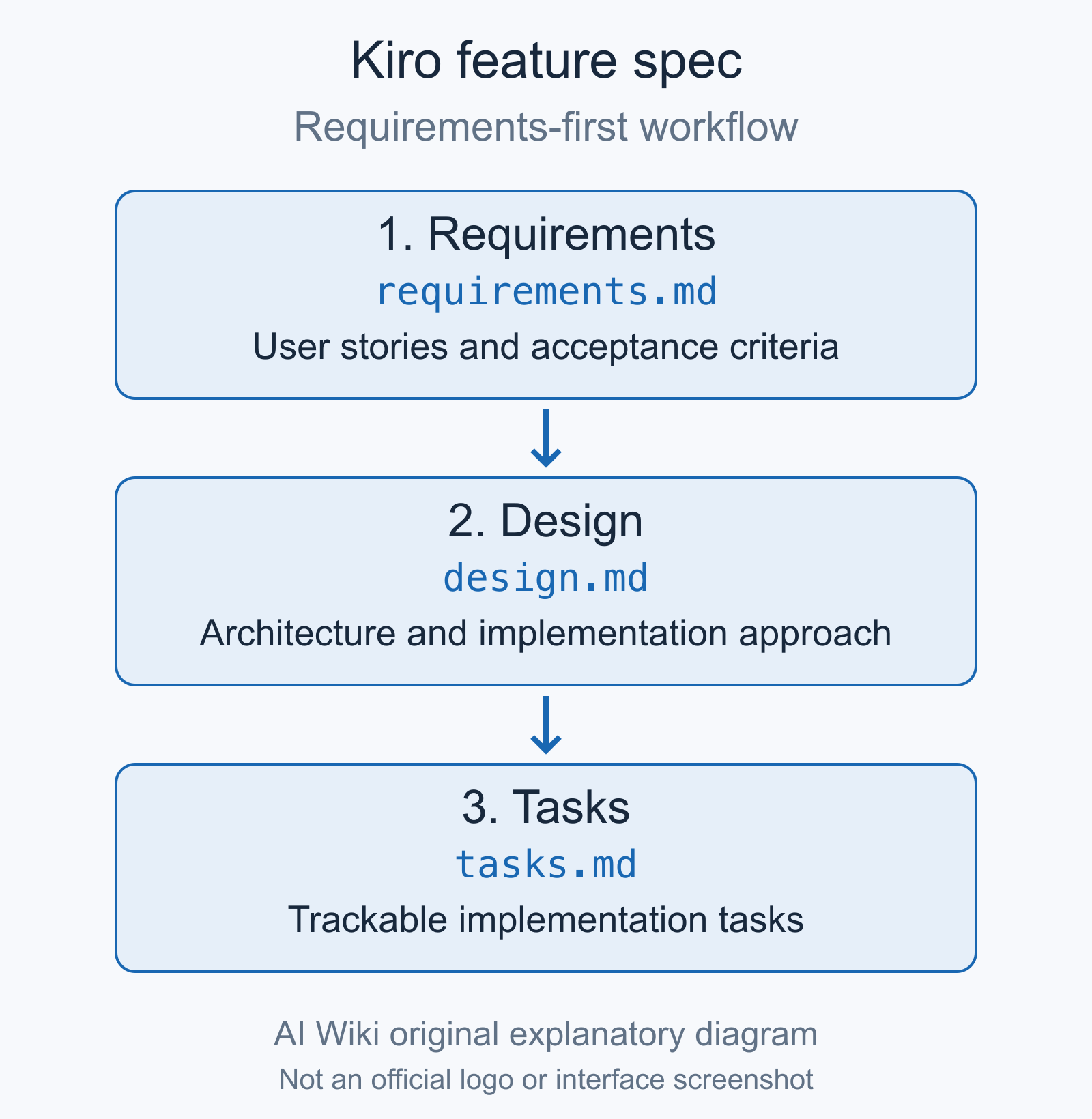
Requirements-first feature specs organize user stories and acceptance criteria in requirements.md, the technical design in design.md, and implementation tasks in tasks.md. Kiro also supports other spec workflows.[71] Diagram: AI Wiki. CC0 1.0.
Requirements
The first phase produces requirements.md, a document that records user stories and acceptance criteria. Kiro generates this document through a conversational exchange in which the developer describes the feature at a high level and Kiro asks clarifying questions to surface unstated assumptions, edge cases, and scope boundaries [4].
Acceptance criteria in Kiro's requirements documents follow EARS notation, which stands for Easy Approach to Requirements Syntax [4]. EARS was originally developed by Alistair Mavin at Rolls-Royce as a method for writing unambiguous, testable requirements in natural language [16]. Each criterion takes a form such as "WHEN [condition] THE SYSTEM SHALL [response]," making the expected behavior machine-readable and straightforward to convert into automated tests [16].
For bug fixes, Kiro generates a bugfix.md file instead of requirements.md. This file documents the current behavior, the expected behavior, and the parts of the system that should remain unchanged, giving the agent a precise description of the problem before any code is touched.
Design
The second phase produces design.md, which documents the technical architecture. Kiro generates sequence diagrams describing data flow between components, TypeScript interfaces or equivalent type definitions for the relevant data models, database schema changes, and an error-handling strategy. The design document also includes a testing approach covering unit, integration, and end-to-end test considerations [4].
Developers can use either a Requirements-First workflow, in which the requirements document is completed before design begins, or a Design-First workflow, in which architectural decisions drive the requirements articulation [17]. A third option called Quick Plan generates all three documents in a single automated pass, suited for situations where requirements are already well understood [32].
Tasks
The third phase produces tasks.md, a numbered list of discrete, executable implementation tasks [4]. Each task is small enough to complete in a single agentic run and is tagged with its dependencies on other tasks. Kiro builds a dependency graph from these tags and identifies which tasks can be executed in parallel, grouping independent tasks into concurrent waves to reduce overall execution time [32].
Task status is tracked in real time in the Kiro UI. As the agent completes each task, the checkbox updates and the spec document reflects the current state of the implementation. If requirements change mid-development, the developer can update requirements.md and ask Kiro to regenerate the tasks list, or manually edit tasks and ask Kiro to apply the changes to the codebase [4].
Spec synchronization
One of the persistent problems with technical documentation is that it falls out of date as code evolves. Kiro addresses this with a sync mechanism: after implementation, the developer can ask Kiro to update the spec files to reflect what was actually built, or can manually revise the spec and instruct Kiro to bring the code into alignment [4]. The goal is to keep the spec and the implementation in a consistent state throughout the project lifecycle, not just at the moment a feature is first built.
Hooks
Hooks run an agent prompt or shell command in response to an event. The current format uses versioned JSON definitions under .kiro/hooks/, with a trigger and an optional regular-expression matcher. Shell actions run from the project root and receive event data through standard input [5].
| Event | Availability in current documentation |
|---|---|
PromptSubmit, AgentStop | IDE, CLI, Web |
SessionStart | IDE, CLI V3, Web |
SessionEnd | CLI V3 |
PreToolUse, PostToolUse | IDE, CLI, Web |
FileCreate, FileSave, FileDelete | IDE, CLI V3, Web; agent file changes |
PreTaskExecution, PostTaskExecution | IDE, CLI V3, Web |
| Manual | Web; CLI V3 recognizes definitions but cannot invoke them through /hooks; legacy manual hooks in IDE |
The trigger reference distinguishes these events by interface; it does not document Mobile hook support [56].
IDE 1.x requires migration of legacy .hook files into the structured format before they execute, except legacy manual hooks. The migration guide recommends manual Steering slash commands for new on-demand prompt workflows [38].
Hooks can run tests, update documentation, or check changes for secrets. They are configurable automations, not a guarantee that a project's tests or security checks are complete [5].
Steering files
Steering files give Kiro persistent, project-level context through markdown documents stored in .kiro/steering/ at the workspace root [6]. Where hooks automate reactions to events, steering files shape the AI agent's behavior across all interactions by providing standing instructions about architecture, conventions, and constraints.
The IDE can generate three foundational steering files through its Generate Steering Docs action [6]:
product.md, which describes the product's purpose, users, and business objectivestech.md, which documents the frameworks, libraries, and technical constraints in usestructure.md, which records file organization patterns, naming conventions, and architectural decisions
Steering files support three inclusion modes configured through YAML front matter [6]. An always-on file is loaded with every interaction, making it appropriate for core standards and conventions. A conditional file activates only when the developer is working with files that match a specified glob pattern, keeping specialized guidance scoped to relevant contexts. A manual file is available on demand by referencing it with #steering-file-name in a chat message, which is useful for specialized workflows or troubleshooting procedures.
A fourth mode called auto loads a steering file when the agent's assessment of the current request matches the file's description, letting the system decide dynamically which context is relevant [6].
Global steering files, stored in ~/.kiro/steering/, apply across local IDE and CLI workspaces [6]. Organizations can distribute global files through MDM systems or shared repositories to enforce consistent standards across teams. When conflicts exist between global and workspace steering files, Kiro prioritizes the workspace-level instructions [6].
Manual Steering can also be invoked through slash commands. Kiro reads supported AGENTS.md instructions as always-included context. Custom agents do not inherit all Steering automatically; their context resources must include the relevant files. Workspace Steering is available across interfaces, while local global files require explicit Configuration Sync for cloud use [6][64].
Steering files differ from Kiro's specs in scope and purpose. Specs describe what a particular feature should do. Steering files describe how code should be written in general. The two systems complement each other: specs provide task-specific intent, while steering files provide project-wide context that shapes every task.
Custom agents, Skills, and Workflows
Custom agents
Custom agents define a role's instructions, context, tools, and permissions. Definitions can use JSON or Markdown with equivalent configuration fields and live in project-level .kiro/agents/ or local user-level ~/.kiro/agents/. Project definitions support IDE, CLI, and Web; the local user directory is not automatically available to cloud sessions [42][64].
An agent can select tool groups such as file reads, file writes, and shell access, add MCP servers, choose whether to include shared MCP configuration and Powers, and attach file or Skill resources. Switching between agents is documented in the IDE and CLI. Agent configuration remains subject to the surrounding permission policy [42].
Agent Skills
Skills package reusable instructions, scripts, and supporting material using the Agent Skills format. Kiro initially loads names and descriptions, expands a Skill's instructions when it matches the task, and retrieves additional files when needed. A user can also invoke a Skill by its slash-command name [43].
Workspace Skills reside in .kiro/skills/ and are supported in IDE, CLI, Web, and Mobile. Local user Skills live in ~/.kiro/skills/ for IDE and CLI. A workspace Skill takes precedence over a same-named local user Skill; cloud use of personal configuration requires an explicit upload [43][64].
Multi-agent Workflows
Workflows are reusable graphs of agent steps, sequences, loops, and parallel branches, defined in JSON or YAML recipes. They run in the background while the parent conversation remains available. Each step uses a separate session and receives explicit handoff results, rather than sharing every preceding chat turn [44].
Developers can ask Kiro to construct a Workflow from a desired outcome or run an existing recipe. Review loops can continue until a condition is met or a safety limit is reached. Runs can be inspected, paused, resumed, or stopped. Node-boundary checkpoints allow resuming without replaying completed steps, and waiting for unchanged external conditions does not itself consume model turns [44].
Workflows are documented for IDE, CLI V3, and Web, not Mobile [44]. In CLI V3, enable them under /settings > Features and restart the CLI; /workflow run starts a recipe [70]. The IDE enablement procedure is described above [45]. Recipes from an untrusted workspace are not loaded until that workspace is trusted [45].
Permissions and recovery
Capability permissions
The IDE and CLI V3 use capability rules for file access, shell commands, web access, MCP tools, and related actions. Rules can allow, ask, or deny; deny takes precedence over ask, which takes precedence over allow across applicable scopes. Sub-agents cannot escape a parent's denial by choosing a more permissive configuration [54].
User rules are stored in ~/.kiro/settings/permissions.yaml. Per-workspace user rules are stored outside the repository in a hashed workspace directory, rather than being trusted merely because a repository includes a policy file. Kiro requires approval for protected agent, Hook, Power, and Workflow configuration writes even under broader file permissions. Untrusted workspaces impose additional prompts [54].
Web runs inside a sandbox and does not apply permissions.yaml or the same per-action approval prompts as the local clients [54].
Checkpoints, rewind, and file exclusions
IDE checkpoints restore conversation context and file changes tracked through the agent's built-in file tools. Changes made through shell commands, MCP servers, or external editors are not checkpoint-tracked. Restoring a tracked file can also discard manual edits made since that checkpoint. Reverting the last turn's files is a separate action [55].
CLI rewind forks the conversation from an earlier turn but leaves files and the original session unchanged. It should not be treated as a file rollback. CLI checkpoints are documented as experimental in V2; Web and Mobile checkpoints are not documented [55].
Workspace .kiroignore rules filter supported file reads and search results in the IDE and CLI V3. Global ignore files are documented for the IDE. Web and Mobile do not support this workspace filtering, so a local exclusion file is not a cloud privacy guarantee [66].
Architecture
The Kiro IDE is a desktop application for macOS, Windows, and Linux, built on Code OSS, the open-source version of Visual Studio Code maintained by Microsoft [2]. Code OSS is the codebase from which both VS Code itself and other editors including Cursor are derived. Building on Code OSS lets Kiro support extensions published through the OpenVSX registry and maintain compatibility with VS Code settings files and keybindings, reducing the friction for developers switching from VS Code.
Kiro's model documentation identifies Amazon Bedrock as an inference service and documents geography-dependent model routing [7]. This does not establish an identical inference route for every model in the current catalog.
Kiro does not require an AWS account for individual use. Developers sign in with GitHub, Google, or AWS Builder ID [2]. Current GovCloud access uses Kiro Enterprise with AWS IAM Identity Center or an external identity provider; individual social and Builder ID sign-ins are not supported there [67].
The Kiro CLI is a command-line companion to the IDE that supports spec-driven workflows in terminal environments and CI/CD pipelines. It maintains backward compatibility with Amazon Q Developer CLI entry points, so scripts that called q or q chat continue to work without modification [28].
Kiro's documented architecture uses a standalone agent harness that handles conversation state, tool execution, context, permissions, and model interaction. The IDE, CLI, Web, and Mobile provide client interfaces to that harness. Local clients communicate over standard input/output and cloud clients over WebSocket through Agent Client Protocol (ACP) [59].
ACP also allows compatible applications and editors to connect to Kiro. The documentation includes JetBrains and Zed integrations. Available features depend on the client's advertised capabilities; using ACP does not imply that an editor reproduces Kiro's entire IDE interface. ACP connects clients to the agent, while MCP connects the agent to external tools [41].
Supported models
The commercial catalog below reflects the documentation on October 5, 2026. Context limits are tokens; multipliers measure Kiro credit use relative to Auto, not provider API prices [7].
| Model | Context | Credit multiplier |
|---|---|---|
| GPT-5.6 Sol | 1M | 4.4x* |
| GPT-5.6 Terra | 1M | 2.2x* |
| GPT-5.6 Luna | 1M | 1.1x* |
| Claude Fable 5.1 | 1M | 6.0x |
| Claude Opus 5.5 | 1M | 2.0x |
| Claude Sonnet 5.5 | 1M | 1.3x |
| Claude Opus 5, 4.8, 4.7, 4.6 | 1M | 2.2x |
| Claude Opus 4.5 | 200K | 2.2x |
| Claude Sonnet 5, 4.6 | 1M | 1.3x |
| Claude Sonnet 4.5, 4.0 | 200K | 1.3x |
| Claude Haiku 4.5 | 200K | 0.4x |
| MiniMax M2.5 | 200K | 0.25x |
| MiniMax M2.1 | 200K | 0.15x |
| GLM-5 | 200K | 0.5x |
| DeepSeek 3.2 | 128K | 0.25x |
| Qwen3 Coder Next | 256K | 0.05x |
| Auto | Model-dependent | 1.0x |
Availability depends on plan, location, and enterprise policy [60].
Experimental models, access, and routing
Claude Opus 5.5 was added September 28, 2026, and Sonnet 5.5 on October 2, both with experimental support. Their launch notes specify IDE, CLI, Crew, and Web on Pro, Pro+, Pro Max, or Power in us-east-1 and eu-central-1 [61][62]. GPT-5.6 Sol, Terra, and Luna are also marked experimental. Fable 5.1 is a limited Enterprise Preview, restricted to US East [60].
*For GPT-5.6, requests up to 272K tokens use the listed rate. Above 272K, the rates double to Sol 8.8x, Terra 4.4x, and Luna 2.2x. GPT-5.6 inference uses US geography even for an EU enterprise profile [60].
Auto routes among generally available models in the selected geography and excludes experimental models. Enterprise administrators can disable Auto; allowing Auto does not restrict routing to the organization's individually approved model list [60].
Reasoning effort can be selected where the chosen model supports it. The available levels vary by model; users should rely on the current picker rather than assuming every model offers the same settings. In the CLI, /effort changes the current session, while /effort set-current-as-default saves that model's preference [57].
AWS GovCloud catalog
GovCloud uses a separate catalog, with differences between East and West, and does not offer Auto. The October 1 documentation lists GPT-5.6 Terra and Luna, Claude Opus 5 and 4.8, and Sonnet 5 and 4.5 in both GovCloud regions; GPT-5.4 and NVIDIA Nemotron 3 Super 120B are listed only in West. Sonnet 5 has experimental support there [67].
Pricing tiers
Commercial per-user prices on October 5, 2026, excluding applicable taxes, are [8]:
| Plan | Monthly price | Included credits |
|---|---|---|
| Free | $0 | 50 |
| Pro | $20 | 1,000 |
| Pro+ | $40 | 2,000 |
| Pro Max | $100 | 5,000 |
| Power | $200 | 10,000 |
Credits are metered by work performed, not a fixed count of prompts. Monthly allocations reset and do not roll over. Paid individual users can buy add-on credits at $0.04 each; unused purchased credits expire after 12 months. Enterprise overages also cost $0.04 per credit but are disabled until an administrator enables them [8].
The current first-upgrade offer is $20 toward a paid subscription for social-login or AWS Builder ID users, not a 500-credit signup bonus. Identity Center users are excluded from that offer. Enterprise provides centralized billing, SSO, analytics, and security controls. GovCloud pricing is approximately 20% higher and has no Free tier [8].
Pricing controversy
In August 2025, shortly after the public preview launch, AWS revised the pricing structure to distinguish between two request types: vibe requests (simple completions and chat interactions) and spec requests (structured specification generation) [36]. Spec requests were priced at $0.20 each, five times the $0.04 rate for vibe requests [10][36].
The change drew sharp criticism. Developer Antonio Ribeiro calculated that the revised structure would cost approximately $550 per month for light usage and nearly $1,950 per month for full-time work [10]. Several users reported that single interactions were consuming four to six vibe request units rather than one, with AWS later acknowledging that a pricing bug had caused tasks to inaccurately consume multiple request units [10]. AWS waived August 2025 charges while investigating, and subsequently revised the structure to the unified credit model described above.
Comparison with Cursor and Claude Code
Kiro, Cursor (code editor), and Claude Code all support agent-assisted development through more than one interface. Cursor documents desktop, CLI, and cloud agents [69]. Claude Code documents terminal, editor integrations, Desktop, and Web, as well as scheduled and CI/CD work [68]. It is therefore inaccurate to distinguish them solely as a desktop editor versus a terminal-only agent.
Kiro's spec workflow maintains requirements, design, and task documents in the repository [4]. Its current functions also include custom agents and multi-agent Workflows [42][44]. Product suitability depends on the required workflow, integrations, permissions, and billing arrangements; the documented functions do not establish a universal speed or reasoning-quality ranking.
MCP integration
Kiro supports the Model Context Protocol (MCP), an open standard for connecting AI agents to external tools and data sources. MCP servers are lightweight processes that run locally or are accessed over HTTP and expose specific capabilities to the agent through a standardized interface.
MCP servers in Kiro are configured in a JSON file at .kiro/settings/mcp.json for workspace-scoped servers or in the global Kiro settings for servers available across all projects [9]. Each server entry specifies the startup command, arguments, and any required environment variables.
Practical uses for MCP servers in Kiro include querying AWS documentation directly from the chat interface, connecting to CI/CD pipelines for build status, reading from monitoring and observability systems, managing infrastructure configurations, and integrating with issue trackers or project management tools. The AWS Documentation MCP server, maintained by AWS, allows developers to search and retrieve documentation without leaving the IDE.
MCP compatibility still depends on the server's prerequisites, credentials, and tool definitions. Kiro can exclude tools that fail validation, including invalid names or missing descriptions [9]. The Kiro documentation maintains a curated directory of commonly used MCP servers [9], and the broader MCP ecosystem includes community-contributed servers for databases, APIs, observability tools, and development infrastructure.
In December 2025, alongside AWS re:Invent, Kiro introduced powers: installable packages of specialized tools and guidance that the agent loads dynamically only when a task requires it, reducing the context overhead of keeping many MCP servers connected at once [24]. Powers can be installed with one click from the IDE or the Kiro website, are free for all users, and launched with partners including Datadog, Dynatrace, Figma, Neon, Netlify, Postman, Stripe, and Supabase [24]. AWS has since shipped first-party powers, including an AWS Observability power in February 2026 and an AWS Transform power for code migration and modernization in April 2026 [25][30].
Current Powers format and management
The current Powers documentation uses the Agent Plugins specification: a required plugin.json manifest, with optional Skills, MCP configuration, and Kiro-specific extensions such as Steering. Powers activate relevant instructions and tools when needed rather than loading every connected tool definition into every conversation [58].
Installing and using Powers is documented in IDE, CLI V3, and Web; creating them is documented in IDE and CLI V3. CLI 2.25.0 added /powers install <name|path> and /powers uninstall <name>, with corresponding kiro-cli powers commands outside chat. Changes refresh the current session's available Powers [58][63].
Real-world use cases
Drug discovery target identification
AWS published a detailed case study in 2025 describing the development of a production-ready drug discovery agent using Kiro. Three AWS solution architects built a target identification agent in three weeks while managing other responsibilities in parallel [11].
The TargetID agent synthesizes data from more than 30 biomedical APIs including UniProt, PubMed, ClinicalTrials.gov, and protein databases, providing evidence-based recommendations for potential drug targets [11]. The development timeline ran as follows: days one through three covered requirements gathering and stakeholder alignment, days four through six covered technical design, days seven through fourteen covered specification creation and full-stack implementation, and days fourteen through twenty-one covered testing, feedback integration, and prompt engineering refinement [11].
The case study reported that Kiro generated more than 95% of the business logic code, saving over 80 hours of development time [11]. The system integrated with Amazon Bedrock AgentCore for orchestration, the Strands Agents SDK for agent development, AWS Lambda for tool execution, Amazon S3 for intermediate result storage, and Amazon CloudWatch for monitoring [11]. AWS described the case as evidence that sophisticated agentic systems can reach production quality within compressed timelines using spec-driven methodology.
Bioinformatics workflows
A separate AWS case study documented the use of Kiro alongside AWS HealthOmics to accelerate bioinformatics pipeline development [12]. Researchers used Kiro's spec workflow to structure the requirements for genomic data processing pipelines, reducing the time from concept to deployed workflow. The case highlighted Kiro's ability to generate the orchestration layer connecting HealthOmics API calls with standard bioinformatics tools [12].
Regulated enterprise workloads
Kiro launched in AWS GovCloud regions in February 2026 [20]. Regional availability alone does not establish authorization for a particular regulated or classified workload: the current documentation explicitly distinguishes model availability from FedRAMP High and DoD IL-4/5 authorization [67]. The GovCloud deployment supports private endpoints over VPN or AWS Direct Connect, allowing developers to use Kiro without internet connectivity [13]. AWS committed to pursuing FedRAMP High and DoD Cloud Computing Security Requirements Guide (CC SRG) authorization for the GovCloud deployment [13].
Reception
Kiro launched to significant developer attention. Within the first week of public preview in July 2025, demand exceeded the infrastructure AWS had provisioned, leading to a user waitlist and the introduction of daily usage caps [19]. The Register reported on the capacity constraints as a sign of unexpectedly strong adoption [19].
Feedback on the spec-driven methodology split along predictable lines. Developers working on complex, multi-person projects with distributed teams reported that the structured workflow added genuine value by surfacing requirement ambiguities early and producing documentation as a byproduct of development rather than as an afterthought. Developers working alone on well-understood problems found the upfront specification overhead unnecessary for simpler tasks, with one developer noting on the DEV Community that Kiro generated approximately 5,000 lines of code for a task that took around 800 lines in a conventional workflow, suggesting the spec process introduced over-engineering for straightforward cases.
At AWS re:Invent 2025, Kiro featured in multiple sessions, including a dedicated talk on spec-driven development methodology and a practitioner session covering integration patterns with Bedrock AgentCore.
By early 2026, developer reviews on platforms including Product Hunt and DEV Community had become more nuanced. Reviewers generally praised the hooks system and steering files as concrete improvements over competitor tools. The main criticisms centered on the initial pricing confusion, the steep learning curve for the spec workflow, and the requirement to use Kiro's own IDE rather than the VS Code installation most developers already had configured.
A notable incident in December 2025 involved an agent that, according to a Financial Times report published on February 20, 2026, was given permission to repair a customer-facing system and autonomously decided to delete and recreate the entire deployment environment [26]. The decision triggered a 13-hour disruption to AWS Cost Explorer in a China region, the report said, citing four people familiar with the matter [26]. Amazon disputed the account, saying the interruption resulted from user error, specifically misconfigured access controls, rather than AI, and that it affected one service in one of 39 geographic regions and generated no customer inquiries [27]. The company said it subsequently added safeguards including mandatory peer review for production access, and it called the report's claim that a second event had impacted AWS "entirely false" [27].
Limitations
A full requirements, design, and task workflow involves more steps than direct conversational coding. Quick Plan and conversational modes provide alternatives when a task does not require that full process [4][32][37].
The standalone IDE retains its own editor and extension environment, but Kiro no longer requires that interface for all use. Developers can use the CLI or compatible ACP integrations, including JetBrains and Zed. Capability differences between clients still matter [41].
Availability is not uniform across interfaces. Workflows are documented for IDE, CLI V3, and Web, while checkpoints and local file exclusions have narrower support. Mobile remains early access. Web's sandbox permissions are different from local permission rules [44][53][54][55][66].
Model selection affects credit use, and a long task can consume multiple credits. Experimental status, account governance, geography, and the separate GovCloud catalog affect which models are usable; a model's listed context limit is not a guarantee of error-free reasoning over an entire repository [7][60][67].
Continue reading
- Cursor (code editor)Cursor is a proprietary AI-assisted code editor and software-development platform made by Anysphere.Mentioned 5 times above
- Claude CodeClaude Code is an agentic software development product made by Anthropic. It uses models from the Claude family to inspect software projects, propose and apply changes, run development tools, and report…Mentioned 3 times above
- Amazon BedrockAmazon Bedrock is a fully managed service from Amazon Web Services (AWS) that offers a choice of high-performing foundation models from leading AI companies, accessible through a single unified API, so…Mentioned twice above
- Vibe codingVibe coding is a software development practice in which a programmer describes their intent in plain natural language and relies on a large language model (LLM) to generate the corresponding source code.Mentioned twice above
- Amazon Web ServicesAmazon Web Services (AWS) is the cloud-computing business of Amazon. It supplies computing, storage, database, networking, analytics, security, and application services from infrastructure operated by Amazon.Listed in See also
- Model Context ProtocolModel Context Protocol (MCP) is an open protocol for exchanging context and invoking capabilities between applications that use large language models and external programs or data sources.Listed in See also




More from See also
More to read
Topics:AI AgentsAI Code GenerationAI CompaniesAI InfrastructureDeveloper Tools
References
- ^1 ^2 ^3 ^4Swaminathan, Nikhil and Singh, Deepak. "Introducing Kiro." kiro.dev/blog/introducing-kiro/. July 14, 2025.
- ^1 ^2 ^3 ^4The Register. "AWS previews Kiro IDE for devs over vibe coding." theregister.com. July 14, 2025.
- ^1 ^2AWS DevOps Blog. "Amazon Q Developer end-of-support announcement." aws.amazon.com/blogs/devops/amazon-q-developer-end-of-support-announcement/. April 30, 2026.
- ^1 ^2 ^3 ^4 ^5 ^6 ^7 ^8 ^9 ^10Kiro Documentation. "Specs." kiro.dev/docs/specs/.
- ^1 ^2Kiro Documentation. Hooks. Accessed October 5, 2026.
- ^1 ^2 ^3 ^4 ^5 ^6 ^7Kiro Documentation. Steering. Accessed October 5, 2026.
- ^1 ^2 ^3 ^4Kiro Documentation. Models. Accessed October 5, 2026.
- ^1 ^2 ^3Kiro Documentation. Pricing. Accessed October 5, 2026.
- ^1 ^2 ^3Kiro Documentation. Model context protocol (MCP). Accessed October 5, 2026.
- ^1 ^2 ^3The Register. "AWS pricing for Kiro dev tool 'a wallet-wrecking tragedy'." theregister.com. August 18, 2025.
- ^1 ^2 ^3 ^4 ^5AWS Industries Blog. "From spec to production: a three-week drug discovery agent using Kiro." aws.amazon.com/blogs/industries/from-spec-to-production-a-three-week-drug-discovery-agent-using-kiro/.
- ^1 ^2AWS Industries Blog. "From Prompt to Pipeline: AI-Powered Bioinformatics Workflow Development with Kiro and AWS HealthOmics." aws.amazon.com/blogs/industries/.
- ^1 ^2 ^3Kiro Blog. "Kiro loves regulated workloads." kiro.dev/blog/introducing-govcloud/. February 18, 2026.
- ^Kiro Blog. "Kiro and the future of AI spec-driven software development." kiro.dev/blog/kiro-and-the-future-of-software-development/.
- InfoQ. "Beyond Vibe Coding: Amazon Introduces Kiro, the Spec-Driven Agentic AI IDE." infoq.com/news/2025/08/aws-kiro-spec-driven-agent/. August 2025.
- ^1 ^2Mavin, Alistair. "EARS: Easy Approach to Requirements Syntax." alistairmavin.com/ears/.
- ^Kiro Documentation. "Feature Specs." kiro.dev/docs/specs/feature-specs/.
- AWS re:Post. "Kiro Agentic AI IDE: Beyond a Coding Assistant." repost.aws.
- ^1 ^2The Register. "AWS Kiro AI dev tool suffers waitlist, usage limits." theregister.com. July 21, 2025.
- ^1 ^2 ^3AWS About. "Kiro is now available in AWS GovCloud (US) Regions." aws.amazon.com/about-aws/whats-new/2026/02/kiro-launch-aws-govcloud-us/.
- ^1 ^2 ^3 ^4 ^5Kiro Blog. "Kiro is generally available: Build with your team in the IDE and terminal." kiro.dev/blog/general-availability/. November 17, 2025.
- ^1 ^2GeekWire. "Amazon's surprise indie hit: Kiro launches broadly in bid to reshape AI-powered software development." geekwire.com. November 17, 2025.
- ^1 ^2 ^3Constellation Research. "AWS' Kiro launches autonomous agents for individual developers." constellationr.com. December 2025.
- ^1 ^2 ^3Kiro Blog. "Introducing Kiro powers." kiro.dev/blog/introducing-powers/. December 2025.
- ^AWS. "AWS Observability now available as a Kiro power." aws.amazon.com/about-aws/whats-new/2026/02/aws-observability-kiro-power/. February 2026.
- ^1 ^2The Register. "Amazon's vibe-coding tool Kiro reportedly vibed too hard." theregister.com/2026/02/20/amazon_denies_kiro_agentic_ai_behind_outage/. February 20, 2026.
- ^1 ^2Amazon. "AI coding bot didn't take down AWS, Amazon confirms." aboutamazon.com/news/aws/aws-service-outage-ai-bot-kiro. February 2026.
- ^1 ^2Kiro Documentation. "Upgrading from Amazon Q Developer CLI." kiro.dev/docs/cli/migrating-from-q/.
- ^1 ^2Kiro Blog. "Kiro CLI 2.0: a new look and feel, headless CI/CD pipelines, and Windows support." kiro.dev/blog/cli-2-0/. April 2026.
- ^1 ^2AWS. "AWS Transform is now available in Kiro and VS Code." aws.amazon.com/about-aws/whats-new/2026/04/aws-transform-kiro-vscode/. April 14, 2026.
- ^1 ^2Kiro Blog. "Introducing Kiro Web." kiro.dev/blog/introducing-kiro-web/. May 2026.
- ^1 ^2 ^3 ^4 ^5Kiro Blog. "Specs just got faster (and smarter)." kiro.dev/blog/faster-smarter-specs/. May 12, 2026.
- ^1 ^2SiliconANGLE. "AWS Kiro accelerates software development by proving code correctness before it gets to work." siliconangle.com. May 12, 2026.
- ^The New Stack. "AWS found bugs in 60% of software requirements. Its fix isn't more AI - it's a 50-year-old logic engine." thenewstack.io. May 2026.
- ^1 ^2GeekWire. "AWS targets AI slop with new spec check in Kiro coding tool, amid scrutiny of agent reliability." geekwire.com. May 2026.
- ^1 ^2Kiro Blog. "Understanding Kiro's pricing: specs, vibes, and usage tracking." kiro.dev/blog/understanding-kiro-pricing-specs-vibes-usage-tracking/. August 7, 2025.
- ^1 ^2 ^3 ^4 ^5Kiro Documentation. Documentation overview. October 1, 2026. Accessed October 5, 2026.
- ^1 ^2 ^3 ^4 ^5Kiro Documentation. What's new in IDE 1.0. August 21, 2026. Accessed October 5, 2026.
- ^1 ^2 ^3Kiro Documentation. What's new in CLI V3. October 1, 2026. Accessed October 5, 2026.
- ^1 ^2Kiro Documentation. Headless mode. Accessed October 5, 2026.
- ^1 ^2Kiro Documentation. ACP integrations. October 1, 2026. Accessed October 5, 2026.
- ^1 ^2 ^3Kiro Documentation. Custom agents. Accessed October 5, 2026.
- ^1 ^2Kiro Documentation. Agent Skills. Accessed October 5, 2026.
- ^1 ^2 ^3 ^4 ^5Kiro Documentation. Workflows. October 2, 2026. Accessed October 5, 2026.
- ^1 ^2 ^3 ^4Kiro Changelog. Workflows, Safer Untrusted Workspaces, and Enterprise Sign-In Controls (IDE 1.2.4). September 30, 2026. Accessed October 5, 2026.
- ^1 ^2 ^3Kiro Changelog. Workflow Delegation, Live Steering Context, and Saved Prompt Commands (CLI 2.27.0). October 1, 2026. Accessed October 5, 2026.
- ^Kiro Documentation. Autonomous mode. Accessed October 5, 2026.
- ^1 ^2 ^3Kiro Documentation. Cloud sessions. Accessed October 5, 2026.
- ^1 ^2Kiro Documentation. Automations. Accessed October 5, 2026.
- ^Kiro Documentation. Memory. Accessed October 5, 2026.
- ^1 ^2 ^3 ^4Kiro Documentation. Kiro Crew quick start. Accessed October 5, 2026.
- ^1 ^2Kiro Changelog. Live Settings, Durable Work, and Broader Pull Request Watches (Crew 0.7.0). September 24, 2026. Accessed October 5, 2026.
- ^1 ^2 ^3 ^4 ^5Kiro Documentation. Mobile overview. August 4, 2026. Accessed October 5, 2026.
- ^1 ^2 ^3 ^4Kiro Documentation. Permissions. October 1, 2026. Accessed October 5, 2026.
- ^1 ^2 ^3Kiro Documentation. Checkpoints and rewind. August 4, 2026. Accessed October 5, 2026.
- ^Kiro Documentation. Hook types. Accessed October 5, 2026.
- ^Kiro Documentation. Reasoning effort. Accessed October 5, 2026.
- ^1 ^2Kiro Documentation. Powers. Accessed October 5, 2026.
- ^Kiro Documentation. How Kiro works. October 1, 2026. Accessed October 5, 2026.
- ^1 ^2 ^3 ^4 ^5Kiro Documentation. Available models. Accessed October 5, 2026.
- ^1 ^2Kiro Changelog. Claude Sonnet 5.5 Now Available. October 2, 2026. Accessed October 5, 2026.
- ^Kiro Changelog. Claude Opus 5.5 Now Available. September 28, 2026. Accessed October 5, 2026.
- ^Kiro Changelog. Power Management, V3 Output Styles, and Fullscreen Scroll Speed (CLI 2.25.0). September 28, 2026. Accessed October 5, 2026.
- ^1 ^2 ^3 ^4Kiro Documentation. Configuration Sync. September 30, 2026. Accessed October 5, 2026.
- ^Kiro Documentation. Voice mode. Accessed October 5, 2026.
- ^1 ^2Kiro Documentation. Kiroignore. Accessed October 5, 2026.
- ^1 ^2 ^3 ^4Kiro Documentation. AWS GovCloud (US) models. October 1, 2026. Accessed October 5, 2026.
- ^Anthropic Documentation. Claude Code overview. Accessed October 5, 2026.
- ^Cursor. Product overview. Accessed October 5, 2026.
- ^1 ^2Kiro Changelog. Workflows, Classic Migration Guidance, and V3 Approval Safeguards (CLI 2.26.0). September 30, 2026. Accessed October 5, 2026.
- ^AI Wiki. Original Kiro requirements-first feature-spec workflow diagram. Technical basis: Kiro, "Specs", updated October 2, 2026. CC0 1.0. Original diagram created by AI Wiki; not an official logo or interface screenshot.
Improve this article
Add missing citations, update stale details, or write a clearer explanation. Anyone can edit: changes go live when you publish, and every edit is checked by an editor.
7 revisions · v7 · 7,664 words · full history
Fact-checks are independent of edits: a reviewer re-verifies the article against its sources and stamps the date. How we verify
Research and drafting on this wiki are AI-assisted, under named human editorial standards. How AI is used here
Cite this page: AI Wiki. "Kiro." aiwiki.ai, updated 5 Oct 2026. CC BY 4.0. https://aiwiki.ai/wiki/kiro