

NumPy
See also: Machine learning terms, pandas, scikit-learn
Introduction
NumPy (short for Numerical Python) is the foundational open-source library for numerical and scientific computing in Python, providing an n-dimensional array object called ndarray along with a large collection of fast mathematical, linear-algebra, Fourier-transform, and random-number functions built on optimized C and Fortran code [1]. The library's authors describe it in the journal Nature as "the primary array programming library for the Python language" and "the foundation upon which the entire scientific Python universe is constructed" [1]. Nearly every major library for machine learning, data analysis, and scientific research depends on it, including pandas, scikit-learn, SciPy, Matplotlib, TensorFlow, and PyTorch [1].
NumPy is one of the most heavily used packages in the Python ecosystem: it is downloaded roughly one billion times per month from the Python Package Index, with about 990 million downloads in a recent month [11]. According to its developers, NumPy was "an important part of the software stack used in the discovery of gravitational waves and the first imaging of a black hole" [1]. It is released under a permissive BSD license and is fiscally sponsored by NumFOCUS [10]. Its source code is maintained on GitHub, where it has attracted hundreds of contributors from around the world. As of 2026, the latest stable release is version 2.4.6, published on May 18, 2026 [12].
History
When was NumPy created?
NumPy's origins trace back to 1995, when Jim Hugunin, then a graduate student at MIT, created a library called Numeric (also known as Numerical Python) [7]. Numeric grew out of the matrix-sig special interest group, which was founded that same year with the goal of defining an array computing package for Python. Among the members of matrix-sig was Guido van Rossum, the creator and maintainer of Python. Numeric provided Python with its first high-performance multidimensional array object, and it attracted contributions from several early scientific Python pioneers including David Ascher, Konrad Hinsen, and Travis Oliphant [7].
In the early 2000s, a competing library called Numarray emerged as a more flexible replacement for Numeric [7]. Numarray offered faster operations on large arrays and better support for memory-mapped files, but it was significantly slower than Numeric for small arrays. For several years, the Python scientific computing community was split between the two packages, creating compatibility headaches for library authors and users alike.
In 2005, Travis Oliphant, then a researcher at the Mayo Clinic, set out to unify the community around a single array package. He merged the best features of Numarray into the Numeric codebase, applied extensive modifications and improvements, and released the result as NumPy 1.0 on October 26, 2006 [7]. This unification was a turning point for scientific Python: it gave the community a single, authoritative array library that everyone could build upon. Oliphant also authored the definitive Guide to NumPy in 2006, which served as the primary reference for the library for many years [2].
Since its initial release, NumPy has evolved steadily. Python 3 support arrived with version 1.5.0 in 2011. The library has seen continuous performance improvements, API refinements, and new features across dozens of releases. In June 2024, the project reached a major milestone with the release of NumPy 2.0, its first major version bump since the original 1.0 release in 2006 [8].
The ndarray: NumPy's Core Data Structure
At the heart of NumPy is the ndarray (n-dimensional array), a fixed-size container of items that all share the same data type. Unlike Python lists, which store pointers to individual objects scattered across memory, an ndarray stores its elements in a single contiguous block of memory [6]. This design has several critical advantages.
| Feature | Python List | NumPy ndarray |
|---|---|---|
| Data types | Heterogeneous (mixed types) | Homogeneous (single type) |
| Memory layout | Array of pointers to objects | Contiguous block of typed values |
| Memory efficiency | High overhead per element | Low overhead, 3 to 10x less memory |
| Element access | Pointer dereference per element | Direct offset calculation |
| Vectorized math | Not supported natively | Built-in, optimized in C |
| Dimensionality | 1-D only (nested lists for more) | True n-dimensional support |
| Broadcasting | Not supported | Automatic shape alignment |
Internally, an ndarray is described by its shape (a tuple specifying the size of each dimension), its dtype (the data type of each element, such as float64 or int32), and its strides (the number of bytes to skip in memory to move along each dimension) [6]. The stride-based architecture allows NumPy to create views of arrays, slicing and reshaping data without copying the underlying memory. For example, transposing a matrix in NumPy does not move any data; it simply rearranges the strides.
NumPy supports a wide range of data types, including various sizes of integers and floating-point numbers, complex numbers, booleans, strings, and user-defined structured types. NumPy 2.0 introduced StringDType, a new variable-length UTF-8 string type that replaces the older fixed-width and object-based string representations [3].
Vectorized Operations
Vectorization is one of the key features that makes NumPy dramatically faster than plain Python for numerical work. Instead of writing explicit Python loops to process each element of an array, users express operations on entire arrays at once. NumPy then delegates the actual computation to pre-compiled C code that processes elements in tight loops, taking advantage of CPU-level optimizations such as SIMD (Single Instruction, Multiple Data) instructions [1].
For example, squaring every element in an array of one million numbers takes a single NumPy expression (arr ** 2) and runs roughly 100 to 200 times faster than an equivalent Python for-loop. This speedup comes from eliminating Python's per-element overhead: type checking, reference counting, and interpreter dispatch are all bypassed when NumPy hands the work off to compiled code.
NumPy implements vectorized operations through universal functions (ufuncs), which are functions that operate element-by-element on one or more arrays. NumPy includes over 60 built-in ufuncs covering arithmetic, trigonometry, exponentiation, logarithms, comparisons, and bitwise operations. Ufuncs also support advanced features such as reduction (for example, summing all elements), accumulation (running totals), and outer products.
Broadcasting
Broadcasting is a mechanism that allows NumPy to perform arithmetic on arrays of different shapes without explicitly copying data. When two arrays with different shapes are combined in an operation, NumPy automatically "broadcasts" the smaller array across the larger one so that they have compatible shapes [4].
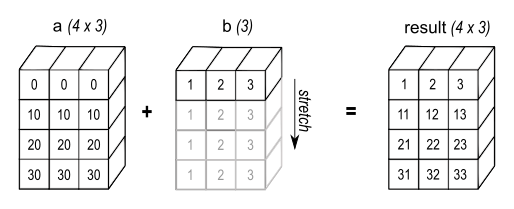
Broadcasting adds a three-element vector to each row of a four-by-three array; the repeated rows illustrate alignment, not copies that NumPy must create.[13] Diagram: NumPy Developers. BSD 3-Clause (NumPy documentation license).
Broadcasting follows three rules:
- If the arrays differ in the number of dimensions, the shape of the smaller array is padded with ones on its leading (left) side.
- If the shapes disagree along a dimension where one array has size 1, that array is stretched (conceptually repeated) to match the other array's size along that dimension.
- If the shapes disagree along any dimension where neither array has size 1, an error is raised [4].
Internally, broadcasting is implemented using zero-valued strides: no actual data is copied, and the "stretched" dimension simply reads the same memory location repeatedly. This makes broadcasting both memory-efficient and fast.
A common example is adding a 1-D bias vector to every row of a 2-D matrix, an operation that appears frequently in neural network implementations. Without broadcasting, this would require either an explicit loop or manual replication of the bias vector.
Key Functionality
Linear Algebra
NumPy's numpy.linalg module provides a comprehensive set of linear algebra routines. Under the hood, these routines call into highly optimized BLAS (Basic Linear Algebra Subprograms) and LAPACK (Linear Algebra Package) libraries, delivering near-peak hardware performance for matrix computations.
| Operation | Function | Description |
|---|---|---|
| Matrix multiplication | np.matmul(), @ operator | Standard matrix product |
| Dot product | np.dot() | Scalar dot product or matrix multiplication |
| Determinant | np.linalg.det() | Compute matrix determinant |
| Inverse | np.linalg.inv() | Compute matrix inverse |
| Eigenvalues | np.linalg.eig() | Eigenvalue decomposition |
| SVD | np.linalg.svd() | Singular value decomposition |
| Cholesky | np.linalg.cholesky() | Cholesky factorization |
| Least squares | np.linalg.lstsq() | Least-squares solution |
| Norms | np.linalg.norm() | Vector and matrix norms |
| QR decomposition | np.linalg.qr() | QR factorization |
These linear algebra tools are essential for machine learning algorithms, physics simulations, signal processing, and many other scientific applications. Tensors in deep learning frameworks build upon the same mathematical foundations that NumPy pioneered for Python.
Random Number Generation
NumPy's numpy.random module provides facilities for generating random numbers from a wide variety of probability distributions, including uniform, normal (Gaussian), binomial, Poisson, and many others. Starting with NumPy 1.17, the random module was redesigned around a new Generator class and pluggable BitGenerator backends (such as PCG64 and Philox), replacing the older RandomState interface [7]. This redesign brought better statistical quality, improved performance, and the ability to create independent random streams for parallel computation.
Fast Fourier Transform (FFT)
The numpy.fft module provides functions for computing the discrete Fourier transform (DFT) and its inverse. Fourier transforms are widely used in signal processing, image analysis, and solving partial differential equations. NumPy 2.0 expanded FFT support to include float32 and longdouble precision, whereas earlier versions only supported float64 [3]. For more advanced FFT functionality, the SciPy library's scipy.fft module provides a superset of NumPy's FFT capabilities.
Statistical Functions
NumPy includes a broad set of statistical functions for computing descriptive statistics on arrays. These include mean, median, std (standard deviation), var (variance), min, max, percentile, quantile, histogram, and corrcoef (correlation coefficient). NumPy 2.0 added support for weights in percentile and quantile calculations, and introduced a correction keyword for var and std as an alternative to ddof [3].
How does NumPy differ from Python lists?
Python's built-in lists are general-purpose containers that can hold objects of any type. While flexible, this generality comes at a significant performance cost for numerical computation. The following table summarizes the key differences.
| Aspect | Python List | NumPy Array |
|---|---|---|
| Speed (element-wise operations) | Baseline | 10x to 200x faster |
| Memory usage | Higher (stores pointers + objects) | Lower (contiguous typed data) |
| Mathematical operations | Manual loops required | Vectorized, single expression |
| Multidimensional support | Nested lists, no shape enforcement | True n-D arrays with shape, strides |
| Type safety | Mixed types allowed | Single dtype enforced |
| Slicing | Creates a copy | Creates a view (no copy) |
| Ecosystem integration | General Python | Scientific computing stack |
Benchmarks consistently show that NumPy arrays are 10x to 200x faster than Python lists for numerical operations, depending on the specific task. For summation, NumPy is roughly 20x faster. For element-wise squaring, the advantage can reach 200x. Memory usage is typically 3x to 10x lower with NumPy, because Python lists store a pointer (8 bytes on 64-bit systems) plus a full Python object (at least 28 bytes for an integer) per element, while a NumPy float64 array stores just 8 bytes per element with negligible per-element overhead [6].
That said, NumPy arrays have trade-offs. Appending elements to a NumPy array is slower than appending to a Python list because the array must be reallocated and copied. For tasks that involve frequent dynamic resizing rather than bulk numerical computation, Python lists may be the better choice.
What changed in NumPy 2.0?
Released on June 16, 2024, NumPy 2.0 was the first major version update since NumPy 1.0 in 2006. It was the product of 11 months of development by 212 contributors across 1,078 pull requests [3]. The release introduced several significant changes.
New features in NumPy 2.0:
- StringDType: A new variable-length UTF-8 string data type (
numpy.dtypes.StringDType) paired with a newnumpy.stringsnamespace containing performant string ufuncs. - Array API Standard compliance: Full support for the Python array API standard (v2022.12), including 13 new function aliases such as
acos,asin,concat, andpermute_dims, plus new functions likenumpy.isdtype()andndarray.device. - Public DType API: The C implementation of the DType system (NEP 42) became public, enabling developers to create custom data types outside of NumPy itself.
- Enhanced FFT: Support for
float32andlongdoubleprecision in allnumpy.fftfunctions. - New linear algebra functions:
linalg.svdvals(),linalg.matrix_norm(),linalg.vector_norm(),linalg.diagonal(),linalg.trace(), and others. - Performance improvements: Integration of Intel x86-simd-sort and Google Highway libraries for SIMD-accelerated sorting (with VQSort on AArch64 improving sort time by up to 16x in some cases), plus macOS Accelerate support delivering up to 10x speedups for linear algebra on Apple Silicon [3].
Breaking changes in NumPy 2.0:
- ABI break: C extensions built against NumPy 1.x need to be recompiled.
- Type promotion overhaul (NEP 50): Promotion rules now depend only on dtypes, not on data values, fixing long-standing inconsistencies [9].
- Default integer on Windows: Changed from
int32toint64on 64-bit Windows, matching other platforms. - Maximum dimensions: Increased from 32 to 64 [3].
- Removed aliases and functions: Many deprecated aliases (such as
np.float_,np.Inf,np.NaN) and functions (such asnp.in1d,np.msort,np.trapz) were removed. - Scalar representation (NEP 51): Scalars now display their type, e.g.,
np.float64(3.0)instead of3.0.
The Array Protocol and Interoperability
As the Python scientific computing ecosystem has grown, several libraries have reimplemented the NumPy API for specialized hardware and use cases: CuPy for NVIDIA GPUs, JAX for accelerator-backed differentiable computing, and Dask for parallel and distributed computation on datasets larger than memory. NumPy provides a set of interoperability protocols that allow these libraries to work seamlessly with NumPy's API [5]. Because of this central position, the Nature paper notes that NumPy "increasingly plays the role of an interoperability layer between these new array computation libraries" [1].
| Protocol | Purpose | Device Support |
|---|---|---|
__array__() | Convert foreign object to ndarray | Any (via library) |
__array_ufunc__ | Override NumPy universal functions | Any |
__array_function__ | Override general NumPy functions | Any |
__array_interface__ | Legacy memory layout description | CPU only |
DLPack (__dlpack__()) | Device-agnostic zero-copy data exchange | Multi-device (CPU, GPU, etc.) |
| Buffer protocol | Python's standard C-level memory sharing | CPU only |
The __array_ufunc__ protocol (NEP 13) allows libraries like CuPy to intercept NumPy ufunc calls and redirect them to GPU-optimized implementations. The __array_function__ protocol (NEP 18) extends this to arbitrary NumPy functions such as np.linalg.qr() or np.concatenate() [5]. Together, these protocols mean that code written with NumPy's API can often run on GPUs or distributed clusters with minimal changes.
The DLPack protocol is especially important for exchanging data between frameworks without copying. For instance, a PyTorch tensor on a GPU can be shared with CuPy via DLPack without moving data off the device. NumPy adopted DLPack through the numpy.from_dlpack() function [5].
The Python array API standard, which NumPy 2.0 fully supports, defines a common interface that array libraries can implement, making it easier to write library code that is agnostic to the specific backend (NumPy, CuPy, JAX, PyTorch, or others) [3].
NumPy in the Scientific Python Ecosystem
NumPy occupies a unique position as the foundation layer of the scientific Python stack. Virtually every major scientific and data library in Python depends on NumPy arrays as their primary data exchange format [1]. The Nature paper documents that NumPy "plays an essential role in research analysis pipelines in fields as diverse as physics, chemistry, astronomy, geoscience, biology, psychology, material science, engineering, finance and economics" [1].
- SciPy: Builds on NumPy to provide advanced algorithms for optimization, interpolation, signal processing, sparse matrices, and more.
- pandas: Uses NumPy arrays internally to store the data in its DataFrame and Series objects, providing high-level data manipulation and analysis tools.
- Matplotlib: Accepts NumPy arrays as the standard input for plotting functions.
- scikit-learn: Expects NumPy arrays (or compatible objects) as inputs and outputs for all of its machine learning estimators.
- TensorFlow and PyTorch: Both can convert NumPy arrays to and from their native tensor types, and both use NumPy for data preprocessing pipelines.
- Jupyter notebooks: NumPy integrates seamlessly with the interactive computing environment that is central to modern data science workflows.
This central role means that improvements to NumPy propagate across the entire ecosystem. When NumPy added SIMD-accelerated sorting in version 2.0, every library that uses NumPy's sort functions benefited automatically.
Explain Like I'm 5 (ELI5)
Imagine you have a big box of numbered blocks. If you wanted to double every number, you could pick up each block one by one, read the number, multiply it by two, and put it back. That would take a long time if you had a million blocks.
NumPy is like a magic table that lets you dump all your blocks on it and say "double everything," and it does the entire job at once, almost instantly. It works so fast because, behind the scenes, it uses a super-efficient helper (written in the C programming language) that can process blocks way faster than picking them up one at a time in Python.
NumPy also makes sure all the blocks are the same kind (all integers, or all decimals), lined up neatly in a row in memory. This makes it much easier and faster for the computer to work with them compared to a messy pile where each block might be a different type.
Scientists, data analysts, and people who build AI use NumPy every day because it makes working with huge amounts of numbers quick and easy. Almost every other Python tool for math, data, or machine learning is built on top of NumPy.
References
- ^1 ^2 ^3 ^4 ^5 ^6 ^7 ^8Harris, C.R., Millman, K.J., van der Walt, S.J. et al. "Array programming with NumPy." *Nature* 585, 357-362 (2020), published September 16, 2020. doi.org/...s41586-020-2649-2
- ^Oliphant, T.E. "Guide to NumPy." Trelgol Publishing, 2006.
- ^1 ^2 ^3 ^4 ^5 ^6 ^7NumPy Documentation. "NumPy 2.0.0 Release Notes." numpy.org/...2.0.0-notes
- ^1 ^2NumPy Documentation. "Broadcasting." numpy.org/...basics.broadcasting
- ^1 ^2 ^3NumPy Documentation. "Interoperability with NumPy." numpy.org/...basics.interoperability
- ^1 ^2 ^3van der Walt, S., Colbert, S.C., Varoquaux, G. "The NumPy Array: A Structure for Efficient Numerical Computation." *Computing in Science & Engineering* 13, 22-30 (2011).
- ^1 ^2 ^3 ^4 ^5Wikipedia. "NumPy." en.wikipedia.org/...NumPy
- ^Scientific Python Blog. "NumPy 2.0: An Evolutionary Milestone." blog.scientific-python.org/...numpy2
- ^NumPy Enhancement Proposals. "NEP 50: Promotion rules." numpy.org/...nep-0050-scalar-promotion
- ^NumPy Official Website. numpy.org
- ^PyPI Stats. "numpy download statistics." pypistats.org/...numpy
- ^NumPy Project (PyPI). "numpy release history." pypi.org/...numpy
- ^NumPy Developers. "Broadcasting - Figure 2". Copyright (c) 2005-2025, NumPy Developers. All rights reserved. Documentation © 2008-2026, NumPy Developers. NumPy documentation license. Original NumPy documentation PNG; no changes by AI Wiki. Copyright (c) 2005-2025, NumPy Developers. All rights reserved. Redistribution and use in source and binary forms, with or without modification, are permitted provided that the following conditions are met: * Redistributions of source code must retain the above copyright notice, this list of conditions and the following disclaimer. * Redistributions in binary form must reproduce the above copyright notice, this list of conditions and the following disclaimer in the documentation and/or other materials provided with the distribution. * Neither the name of the NumPy Developers nor the names of any contributors may be used to endorse or promote products derived from this software without specific prior written permission. THIS SOFTWARE IS PROVIDED BY THE COPYRIGHT HOLDERS AND CONTRIBUTORS "AS IS" AND ANY EXPRESS OR IMPLIED WARRANTIES, INCLUDING, BUT NOT LIMITED TO, THE IMPLIED WARRANTIES OF MERCHANTABILITY AND FITNESS FOR A PARTICULAR PURPOSE ARE DISCLAIMED. IN NO EVENT SHALL THE COPYRIGHT OWNER OR CONTRIBUTORS BE LIABLE FOR ANY DIRECT, INDIRECT, INCIDENTAL, SPECIAL, EXEMPLARY, OR CONSEQUENTIAL DAMAGES (INCLUDING, BUT NOT LIMITED TO, PROCUREMENT OF SUBSTITUTE GOODS OR SERVICES; LOSS OF USE, DATA, OR PROFITS; OR BUSINESS INTERRUPTION) HOWEVER CAUSED AND ON ANY THEORY OF LIABILITY, WHETHER IN CONTRACT, STRICT LIABILITY, OR TORT (INCLUDING NEGLIGENCE OR OTHERWISE) ARISING IN ANY WAY OUT OF THE USE OF THIS SOFTWARE, EVEN IF ADVISED OF THE POSSIBILITY OF SUCH DAMAGE.
Improve this article
Add missing citations, update stale details, or suggest a clearer explanation. Every suggestion is reviewed for sourcing before it goes live.
9 revisions · v9 · 3,384 words · full history
Fact-checks are independent of edits: a reviewer re-verifies the article against its sources and stamps the date. How we verify
Research and drafting on this wiki are AI-assisted, under named human editorial standards. How AI is used here
Cite this page: AI Wiki. "NumPy." aiwiki.ai, updated 4 Oct 2026. CC BY 4.0. https://aiwiki.ai/wiki/numpy