

Pandas
See also: Machine learning terms, Data analysis, NumPy
Introduction
Pandas is an open-source data analysis and manipulation library for the Python programming language, providing high-performance, flexible data structures designed for working with structured (tabular, multidimensional, potentially heterogeneous) and time series data.[1] Built on top of NumPy, pandas has become one of the most widely used tools in data science, machine learning, and quantitative analysis, with roughly 49,000 stars and 20,000 forks on GitHub as of 2026.[11] The library is licensed under the three-clause BSD license and is implemented in Python, Cython, and C.[2]
The name "pandas" is derived from "panel data," an econometrics term for multidimensional structured datasets, and also serves as wordplay on "Python data analysis."[2] As of 2026, pandas is maintained by a large open-source community and is a fiscally sponsored project of NumFOCUS, a U.S. 501(c)(3) nonprofit charity. The latest stable release is version 3.0.3, released on May 11, 2026, in the 3.0.x series that began with pandas 3.0.0 on January 21, 2026.[4][12]
History
Wes McKinney began developing pandas in 2008 while working at AQR Capital Management, a quantitative investment management firm.[8] McKinney, who graduated from the Massachusetts Institute of Technology with a B.S. in Mathematics in 2007, needed a high-performance, flexible tool to perform quantitative analysis on financial data. At the time, Python's data ecosystem was fragmented. NumPy provided excellent support for numerical computation but lacked features for handling structured data with column labels, mixed data types, and proper indexing.[1]
McKinney's design drew inspiration from R's data.frame object, adapting its concepts for Python while leveraging NumPy's speed and Python's readability. His early work focused on two core data structures: the Series (a one-dimensional labeled array) and the DataFrame (a two-dimensional labeled table).[1] He convinced AQR's management to allow the library to be open-sourced, and by mid-2009, pandas 0.1 was released on PyPI.[8]
Chang She joined as the second major contributor in 2012, also coming from AQR. In 2015, pandas became a fiscally sponsored project of NumFOCUS, which helped ensure long-term financial support and governance.[2] Over the years, the project has grown from a niche financial analysis tool into a foundational component of the Python data science ecosystem, used by data scientists at Google, Meta, JP Morgan, and virtually every major organization that performs data analysis.
When was each major version of pandas released?
| Version | Release Date | Key Changes |
|---|---|---|
| 0.1 | Mid-2009 | Initial public release with Series and DataFrame |
| 0.8 | June 2012 | Major performance improvements, new groupby engine |
| 0.20 | May 2017 | .ix indexer deprecated in favor of .loc and .iloc |
| 1.0 | January 2020 | First major release, new nullable integer and string types, convert_dtypes() |
| 2.0 | April 2023 | Apache Arrow backend, Copy-on-Write opt-in, nullable dtypes by default |
| 2.2 | January 2024 | PyArrow-backed string improvements, ADBC database drivers |
| 3.0 | January 21, 2026 | Copy-on-Write enabled by default and only mode, str dtype inferred by default, pd.col() expressions, microsecond default datetime resolution |
| 3.0.3 | May 11, 2026 | Latest stable patch release with regression and bug fixes |
Core Data Structures
Pandas provides three primary data structures, each serving a different purpose in data manipulation workflows.
Series
A Series is a one-dimensional labeled array capable of holding any data type, including integers, floats, strings, Python objects, and more. It is similar to a column in a spreadsheet or a single column in a SQL table. Each element in a Series has an associated label called an index, which allows for fast lookups and alignment during operations.[3]
import pandas as pd

prices = pd.Series([29.99, 49.99, 19.99], index=['product_a', 'product_b', 'product_c'])
print(prices['product_b'])  # Output: 49.99
DataFrame
The DataFrame is the most commonly used pandas data structure. It is a two-dimensional, size-mutable, potentially heterogeneous tabular data structure with labeled axes (rows and columns). Think of it as a spreadsheet, a SQL table, or a dictionary of Series objects sharing the same index. DataFrames can be created from dictionaries, lists of dictionaries, NumPy arrays, CSV files, SQL queries, and many other sources.[3]
df = pd.DataFrame({
    'name': ['Alice', 'Bob', 'Charlie'],
    'age': [30, 25, 35],
    'salary': [70000, 50000, 90000]
})
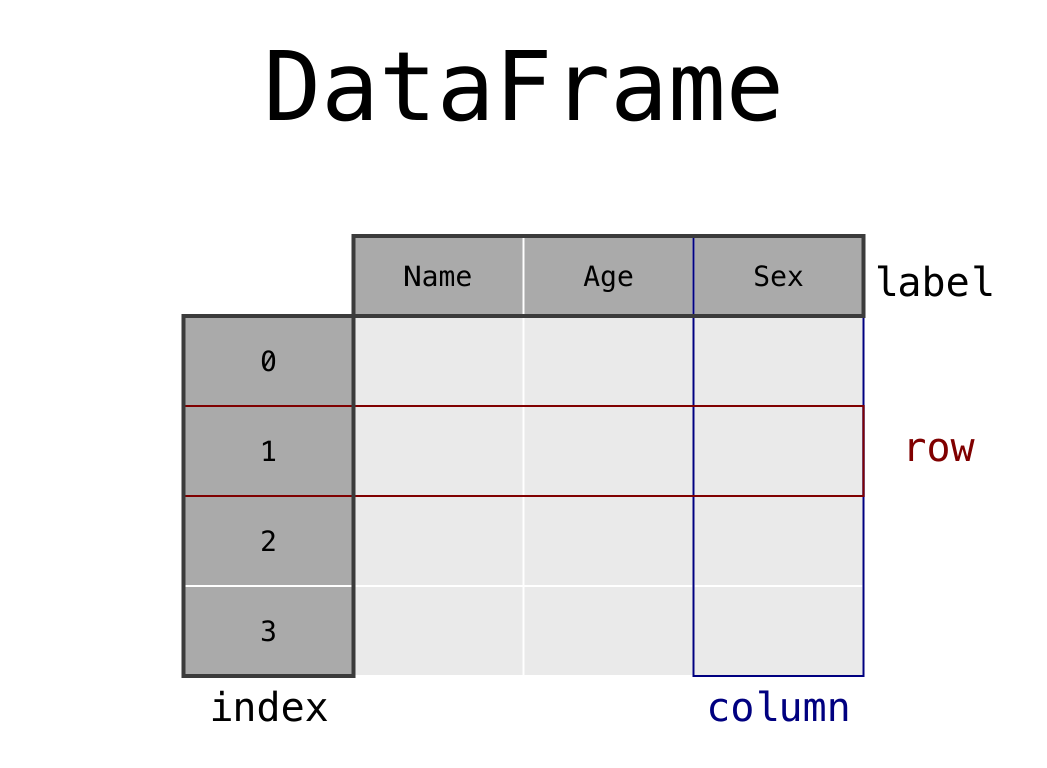
A pandas DataFrame diagram showing rows, columns, the row index and column labels.[13] Diagram: The pandas development team. BSD 3-Clause documentation license.
Index
The Index is a metadata object that stores axis labels for Series and DataFrames. It enables fast lookups, alignment between datasets, and label-based slicing. Specialized index types include DatetimeIndex for time series data, MultiIndex for hierarchical indexing, and CategoricalIndex for categorical data.
Key Operations
Pandas offers a broad set of operations for data manipulation. The following table summarizes the most commonly used functions and methods.
| Operation | Method/Function | Description |
|---|---|---|
| Reading data | pd.read_csv(), pd.read_excel(), pd.read_sql(), pd.read_json(), pd.read_parquet() | Import data from various file formats and databases |
| Writing data | df.to_csv(), df.to_excel(), df.to_parquet(), df.to_sql() | Export DataFrames to various formats |
| Selection by label | df.loc[row_label, col_label] | Select rows and columns by their labels |
| Selection by position | df.iloc[row_pos, col_pos] | Select rows and columns by integer position |
| Filtering | df[df['column'] > value] | Boolean indexing to filter rows |
| Grouping | df.groupby('column').agg(func) | Split-apply-combine pattern for aggregation |
| Merging | pd.merge(df1, df2, on='key') | SQL-style joins between DataFrames |
| Concatenation | pd.concat([df1, df2]) | Stack DataFrames vertically or horizontally |
| Pivot tables | df.pivot_table(values, index, columns, aggfunc) | Reshape data and compute aggregations |
| Apply functions | df.apply(func), df['col'].map(func) | Apply custom functions to rows, columns, or elements |
| Sorting | df.sort_values('column'), df.sort_index() | Sort by column values or index |
| Missing data | df.fillna(), df.dropna(), df.isna() | Handle missing (NaN) values |
| String methods | df['col'].str.upper(), df['col'].str.contains() | Vectorized string operations |
| Reshaping | df.melt(), df.stack(), df.unstack() | Transform between wide and long formats |
GroupBy: Split-Apply-Combine
The groupby() method is one of the most powerful features in pandas. It follows the split-apply-combine pattern: the data is split into groups based on one or more keys, a function is applied to each group independently, and the results are combined back into a single data structure.[3]
# Average salary by department
df.groupby('department')['salary'].mean()

# Multiple aggregations
df.groupby('department').agg(
    avg_salary=('salary', 'mean'),
    headcount=('employee_id', 'count'),
    max_salary=('salary', 'max')
)
Merging and Joining
Pandas supports SQL-style joins through the merge() function and the join() method. These operations allow combining two DataFrames based on shared columns or indices, supporting inner, left, right, and outer join types.
orders = pd.DataFrame({'order_id': [1, 2, 3], 'customer_id': [101, 102, 101]})
customers = pd.DataFrame({'customer_id': [101, 102, 103], 'name': ['Alice', 'Bob', 'Charlie']})

result = pd.merge(orders, customers, on='customer_id', how='left')
Selection with loc and iloc
Pandas provides two primary indexing methods for selecting data. The loc accessor selects data by label (row and column names), while iloc selects by integer position. These replaced the older .ix indexer, which was deprecated in version 0.20 due to ambiguity between label-based and position-based indexing.[3]
# Select by label
df.loc[df['age'] > 30, ['name', 'salary']]

# Select by position
df.iloc[0:5, [0, 2]]  # First 5 rows, columns 0 and 2
Data Cleaning and Preprocessing
Pandas provides a comprehensive set of tools for data cleaning, which is often the most time-consuming step in any data analysis or machine learning workflow.
Handling Missing Data
Real-world datasets frequently contain missing values. Pandas uses NaN (Not a Number) for floating-point missing values and NaT (Not a Time) for datetime missing values. Key methods include isna() and notna() for detection, fillna() for imputation, and dropna() for removal.
Data Type Conversion
Optimizing data types is critical for both memory efficiency and correctness. The astype() method converts columns between types, while pd.to_datetime(), pd.to_numeric(), and pd.Categorical() provide specialized conversions. Pandas 3.0 introduced automatic inference of the new str dtype for string columns instead of the generic object dtype.[4]
Deduplication and Validation
The duplicated() and drop_duplicates() methods identify and remove duplicate rows. The value_counts() method provides frequency distributions, and describe() generates summary statistics for quick data validation.
Time Series Analysis
Pandas offers robust support for working with time series data, making it suitable for financial analysis, IoT data processing, and temporal machine learning tasks. Key capabilities include generating date ranges with pd.date_range(), resampling time series to different frequencies with resample(), handling time zones with tz_localize() and tz_convert(), computing rolling and expanding window statistics, and performing date arithmetic with Timedelta objects. Pandas 3.0 changed the default datetime resolution from nanoseconds to microseconds (or the resolution of the input), improving compatibility with other systems and avoiding out-of-bounds errors for dates before 1678 or after 2262.[4]
Pandas in the Machine Learning Pipeline
Although pandas is not a machine learning library itself, it plays a central role in nearly every ML workflow. It serves as the primary tool for data loading, exploration, cleaning, and feature engineering before data is passed to modeling libraries like scikit-learn, XGBoost, or TensorFlow.
Typical ML Workflow with Pandas
| Step | Pandas Role | Example Operations |
|---|---|---|
| Data loading | Import raw data | pd.read_csv(), pd.read_sql(), pd.read_parquet() |
| Exploration | Understand data shape and distribution | df.describe(), df.info(), df.value_counts() |
| Cleaning | Handle missing and inconsistent data | df.fillna(), df.dropna(), df.drop_duplicates() |
| Feature engineering | Create new features from existing data | df.apply(), df.groupby().transform(), pd.get_dummies() |
| Encoding | Convert categorical variables to numeric | pd.get_dummies(), df['col'].cat.codes |
| Splitting | Divide data into train and test sets | df.sample(), index slicing |
| Post-processing | Analyze model outputs | Merge predictions with original data, compute metrics |
Integration with scikit-learn
Since scikit-learn version 1.2, pipelines can output pandas DataFrames directly using the set_output(transform='pandas') configuration.[3] This improvement makes it easier to chain multiple ColumnTransformer operations while maintaining the DataFrame structure, column names, and data types throughout the pipeline. The sklearn-pandas package provides additional bridge utilities for integrating pandas with scikit-learn transformers and pipelines, helping prevent data leakage and ensuring consistent preprocessing across training and prediction.
How does pandas differ from SQL?
Pandas and SQL serve overlapping but distinct purposes in data manipulation. Both operate on tabular data and support similar operations, but they differ in execution context, scalability, and flexibility.
| Aspect | Pandas | SQL |
|---|---|---|
| Execution | In-memory, client-side | Server-side, database engine |
| Data size | Limited by available RAM | Can handle datasets larger than memory |
| Language | Python API (method chaining) | Declarative query language |
| Flexibility | Arbitrary Python functions, complex transformations | Structured queries, limited to SQL functions |
| Use case | Exploratory analysis, prototyping, feature engineering | Production queries, reporting, data warehousing |
| Learning curve | Requires Python knowledge | Standalone language, widely taught |
| Ecosystem | Integrates with Python ML/visualization libraries | Integrates with databases and BI tools |
The logic behind pandas and SQL operations is similar. For example, pandas groupby() corresponds to SQL GROUP BY, merge() to JOIN, and boolean indexing to WHERE clauses.[6] Many data practitioners use SQL to extract and pre-filter data from databases, then load the results into pandas for further analysis, cleaning, and modeling.
Performance and Optimization
Pandas operations can be significantly accelerated by following performance best practices. The core principle is to use vectorized operations instead of Python loops whenever possible.
Vectorization
Vectorized operations in pandas delegate computation to optimized C code through NumPy, avoiding the overhead of Python's interpreter loop. This approach can yield speedups of 100x to 1000x compared to row-by-row iteration with iterrows() or apply() with a Python function.[7]
# Slow: Python loop
for i, row in df.iterrows():
    df.at[i, 'total'] = row['price'] * row['quantity']

# Fast: Vectorized operation (100x+ faster)
df['total'] = df['price'] * df['quantity']
Performance Tips
| Tip | Description | Impact |
|---|---|---|
| Use vectorized operations | Operate on entire columns instead of looping row by row | 100x to 1000x speedup |
| Optimize data types | Use int32 instead of int64, category instead of object for low-cardinality strings | 50% to 90% memory reduction |
| Use built-in methods | Prefer .agg(), .query(), .isin() over custom loops | Significant speedup |
| Read only needed columns | Pass usecols parameter to read_csv() | Reduced memory and load time |
| Use chunked reading | Process large files in chunks with chunksize parameter | Enables processing files larger than RAM |
| Use Parquet format | Prefer .parquet over .csv for storage and retrieval | Faster I/O, smaller file size, type preservation |
| Leverage NumPy | Use .to_numpy() for computation-heavy operations | Eliminates pandas overhead |
Memory Considerations
Pandas requires the entire dataset to be loaded into RAM. Creator Wes McKinney has recommended having 5 to 10 times as much RAM as the size of the dataset to accommodate intermediate operations and copies.[8] This memory requirement is one of the primary motivations behind alternative libraries and the Apache Arrow integration.
Pandas 2.0 and the Arrow Backend
Pandas 2.0, released in April 2023, marked a significant architectural shift by introducing optional Apache Arrow as a backend for data storage.[5] Apache Arrow provides a columnar, language-independent memory format that offers several advantages over the traditional NumPy-based backend.
Benefits of the Arrow Backend
The Arrow backend provides native support for more data types, including nested lists and structs, which historically were stored as inefficient NumPy object arrays. It offers better memory efficiency for string data, since Arrow stores strings contiguously in memory rather than as Python objects. It also provides improved interoperability with other tools in the data ecosystem that support the Arrow format, such as Apache Spark, DuckDB, and Polars.[5]
What is Copy-on-Write in pandas?
Pandas 2.0 introduced an opt-in Copy-on-Write (CoW) mode, which was made the default and only mode in pandas 3.0.[5] Under CoW, any indexing operation or method that returns a new DataFrame or Series behaves as if it were a copy. Actual data copying is deferred until a write operation occurs, reducing unnecessary memory allocation. As the official pandas 3.0 announcement explains, "Copy-on-Write is now the default and only mode in pandas 3.0. This makes behavior more consistent and predictable, and avoids a lot of defensive copying (improving performance), but requires updates to certain coding patterns."[12] This change also eliminates the confusing SettingWithCopyWarning that previously plagued pandas users, and chained assignment (e.g., df['a']['b'] = value) no longer works.[4]
What changed in pandas 3.0?
Pandas 3.0, released January 21, 2026, made several changes that were previewed in the 2.x series.[4] The release maintainers describe the two most significant changes as "the new string dtype and the copy/view behaviour changes."[12] String columns are now inferred as the new str dtype instead of object, which uses the PyArrow library under the hood when it is installed to deliver performance improvements. PyArrow is strongly recommended but is not a required dependency installed by default with pandas.[12] The release also introduced pd.col(), a new syntax for building column expressions that can be used in methods like DataFrame.assign(). The Arrow PyCapsule Interface was added for importing and exporting data via DataFrame.from_arrow() and Series.from_arrow().[4]
Alternatives to Pandas
As datasets have grown in size and performance requirements have increased, several alternative libraries have emerged to address pandas' limitations in scalability and speed.
| Library | Approach | Best For | API Compatibility |
|---|---|---|---|
| Polars | Rust-based, multithreaded, lazy evaluation | Fast single-machine analytics (any dataset size) | Different API, some pandas-like methods |
| Dask | Parallel computing, distributed DataFrames | Scaling pandas workflows to clusters | High (mirrors pandas API) |
| Modin | Drop-in pandas replacement using Ray or Dask | Speeding up existing pandas code with minimal changes | Very high (aims for 100% pandas coverage) |
| Vaex | Lazy, out-of-core, memory-mapped DataFrames | Exploring and visualizing very large datasets on a single machine | Partial pandas compatibility |
| RAPIDS cuDF | GPU-accelerated DataFrames | GPU-powered analytics | Partial pandas compatibility |
| DuckDB | In-process SQL OLAP database | Analytical queries on local data | SQL interface, pandas integration |
Polars
Polars has emerged as the most prominent pandas alternative. Written in Rust, it uses multithreaded execution and a query optimizer to achieve 5x to 10x faster performance than pandas on common operations.[9] Polars also requires 2 to 4 times the RAM of the dataset size (compared to pandas' 5 to 10 times), making it more memory-efficient. Benchmarks such as the PDS-H (formerly TPC-H) show Polars performing on par with DuckDB and significantly outperforming pandas, Dask, and PySpark.[9]
Dask
Dask extends the pandas API to larger-than-memory and distributed datasets by breaking DataFrames into partitions that are processed in parallel. It mirrors the pandas API closely, making migration straightforward. Dask is strongest when data needs to be processed across a cluster of machines, though for single-machine workloads, Polars typically offers better performance.[10]
Modin
Modin provides a drop-in replacement for pandas that accelerates computation by distributing work across all available CPU cores using Ray or Dask as a backend. Users can switch from pandas to Modin by changing a single import statement (import modin.pandas as pd), with the goal of achieving 4x to 6x speedup without any other code changes.[10]
ELI5: Pandas Explained Simply
Imagine you have a giant spreadsheet full of data, like a table of every student in a school with their names, grades, and test scores. Pandas is a tool that lets you work with that spreadsheet using Python code instead of clicking around in Excel.
With pandas, you can do things like: find all students who scored above 90, calculate the average grade for each class, combine two different spreadsheets together, and fix cells that are missing data. The main thing you work with is called a DataFrame, which is just a fancy word for a table with rows and columns.
Pandas is especially popular because it makes these tasks really fast and easy to write. Instead of writing a loop to check every single row one at a time, you can tell pandas "give me all rows where the score is above 90" in a single line of code. This is called vectorization, and it makes pandas much faster than doing things the manual way.
Practically every data scientist and machine learning engineer uses pandas as the first step when working with data. You load your data into a DataFrame, clean it up, explore it, and then pass it along to a machine learning model for training.
Code Examples
Loading and Exploring Data
import pandas as pd

# Load a CSV file
df = pd.read_csv('sales_data.csv')

# Quick overview
print(df.shape)       # (rows, columns)
print(df.dtypes)      # Data types per column
print(df.describe())  # Summary statistics
print(df.head(10))    # First 10 rows
Data Cleaning
# Fill missing values
df['revenue'].fillna(0, inplace=True)

# Remove duplicates
df = df.drop_duplicates(subset=['order_id'])

# Convert data types
df['date'] = pd.to_datetime(df['date'])
df['category'] = df['category'].astype('category')
Feature Engineering for Machine Learning
# Create new features
df['year'] = df['date'].dt.year
df['month'] = df['date'].dt.month
df['revenue_per_unit'] = df['revenue'] / df['quantity']

# One-hot encode categorical variables
df_encoded = pd.get_dummies(df, columns=['category', 'region'])

# Group-level features
df['avg_revenue_by_category'] = df.groupby('category')['revenue'].transform('mean')
Pivot Tables
# Create a pivot table
pivot = df.pivot_table(
    values='revenue',
    index='region',
    columns='quarter',
    aggfunc='sum',
    fill_value=0
)
See Also
References
- ^1 ^2 ^3McKinney, Wes. "pandas: a Foundational Python Library for Data Analysis and Statistics." *PyHPC 2011*. ResearchGate
- ^1 ^2 ^3"pandas (software)." *Wikipedia*. en.wikipedia.org/...Pandas_(software)
- ^1 ^2 ^3 ^4 ^5"pandas documentation." *PyData*. pandas.pydata.org/docs
- ^1 ^2 ^3 ^4 ^5 ^6"What's new in 3.0.0 (January 21, 2026)." *pandas documentation*. pandas.pydata.org/...v3.0.0
- ^1 ^2 ^3"pandas 2.0 and the Arrow revolution." *Data Pythonista*. datapythonista.me/...d-the-arrow-revolution-part-i
- ^"Comparison with SQL." *pandas documentation*. pandas.pydata.org/...comparison_with_sql
- ^"Enhancing performance." *pandas documentation*. pandas.pydata.org/...enhancingperf
- ^1 ^2 ^3"Meet the man behind the most important tool in data science." *Quartz*. qz.com/...-the-most-important-tool-in-data-science
- ^1 ^2"Polars vs. pandas: What's the Difference?" *JetBrains Blog*. blog.jetbrains.com/...polars-vs-pandas
- ^1 ^2"Scaling Pandas: Dask vs Ray vs Modin vs Vaex vs RAPIDS." *Data Revenue*. datarevenue.com/...-vaex-vs-modin-vs-rapids-vs-ray
- ^"pandas-dev/pandas." *GitHub*. github.com/...pandas
- ^1 ^2 ^3 ^4"Pandas 3.0 Released!" *pandas community blog*. pandas.pydata.org/...pandas-3.0
- ^The pandas development team. "What kind of data does pandas handle? (DataFrame diagram)". BSD 3-Clause documentation license. Rasterized the official SVG as PNG at its intrinsic dimensions; no cropping, recoloring, redrawing or geometry changes. BSD 3-Clause License Copyright (c) 2008-2011, AQR Capital Management, LLC, Lambda Foundry, Inc. and PyData Development Team All rights reserved. Copyright (c) 2011-2026, Open source contributors. Redistribution and use in source and binary forms, with or without modification, are permitted provided that the following conditions are met: * Redistributions of source code must retain the above copyright notice, this list of conditions and the following disclaimer. * Redistributions in binary form must reproduce the above copyright notice, this list of conditions and the following disclaimer in the documentation and/or other materials provided with the distribution. * Neither the name of the copyright holder nor the names of its contributors may be used to endorse or promote products derived from this software without specific prior written permission. THIS SOFTWARE IS PROVIDED BY THE COPYRIGHT HOLDERS AND CONTRIBUTORS "AS IS" AND ANY EXPRESS OR IMPLIED WARRANTIES, INCLUDING, BUT NOT LIMITED TO, THE IMPLIED WARRANTIES OF MERCHANTABILITY AND FITNESS FOR A PARTICULAR PURPOSE ARE DISCLAIMED. IN NO EVENT SHALL THE COPYRIGHT HOLDER OR CONTRIBUTORS BE LIABLE FOR ANY DIRECT, INDIRECT, INCIDENTAL, SPECIAL, EXEMPLARY, OR CONSEQUENTIAL DAMAGES (INCLUDING, BUT NOT LIMITED TO, PROCUREMENT OF SUBSTITUTE GOODS OR SERVICES; LOSS OF USE, DATA, OR PROFITS; OR BUSINESS INTERRUPTION) HOWEVER CAUSED AND ON ANY THEORY OF LIABILITY, WHETHER IN CONTRACT, STRICT LIABILITY, OR TORT (INCLUDING NEGLIGENCE OR OTHERWISE) ARISING IN ANY WAY OUT OF THE USE OF THIS SOFTWARE, EVEN IF ADVISED OF THE POSSIBILITY OF SUCH DAMAGE.
Improve this article
Add missing citations, update stale details, or suggest a clearer explanation. Every suggestion is reviewed for sourcing before it goes live.
7 revisions · v7 · 3,705 words · full history
Fact-checks are independent of edits: a reviewer re-verifies the article against its sources and stamps the date. How we verify
Research and drafting on this wiki are AI-assisted, under named human editorial standards. How AI is used here
Cite this page: AI Wiki. "Pandas." aiwiki.ai, updated 5 Oct 2026. CC BY 4.0. https://aiwiki.ai/wiki/pandas