

Prompt engineering for image generation
Prompt engineering for image generation is the practice of writing and refining the text prompts that guide text-to-image AI image generation models such as Stable Diffusion, Midjourney, DALL-E, Flux, and Nano Banana to produce a desired picture. A prompt typically combines a subject (what to depict) with style, medium, lighting, composition, and camera descriptors, plus model-specific controls such as negative prompts, token weights, and aspect-ratio parameters. In a 3-month ethnographic study of the AI-art community, researcher Jonas Oppenlaender identified six categories of prompt modifiers practitioners use, subject terms, image prompts, style modifiers, quality boosters, repetitions, and magic terms, and concluded that prompt engineering is "a practiced skill" rather than a one-shot instruction. [1]
See also: Prompt engineering, Prompts and Prompt engineering for text generation
What goes into an image prompt?
A well-formed image prompt is usually assembled from a small number of reusable components. Although the exact syntax varies by model, most prompt guides converge on the same building blocks: a subject, a medium or art form, a style, lighting, composition, and quality or detail descriptors. The table below summarizes the components most commonly cited across community guides and the Oppenlaender taxonomy. [1][7]
| Component | Purpose | Example descriptors |
|---|---|---|
| Subject | The main thing depicted (the only strictly required element) | a calico cat, a lighthouse, an astronaut |
| Medium / art form | The physical or digital medium | oil painting, watercolor, 3D render, photograph |
| Style | Aesthetic or movement | surrealism, cyberpunk, art nouveau, in the style of a named artist |
| Lighting | How the scene is lit | volumetric lighting, golden hour, softbox, chiaroscuro |
| Composition / camera | Framing, lens, angle | wide shot, 85mm lens, low angle, bokeh, aspect ratio |
| Quality boosters | Detail and resolution cues | highly detailed, 4K, 8K, sharp focus |
Basic prompt structure
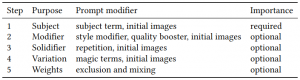
Figure 1. Prompt writing elements. Source: Oppenlaender (2022)
A prompt usually includes a subject term, while any other parts of the prompt are optional (figure 1). However, modifiers are often added to improve the resulting images and provide more control over the creation process. These modifiers are applied through experimentation or based on best practices learned from experience or online resources. [1] Modifiers can either alter the style of the generated image, for example, or boost its quality. There can be overlapping effects between style modifiers and quality boosters. Once a style modifier has been added, solidifiers (using repetition) can be applied to any of the other types of modifiers. The textual prompt can be divided into two main components: the physical and factual content of the image, and the stylistic considerations in the way the physical content is displayed. [1][2]
To enhance the quality of the output images, it is common to include specific keywords before and after the image description following the formula prompt = [keyword1, . . . , keywordm−1] [description] [keywordm, . . . , keywordn]. For example, a user wanting to generate an image of a cat using a text-to-image model may use a specific prompt template that includes a description of a painting of a calico cat and keywords such as highly detailed, cinematic lighting, dramatic atmosphere, and others. This approach helps to provide additional information to the model and improve the generated image's quality. [3]
According to Oppenlaender (2022), there are several opportunities for future research on this field of study:
-
Prompt engineering in Human-Computer Interaction (HCI): a research area that is gaining interest due to the increasing use of deep generative models by people without technical expertise. Social aspects of prompt engineering are important since text-to-image systems were trained on images and text scraped from the web. Prompt engineers need to predict how others described and reacted to the images posted on the web, making describing an image in detail often not enough. There are also dedicated communities that have recently emerged, adding another social aspect to prompt engineering.
-
Human-AI co-creation: Prompt writing is the central part of prompt engineering, but it is only a starting point in some practitioners' creative workflows. Novel creative practices are emerging, where practitioners develop complex workflows for creating their artworks.
-
Bias: an interesting area for future work is bias encoded in text-to-image generation systems.
-
Computational aesthetics and Human-AI alignment: Making computers evaluate and understand aesthetics is an old goal that has recently received renewed attention. Computational aesthetics and Human-AI alignment are areas of research that are being explored through neural image assessment and computational aesthetics. [4]
How does the model read a prompt? (CLIP and text encoders)
Text-to-image models do not read a prompt as a human would. The prompt is first converted into numerical embeddings by a text encoder, and those embeddings condition the image generator. Stable Diffusion 1.x uses OpenAI's CLIP ViT-L/14 text encoder, which is limited to 77 tokens: two tokens mark the start and stop of the sequence, leaving 75 tokens for the actual prompt, and the encoder outputs a 77 by 768 matrix that is fed to the U-Net. [8] Because CLIP was trained to match images and short captions, it responds well to comma-separated lists of descriptors but poorly to long, grammatical sentences. This is a major reason early prompting leaned on keyword stacking rather than prose. [9]
Newer models change this by adding or substituting a language-model text encoder. Flux.1 from Black Forest Labs uses two encoders in parallel: a CLIP-L encoder (77 tokens) and a T5-XXL encoder that accepts up to 512 tokens in the dev variant and 256 in the schnell variant. As one Flux guide puts it, "Clip-L expects a comma-separated list of descriptors and fails badly when given full English sentences. T5xxl expects full English sentences and fails badly with comma-separated lists." [9] The shift toward sentence-level encoders is what lets the latest models be prompted in plain natural language. [9]
Text-to-Image
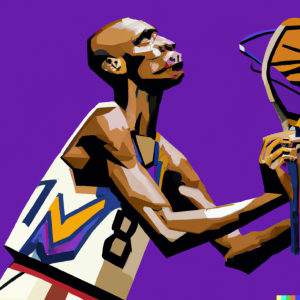
Figure 3a. Without unbundling. Prompt: Kobe Bryant shooting free throws, in the style of The Old Guitarist by Pablo Picasso, digital art. Source: DecentralizedCreator.
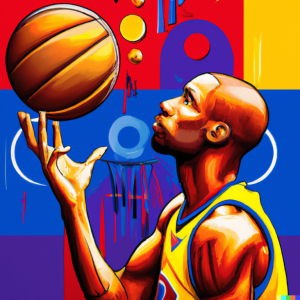
Figure 3b. With unbundling. Prompt: Kobe Bryant shooting free throws, The painting has a simple composition, with just three primary colors: red, blue and yellow. However, it is also packed with hidden meanings and visual complexities, digital art. Source: DecentralizedCreator.
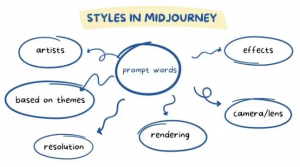
Figure 4. Midjourney elements. Source: Mlearning.ai.
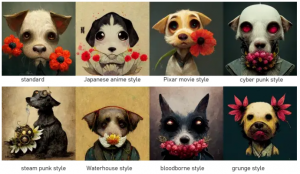
Figure 5. Different keywords for styles result in different outputs. Source: Mlearning.ai.
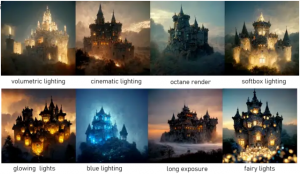
Figure 6. Different lighting options. Source: Mlearning.ai.
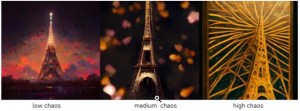
Figure 7. Chaos option. Source. MLearning.ai.
Text prompts can be used to generate images using a text-to-image model, where words are used to describe an image and the model creates it accordingly. Emojis or single lines of text can also be used as prompts to get optimal results. However, the subject term is important to control the generation of digital images. [4][5] In the online community for AI-generated art, templates for writing input prompts have emerged, such as the "Traveler's Guide to the Latent Space," which recommends specific prompt templates such as [Medium][Subject][Artist(s)][Details][Image repository support]. [1]
Prompt anatomy
When designing a prompt for text-to-image generative models, it is important to keep in mind that the tips provided may not apply to all models. The prompt length should be kept short, with prompts for DALL·E2 having a recommended maximum of 400 characters and prompts for Midjourney staying under 60 words. English is the best language to use statistically, but Stable Diffusion can handle other languages and even emojis. However, using non-English prompts may result in failures. [6]
The prompt should contain a noun, adjective, and verb to create an interesting subject. A prompt with more than three words should be written to give the AI a clear context. Multiple adjectives should be used to infuse multiple feelings into the artwork. It is also recommended to include the name of the artist, which will mimic the style of that artist. Additionally, banned words by the AI generator should be avoided to prevent being banned. [5] The use of abstract words leads to more diverse results, while concrete words lead to all pictures showing the same concrete thing. For tokenization (the separation of a text into smaller units-tokens), commas, pipes, or double colons can be used as hard separators, but the direct impact of tokenization is not always clear. [6]
-
Nouns: denotes the subject in a prompt. The generator will produce an image without a noun although not meaningfull. [7]
-
Adjectives: can be used to try to convey an emotion or be used more technically (e.g. beautiful, magnificent, colorful, massive). [7]
-
Artist names: the artstyle of the chosen artist will be included in the image generation. There is also an unbundling technique (figure 3a and 3b) that proposes a "long description of a particular style of the artist's various characteristics and components instead of just giving the artist names." [7]
-
Style: instead of using the style of artists, the prompt can include keywords related to certain styles like "surrealism," "fantasy," "contemporary," "pixel art", etc. [7]
-
Computer graphics: keywords like "octane render," "Unreal Engine," or "Ray Tracing" can enhance the effectiveness and meaning of the artwork. [7]
-
Quality: quality of the generated image (e.g. high, 4K, 8K). [7]
-
Art platform names: these keywords are another way to include styles. For example, "trending on Behance, "Weta Digital", or "trending on artstation." [7]
-
Art medium: there is a multitude of art mediums that can be chosen to modify the AI-generated image like "pencil art," "chalk art," "ink art," "watercolor," "wood," and others. [7]
-
Weight: To give a specific subject a higher weight in a prompt, there are several techniques available. Tokens near the beginning of a prompt carry more weight than those at the end. Repeating the subject by using different phrasing or multiple languages, or even using emojis, can also increase its weighting. In some generative models like Midjourney, you can use parameters such as ::weight to assign a weight to specific parts of a prompt. [6]
In-depth lists with modifier prompts can be found here and here.
Midjourney
In Midjourney, a very descriptive text will result in a more vibrant and unique output. [8] Prompt engineering for this AI image generator follows the same basic elements as all others (figure 4) but some keywords and options will be provided here that are known to work well with this system. Midjourney parameters are flags appended after the prompt text. According to Midjourney's documentation, the stylize parameter (--stylize or --s) defaults to 100 and ranges from 0 to 1000 on current versions, while the chaos parameter (--chaos or --c) ranges from 0 to 100 and controls how varied the four generated options are. [15]
-
Style: standard, pixar movie style, anime style, cyber punk style, steam punk style, waterhouse style, bloodborne style, grunge style (figure 5). An artist's name can also be used.
-
Rendering/lighting properties: volumetric lighting, octane render, softbox lighting, fairy lights, long exposure, cinematic lighting, glowing lights, and blue lighting (figure 6).
-
Style setting: adding the command -s after the prompt will increase or decrease the stylize option (e.g. /imagine firefighters --s 6000).
-
Chaos: a setting to increase abstraction (figure 7) using the command /imagine prompt --chaos <a number from 0 to 100> (e.g. /imagine Eiffel tower --chaos 60).
-
Resolution: the resolution can be inserted in the prompt or using the standard commands --hd and --quality or --q .
-
Aspect ratio: the default aspect ratio is 1:1. This can be modified with the comman --ar <number: number> (e.g. /imagine jasmine in the wild flower --ar 4:3). A custom size image can also be specified using the command --w --h after the prompt.
-
Images as prompts: Midjourney allows the user to use images to get outputs similar to the one used. This can be done by inserting a URL of the image in the prompt (e.g. /imagine http://www.imgur.com/Im3424.jpg box full of chocolates). Multiple images can be used.
-
Weight: increases or decreases the influence of a specific prompt keyword or image on the output. For text prompts, the command :: should be used after the keywords according to their intended impact on the final image (e.g. /imagine wild animals tiger::2 zebra::4 lions::1.5).
-
Filter: to discard unwanted elements from appearing in the output use the --no command (e.g./imagine KFC fried chicken --no sauce). [8]
Newer Midjourney releases add controls aimed at photorealism and consistency. Midjourney V7, released on April 3, 2025 and made the default model on June 17, 2025, introduced a personalization system, a fast low-cost Draft Mode, and Omni-Reference for consistent characters across images. [16] The --style raw parameter reduces Midjourney's automatic "beautify" tendency and increases prompt adherence for more literal, commercial-ready results. [16]
DALL-E
For DALL-E, a tip is to write adjectives plus nouns instead of verbs or complex scenes. To this, the user can add keywords like "gorgeous," "amazing," and "beautiful," plus "digital painting," "oil painting", etc., and "unreal engine," or "unity engine." [9] Other templates can be used that work well with this model:
-
A photograph of X, 4k, detailed.
-
Pixar style 3D render of X.
-
Subdivision control mesh of X.
-
Low-poly render of X; high resolution, 4k.
-
A digital illustration of X, 4k, detailed, trending in artstation, fantasy vivid colors.
Other user experiments can be accessed here. [9]
Stable Diffusion
Overall, prompt engineering in Stable Diffusion doesn't differ from other AI image-generating models. However, it should be noted that it also allows prompt weighting and negative prompting. [10]
-
Prompt weighting: varies between 1 and -1. Decimals can be used to reduce a prompt's influence.
-
Negative prompting: in DreamStudo negative prompts can be added by using | : -1.0 (e.g. | disfigured, ugly:-1.0, too many fingers:-1.0). [10]
What is a negative prompt and how does it work?
A negative prompt lists concepts the model should steer away from, such as "blurry, deformed hands, extra fingers, watermark." Mechanically, the negative prompt replaces the empty string normally used for the unconditional prediction during sampling: at each denoising step the model contrasts the image moving toward the positive prompt with one moving toward the negative prompt, and pushes the result away from the latter. [11] The strength of this push is set by the classifier-free guidance (CFG) scale, so higher CFG amplifies both the positive and negative terms. [11] The technique builds on Jonathan Ho and Tim Salimans' 2022 paper "Classifier-Free Diffusion Guidance," which showed that conditional diffusion models can be steered "without a classifier" by combining conditional and unconditional score estimates. [12] Negative prompting is most associated with Stable Diffusion and its derivatives; some newer conversational models de-emphasize or omit it.
Jasper Art
Jasper Art is similar to DALL-E 2 but results are different since Jasper gives priority to Natural Language Processing (NLP), being able to handle complex sentences with semantic articulation. [11]
There has been some experimentation with narrative prompts, an alternative to the combinations of keywords in a prompt, using instead more expressive descriptions. [17] For example, instead of using "tiny lion cub, 8k, kawaii, adorable eyes, pixar style, winter snowflakes, wind, dramatic lighting, pose, full body, adventure, fantasy, renderman, concept art, octane render, artgerm," convert it to a sentence as if painting with words like, "Lion cub, small but mighty, with eyes that seem to pierce your soul. In a winter wonderland, he stands tall against the snow, wind ruffling his fur. He seems almost like a creature of legend, ready for an adventure. The lighting is dramatic and striking, and the render is breathtakingly beautiful." [11]
Is keyword stuffing still necessary? (the shift to natural-language prompting)
The keyword-heavy style described above arose from the limits of early CLIP-conditioned models. As text encoders moved toward language models, the practice shifted toward writing prompts as ordinary sentences and, increasingly, as a conversation. [9][13]
OpenAI released native image generation in GPT-4o on March 25, 2025, as the default image generator in ChatGPT for Plus, Pro, Team, and Free users. [13] Rather than a frozen diffusion text encoder, it uses an autoregressive multimodal model, so it follows long, detailed instructions and renders legible text in images. Crucially, it supports multi-turn refinement: a user can generate an image and then issue natural-language follow-ups such as "make the background blue" or "add our logo in the corner," and the model applies the edit in the context of the whole conversation. [13]
Google's Gemini 2.5 Flash Image, nicknamed "Nano Banana," launched on August 26, 2025 and pushed this further. Google describes it as enabling "targeted transformation and precise local edits with natural language," lets users blend up to eight images, and is priced at about $0.039 per generated image. [14] Both models reduce the need for descriptor stacking: because the language model parses intent directly, plain descriptions of mood, layout, and lighting, plus iterative conversational edits, often outperform long comma-separated keyword chains. Detail still helps, but it is supplied as natural language rather than as a list of magic words. [13][14]
Research on Prompt engineering
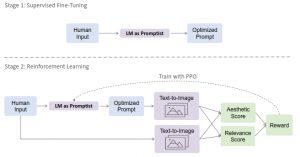
Figure 8. PROMPTIST training overview. Source: Hao et al. (2022)
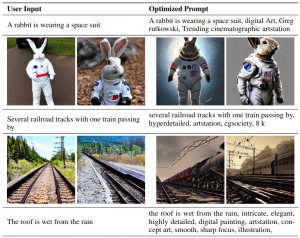
Figure 9. Comparison between the results of the original user prompt and the optimized prompt. Source: Hao et al. (2022)
Automatic prompt engineering
Hao et al. (2022) mention that the implementation of manual prompt engineering towards specific text-to-image models can be laborious and sometimes infeasible. The process of manually engineering prompts is often not transferrable between various model versions. Therefore, a systematic way to automatically align user intentions and various model-preferred prompts is necessary. To address this, a prompt adaptation framework for automatic prompt engineering via reinforcement learning was proposed. The method uses supervised fine-tuning on a small collection of manually engineered prompts to initialize the prompt policy network for reinforcement learning. The model is trained by exploring optimized prompts of user inputs, where the training objective is to maximize the reward, which is defined as a combination of relevance scores and aesthetic scores of generated images. The goal of the framework is to automatically perform prompt engineering that generates model-preferred prompts to obtain better output images while preserving the original intentions of the user. [12]
The resulting prompt optimization model, named PROMPTIST (figure 8), is built upon a pretrained language model, such as GPT, and is flexible to align human intentions and model-favored languages. Optimized prompts can generate more aesthetically pleasing images (figure 9). Experimental results show that the proposed method outperforms human prompt engineering and supervised fine-tuning in terms of automatic metrics and human evaluation. Although experiments are conducted on text-to-image models, the framework can be easily applied to other tasks. [12]
Jian et al. (2020) proposed two automatic methods to improve the quality and scope of prompts used for querying language models about the existence of a relation. The methods are inspired by previous relation extraction techniques and use either mining-based or paraphrasing-based approaches to generate diverse prompts that are semantically similar to a seed prompt. The authors also investigated lightweight ensemble methods that can combine the answers from different prompts to improve retrieval accuracy for different subject-object pairs. [13]
Their paper examined the importance of prompts for retrieving factual knowledge from language models and proposed the use of automated techniques to generate diverse and semantically similar prompts. By combining the different prompts, the research shows that factual knowledge retrieval accuracy can be improved by up to 8% compared to manually designed prompts. The proposed methods outperform the traditional manual prompt design approach and the use of the ensemble approach allows for greater flexibility and improved accuracy for different subject-object pairs. [13]
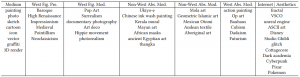
Figure 10. List of styles used in one of the experiments in Liu and Chilton (2021). Source: Liu and Chilton (2021).
Prompt variables
Liu and Chilton (2021) explored the challenges associated with generating coherent outputs using text-to-image generative models. The free-form nature of text interaction can lead to poor result quality, necessitating brute-force trial and error. The research systematically investigated various variables involved in prompt engineering for text-to-image generative models. It examined different parameters, such as prompt keywords, random seeds, and the length of iterations. It also explores the use of subject and style as dimensions in structuring prompts. Furthermore, they analyzed how the abstract nature of a subject or style can impact generation quality. The results of the study are presented as design guidelines to help users prompt text-to-image models for better outcomes. [14]
Prompt engineering for text-to-image generative models is an emerging area of research. Previous studies have used text-to-image models to generate visual blends of concepts. BERT, a large language model, was utilized to help users generate prompts, and generations were evaluated using crowd-source workers on Mechanical Turk. Similar crowd-sourced approaches have been used in the past to evaluate machine-generated images for quality and coherence. [14]
The guidelines provided suggest:
-
Focusing on keywords during prompt engineering rather than rephrasings, as rephrasing does not have a significant impact on the quality of the generation.
-
Trying multiple generations to collect a representative idea of what prompts may return.
-
To speed up the iteration process, the user should choose lower lengths of optimization, as the number of iterations and length of optimization do not significantly impact user satisfaction with the generation.
-
Users can experiment with a variety of artistic styles to manipulate the aesthetic of their generations, but should avoid style keywords with multiple meanings.
-
Choosing subjects and styles (figure 10) that complement each other at an elementary level, either by selecting subjects with forms or subparts that are easily interpreted by certain styles or by selecting highly relevant subjects for a given style.
-
Considering the interaction between levels of abstraction for the subject and style, as they can lead to incompatible representations. [14]
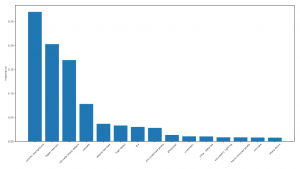
Figure 11. Ranking of top-15 most important keywords. Source: Pavlichenko et al. (2022)
Prompt keyword combinations
Pavlichenko et al. (2022) aimed to improve the aesthetic appeal of computer-generated images by developing a human-in-the-loop approach that involves human feedback to determine the most effective combination of prompt keywords. In combination with this, they used a genetic algorithm that learned the optimal prompt formulation and keyword combination for generating aesthetically pleasing images. [3]
The study showed that adding prompt keywords can significantly enhance the quality of computer-generated images. However, the most commonly used keywords do not necessarily lead to the best-looking images. To determine the importance of different keywords, the authors trained a random forest regressor on sets of keywords and their metrics. They found that the most important keywords for generating aesthetically pleasing images were different from the most widely used ones (figure 11). The approach presented in this paper can be applied to evaluate an arbitrary prompt template in various settings. [3]
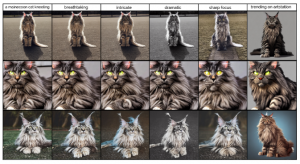
Figure 12. Effect of different image modifiers. Source: Witteveen and Andrews (2022).
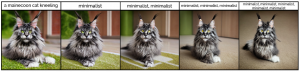
Figure 13. Repeating words. Source: Witteveen and Andrews (2022).
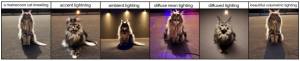
Figure 14. Light modifiers. Source: Witteveen and Andrews (2022).
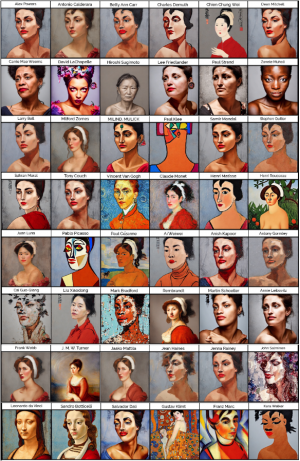
Figure 15. Effect of styled by artist. Source: Witteveen and Andrews (2022).
Prompt Modifiers
Witteveen and Andrews (2022) presented an evaluation of the Stable Diffusion model with chosen metrics on over 15,000 image generations, using more than 2,000 prompt variations. The results revealed that different linguistic categories, such as adjectives, nouns, and proper nouns, have varying impacts on the generated images (figure 12). Simple adjectives have a relatively small effect, whereas nouns can dramatically alter the images as they introduce new content beyond mere modifiers. The paper demonstrated that words and phrases can be categorized based on their impact on image generation, and this categorization can be applied to various types of models. While the effects of each word or phrase may vary depending on the model used, the evaluation process described can establish baselines for future model evaluations. [2]
Creating a prompt to generate an image can be challenging. The authors propose starting with a clear noun-based statement that contains the main subject of the image. Then, to record what seeds are effective, look for artists and key styles to emulate and add that to the prompt, and experiment with descriptors such as adding lighting effects phrases and repeating words. [2]
Repeating Words. A technique to enhance prompts involves repeating words. The researchers examined repeating modifiers from the descriptor class to compare the effects of having the modifier once versus repeating it two, three, and five times. Repetition has been found to remove details from the background, and eventually, with five occurrences of the word, it affects the actual subject of the image (figure 13). However, multiple occurrences of a word may not necessarily have the desired semantic effect that the word is expected to contribute. [2]
Adding "Lighting" Words. Words and phrases that describe lighting effects have unique properties. They can act as descriptors, which do not significantly change generated images, or as nouns, which make larger changes in the actual content of the image. Phrases such as "ambient lighting" can change the content significantly, whereas a phrase like "beautiful volumetric lighting" has relatively little impact on the generated image (figure 14). Lighting phrases can alter the look of the subject, the mood of the image, and the background of the image. [2]
Styled by Artist. Adding the prompt "in the style of" with an artist's name to the original prompt can lead to changes in image generation on multiple levels, such as the art medium, the color palette, and the racial qualities of the subject (figure 15). [2]
Finally, Oppenlaender (2022) noted that text-to-image art practitioners uses six different types of prompt modifiers to create images of specific subjects in different styles and qualities. These six types of prompt modifiers are subject terms, image prompts, style modifiers, quality boosters, repetitions, and magic terms. [1]
Subject terms are used to indicate the desired subject for image generation, while image prompts are used to provide visual targets for the synthesis of images. Style modifiers can be added to a prompt to generate images in a certain style, while quality boosters can be used to increase the level of detail and aesthetic qualities of the image. Repetitions in the prompt can potentially strengthen the associations formed by the generative system, while magic terms (e.g. "control the soul") introduce randomness and unpredictability to the generated images. [1]
Practitioners can assign weights to these six types of prompt modifiers, which can be negative to exclude subjects. It is important to note that the taxonomy of these prompt modifiers reflects the community's understanding and categorization of modifiers. Although text-to-image systems are trained to produce images of subjects in a particular style and quality, prompt modifiers enable the generation of unique and creative images that reflect the desired style and subject matter. [1]
References
- ^1 ^2 ^3 ^4 ^5 ^6 ^7 ^8Oppenlaender, J. (2022). "A Taxonomy of Prompt Modifiers for Text-to-Image Generation." arXiv:2204.13988; published in Behaviour & Information Technology (2023). arxiv.org/...2204.13988
- ^1 ^2 ^3 ^4 ^5 ^6Witteveen, S. and Andrews, M. (2022). "Investigating Prompt Engineering in Diffusion Models." arXiv:2211.15462. arxiv.org/...2211.15462
- ^1 ^2 ^3Pavlichenko, N. and Ustalov, D. (2022). "Best Prompts for Text-to-Image Models and How to Find Them." arXiv:2209.11711. arxiv.org/...2209.11711
- ^1 ^2Oppenlaender, J. (2022). "Prompt Engineering for Text-Based Generative Art." arXiv:2204.13988. arxiv.org/...2204.13988
- ^1 ^2DecentralizedCreator. "How to Write Good Prompts for AI Art Generators." decentralizedcreator.com/...-for-ai-art-generators
- ^1 ^2 ^3MLearning.ai / Medium. "Prompt engineering and tokenization tips for text-to-image models." medium.com/mlearning-ai
- ^1 ^2 ^3 ^4 ^5 ^6 ^7 ^8 ^9DecentralizedCreator. "Prompt elements: nouns, adjectives, artist names, styles, mediums and quality keywords." decentralizedcreator.com/...-for-ai-art-generators
- ^1 ^2 ^3"Understanding the 77-token Limitation," in Using Stable Diffusion with Python (Packt, 2024). subscription.packtpub.com/...e-77-token-limitation
- ^1 ^2 ^3 ^4 ^5 ^6Kuhr, A. "The Flux AI guide: installation, models, prompts and settings." andreaskuhr.com/...flux-ai-guide
- ^1 ^2Stability AI DreamStudio documentation. "Prompt weighting and negative prompts." platform.stability.ai/docs
- ^1 ^2 ^3 ^4AUTOMATIC1111. "Negative prompt," stable-diffusion-webui Wiki. github.com/...Negative-prompt
- ^1 ^2 ^3Ho, J. and Salimans, T. (2022). "Classifier-Free Diffusion Guidance." arXiv:2207.12598. arxiv.org/...2207.12598
- ^1 ^2 ^3 ^4 ^5 ^6OpenAI (March 25, 2025). "Introducing 4o Image Generation." openai.com/...introducing-4o-image-generation
- ^1 ^2 ^3 ^4 ^5Google Developers Blog (August 26, 2025). "Introducing Gemini 2.5 Flash Image, our state-of-the-art image model." developers.googleblog.com/...emini-2-5-flash-image
- ^Midjourney Documentation. "Parameter List," "Stylize," and "Chaos." docs.midjourney.com/...32859204029709-Parameter-List
- ^1 ^2Midjourney (April 3, 2025). "Version" documentation and "V7 is now the default model." docs.midjourney.com/...32199405667853-Version
- ^Hao, Y., Chi, Z., Dong, L. and Wei, F. (2022). "Optimizing Prompts for Text-to-Image Generation" (PROMPTIST). arXiv:2212.09611. arxiv.org/...2212.09611
Improve this article
Add missing citations, update stale details, or suggest a clearer explanation. Every suggestion is reviewed for sourcing before it goes live.
9 revisions · v9 · 4,720 words · full history
Fact-checks are independent of edits: a reviewer re-verifies the article against its sources and stamps the date. How we verify
Research and drafting on this wiki are AI-assisted, under named human editorial standards. How AI is used here
Cite this page: AI Wiki. "Prompt engineering for image generation." aiwiki.ai, updated 23 Jun 2026. CC BY 4.0. https://aiwiki.ai/wiki/prompt_engineering_for_image_generation