

AgiBot World 2026
AgiBot World 2026 (styled AGIBOT WORLD 2026 by its publisher) is a real-world robot manipulation dataset released in stages during 2026 by the Chinese robotics company AgiBot. It is hosted on Hugging Face as agibot-world/AgiBotWorld2026, uses the LeRobot v2.1 directory format, and is licensed under CC BY-NC-SA 4.0. The data was collected on the company's dual-arm AgiBot G2 platform in what the dataset card describes as "100% real-world environments" covering commercial spaces, homes, and other general-purpose scenarios (the Theme 3 release adds an Industry scenario folder).[1][2]
The dataset is organized into themes that the company unlocks one at a time. The project site names three: Imitation Learning, Rich Interaction, and Reinforcement Learning. On September 4, 2026, AgiBot's US account on X announced that "AGIBOT WORLD 2026 Theme 3 is now open source: 11,430 trajectories across 14 real-world tasks, including successes, failures, and human corrections."[5][6] The trajectory count is the company's figure; the Hugging Face repository lists the 14 tasks but does not publish a trajectory total.[3]
AgiBot World 2026 follows the company's 2025 dataset, AgiBot World (also called AgiBot World Colosseo), which reported about one million teleoperated trajectories. The 2026 release is much smaller in raw count and differs in intent: instead of only successful demonstrations, it adds contact-rich edge cases, failed policy rollouts, and human interventions that the company says are meant for reinforcement learning, world model training, and failure-recovery research in embodied AI and robot learning.[6][8]
Dataset facts
All figures below are taken from the publisher's dataset card, the Hugging Face API, and the company's own announcements; none has been independently audited.
| Item | Value as published |
|---|---|
| Hub repository | agibot-world/AgiBotWorld2026 on Hugging Face[2] |
| Publisher | "AgiBot World Team" (the citation block in the dataset card)[1] |
| Repository created | March 11, 2026 (initial commit)[2][4] |
| Last modified | September 1, 2026 (upload of the Theme 3 README)[2][4] |
| License | CC BY-NC-SA 4.0 for "all the data and code within this repo"[1][10] |
| Format | LeRobot v2.1 directory layout: Parquet episode files, MP4 per-camera videos, JSON and JSONL metadata; distributed as .tar.gz packages per task[1] |
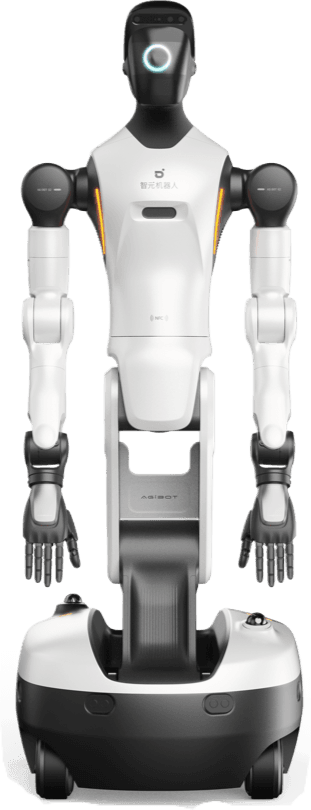
| Robot | AgiBot G2, described by the dataset card as the collection platform[1] |
| Hub tags | agibot, imitation-learning, embodied-ai, lerobot, real-world, dual-arm (task category robotics); modalities image and text; language English[2] |
| Declared size category | 1K<n<10K in the card's front matter[1][2] |
| Stored files | The Hub API reports a usedStorage value of 14,054,068,535,897 bytes, roughly 14 TB[2] |
| Downloads and likes | About 245,000 downloads (a rolling count) and 66 likes shown by the Hub API on September 5, 2026[2] |
| Top-level directories | ImitationLearning, RichInteraction, ReinforcementLearning, simulation, assets, plus README.md and split_episodes_tool.zip[2] |
| Theme 3 headline figures | 11,430 trajectories across 14 tasks (company-reported in the September 4, 2026 X post)[5] |
| Gating | Not gated; the 2025 Beta repository, by contrast, required a Hugging Face login when checked on September 5, 2026[2][11] |
Themes and release timeline
The project site presents AgiBot World 2026 under a "Key Themes" heading with the note that "Subsequent themes will be gradually unlocked in 2026." A separate highlights section says the dataset "spans five major embodied AI research paths" and "will be released in five sequential phases." Only three themes are named on the site as of September 5, 2026; the site does not say what the remaining two will cover, and this article does not guess.[6]
The site lists the first theme as Imitation Learning without a number in the fetched copy, while the second and third are explicitly labeled "Theme 2: Rich Interaction" and "Theme 3: Reinforcement Learning." The numbering used here follows the company's.[6]
| Theme | Hub directory | What the company says it contains | Upload activity in the commit history |
|---|---|---|---|
| Imitation Learning | ImitationLearning/ (12 task folders under CommercialSpaces, 1 under Home) | Teleoperated demonstrations gathered in a "free-form collection mode" in which "teleoperators design operational steps according to actual conditions"; force-control signals; multi-level instructions, atomic-skill labels, 2D boxes, and retained error-recovery trajectories | Task packages uploaded April 2 and April 25, 2026, with one more task on May 19, 2026[4][6] |
| Theme 2: Rich Interaction | RichInteraction/ (6 task folders under CommercialSpaces, 4 under Home) | "Contact-rich" interactions in which operators "intentionally guide the robot to interact with an extensive variety of environment objects," explicitly including "missed grasps, physical collisions, object drops, and liquid splashes"; aimed at world models, neural simulators, and physics-informed perception | Packages uploaded May 19 to May 27, 2026[4][6] |
| Theme 3: Reinforcement Learning | ReinforcementLearning/ (8 task folders under Industry, 6 under Home) | Expert demonstrations, "HG-DAgger human-in-the-loop correction trajectories, and success/failure rollouts generated by deployed policies," with reward-related fields | Packages uploaded July 22, August 4, and August 31, 2026; theme README first uploaded August 31 and replaced under its final filename September 1, 2026; announced on X September 4, 2026[3][4][5] |
| Simulation companion | simulation/ (6 task folders, each under a g2_swift_picker subfolder) | Digital-twin data: the card says "Digital twin technology is leveraged to construct a 1:1 scale scenario in the simulation environment for data collection, with the simulation data concurrently open-sourced in the GenieSim project" | Uploaded April 7, 2026[1][4] |
Folder counts are from the Hub file listing on September 5, 2026 and can change as the company adds packages. The six simulation tasks are named in their folder paths: scoop popcorn to bucket, take bagged food to cart, take cup to cart, take drink to cart, take laundry detergent to cart, and tidy up food in freezer.[2]
Theme 3: Reinforcement Learning
The Theme 3 README describes the release as "real-world robot trajectories and feedback fields for reinforcement learning research," combining "expert demonstrations, human-in-the-loop correction trajectories, and success/failure rollouts generated by deployed policies." Compared with the earlier themes it "adds force-related observations and reward-related fields that capture execution outcomes, policy deviations, and human interventions in real-world tasks."[3]
Tasks
The README lists 14 tasks. Some carry two task IDs, which the README does not explain; the second ID in each pair (16655 to 16661) does not appear as a folder in the Hub listing as of September 5, 2026.[2][3]
| Task ID(s) | Task name | Scenario folder |
|---|---|---|
| 6671 | Unlocking and Opening a Cabinet Door | Industry |
| 6673 | Replacing a Shaver Head | Industry |
| 6674 | Cutting and Applying Tape | Industry |
| 6687, 16661 | Applying a Logistics Code to a Package | Industry |
| 6688, 16660 | Packing a Desk Lamp and Data Cable into a Box | Industry |
| 6767 | Wrapping a Bearing in Bubble Wrap | Industry |
| 6809 | Inserting a Network Cable into a Router | Industry |
| 7093, 16657 | Installing Batteries in a Remote Control | Industry |
| 12173 | Placing a Tea Bag from a Tea Canister into a Mug | Home |
| 12190 | Folding Socks and Putting Them into a Storage Basket | Home |
| 12192, 16655 | Putting Coins into a Piggy Bank | Home |
| 12197 | Installing a Toilet Paper Roll in a Lockable Holder | Home |
| 12208 | Putting Clothes on a Hanger and Hanging Them on a Clothing Rod | Home |
| 12228 | Loading Plates and Bowls into a Dish Rack | Home |
The scenario assignment (Industry or Home) comes from the folder each task sits in on the Hub.[2][3]
Trajectory types
Each task folder is meant to hold up to three subfolders, one per trajectory type. The README warns that "Not every task necessarily contains all trajectory types" and that "Some currently visible folders may still use temporary names while the final layout is being updated." The commit history shows this in practice: packages uploaded on August 4, 2026 went into folders named PolicyRollout, while the August 31 uploads used Rollout, the name the README documents.[3][4]
| Folder | Company description |
|---|---|
ExpertDemonstration | "Expert demonstration trajectories collected through human teleoperation." |
HG-DAgger | "Human-in-the-loop correction trajectories. A deployed policy first executes on the real robot, and an operator intervenes when correction is needed." |
Rollout | "Successful and failed rollouts generated by deployed policies." |
HG-DAgger refers to a human-in-the-loop variant of dataset aggregation in which a human takes over from a running policy rather than providing demonstrations from scratch; the README uses the name without further definition.[3]
Labels and extra fields
Theme 3 ships "task-level and process-level annotation labels for task execution and policy feedback." The README also adds two force-related features for all trajectories and five fields for correction and rollout trajectories.[3]
| Label | Company description | Example given in the README |
|---|---|---|
| Task / subtask step | "Describes the task process and decomposes each task into ordered subtask steps." | |
| Success | "Marks whether the task or subtask is successfully completed." | |
| Error | "Marks execution errors during the task." | Piggy-bank task: "The coin is not grasped during handover, or drops after being grasped." |
| Intervention | "Marks human intervention during policy execution." | |
| Adversarial disturbance | "Marks intervals where external disturbance is introduced during task execution." | Desk-lamp packing: "After the box has been aligned, an operator rotates it again during execution." |
| Feature | Applies to | Type | Company description |
|---|---|---|---|
end.wrench | All Theme 3 trajectories | Required | "End-effector wrench signals." |
joint.effort | All Theme 3 trajectories | Required | "Joint effort signals." |
intervened | HG-DAgger and Rollout | Optional, boolean | "Whether the step is taken over by an operator." |
succeed | HG-DAgger and Rollout | Required, boolean | "Whether the episode succeeded." |
reward | HG-DAgger and Rollout | Required, float | "Reward from the environment." |
done | HG-DAgger and Rollout | Required, boolean | "Whether the episode is done." |
truncated | HG-DAgger and Rollout | Required, boolean | "Whether the episode is truncated." |
The project site says these annotations "can be further transformed into feedback signals required for reinforcement learning, supporting reward model and value model training, as well as research on task progress prediction, success detection, error recognition, risk warning, intervention timing prediction, and error recovery."[6]
Collection platform and pipeline
The dataset card and project site describe the collection setup in the company's own terms. The G2 is presented as "a next-generation, industry-standard robotic platform" with "high-performance joint actuators, multi-type sensors, and a high-performance domain controller." The site says that, fitted with the Swift Picker gripper and the OmniHand dexterous hand, the platform "collects RGB(D), tactile, force, LiDAR point-cloud, IMU, and full-body joint-state data synchronously in a unified pipeline." Which of these streams appear in a given theme's files is defined per theme by meta/info.json; the root README's camera list, for example, contains RGB, depth, fisheye, and stereo camera keys but no tactile or LiDAR key.[1][6]
Teleoperation is described as "BLOS first-person teleoperation," in which "the teleoperator connects to robots remotely over public networks and shares the perceptual space with the robot from a first-person perspective." Movement during collection uses "a flexible mobile chassis, head movements, waist rotation, and lift-pitch motions," and the site says that data collection "incorporates force control, including contact and force feedback information."[6]
After collection, the company says data "is validated through policy training and real-robot testing" and then passes through "a rigorous DaaS industrial quality control pipeline, which involves multiple rounds of screening and cleaning against unified standards." DaaS is the company's data-as-a-service business, which the site also markets alongside the dataset. The 2026 highlights section says the task matrix "encompasses fine-grained and ultra-long-horizon manipulation, spatial navigation, dual-arm coordination, and multi-agent / human-robot collaboration," and that each episode "features the dynamic disturbances, spatial complexity, and interaction uncertainty of real environments." These are the company's characterizations; the Hub listing so far shows tabletop and shelf manipulation tasks in commercial, home, and industrial scenes.[2][6]
A digital twin of each real scene is used for simulated collection, and the resulting simulation data is released alongside the real data through the company's GenieSim project. The simulation/ directory on the Hub is the visible result.[1][2]
Data format
The dataset follows the LeRobot v2.1 layout and points users to the LeRobot installation guide pinned to the v0.3.3 tag, which requires Python 3.10 or later and PyTorch 2.2 or later.[1]
| Part | Contents |
|---|---|
meta/ | episodes.jsonl, info.json, episodes_stats.jsonl, tasks.jsonl, and an optional annotations.json |
data/ | One Parquet file per episode under chunk-000/ |
videos/ | One MP4 per camera per episode, in subfolders named after the camera key |
info.json is the main manifest. It carries dataset summary fields (robot_type, total_episodes, total_frames, fps, splits), the data_path and video_path templates, the features schema, and optional custom metadata (instruction_segments, key_frame, high_level_instruction, take_over, h5_path, camera_parameters). The README notes that per-episode video channel statistics in episodes_stats.jsonl "are set to 0 due to internal preprocessing."[1]
State and action vectors
observation.state and action are flat vectors stored in Parquet. Their layout is described by a field_descriptions block in info.json, in which each sub-field carries a description, a dimensions count, optional per-dimension dims names, and the indices that locate it in the flattened vector. Example keys given in the README are state/left_effector/position, state/right_effector/position, state/joint/position, state/joint/velocity, action/joint/position, and action/robot/velocity. The README does not publish the total vector length; users must read info.json for each task.[1]
Camera keys
Camera streams are observation.images.* entries, each describing video type, frame rate, codec, pixel format, and frame shape. The README lists nine common keys: top_head, hand_left, hand_right, head_depth, head_left_fisheye, head_right_fisheye, head_back_fisheye_color, head_stereo_left_color, and head_stereo_right_color. The directory example in the README shows only the first three, so the set present in any given task should be checked in its manifest.[1]
A documentation mismatch
The root README's sparse-checkout example tells users to select 20260315/tar/task_3777 and 20260315/task_3777, and its sample-dataset note points to task3777/380098_380609.tar.gz. Neither path exists in the repository as listed on September 5, 2026: task 3777 lives at ImitationLearning/CommercialSpaces/task_3777/ and holds 24 packages with different frame-range names. The example appears to predate the reorganization into theme folders.[1][2]
Annotation layers
The root README says meta/info.json "adds three annotation layers beyond the standard LeRobot spec," stored under the key_frame and instruction_segments keys and indexed by episode index as a string. The hierarchy runs from the episode's high-level label in tasks.jsonl down to step-level segments.[1]
| Layer | Where it lives | What it records | Fields in the README example |
|---|---|---|---|
| Layer 1: Task Frame (subtask instructions) | key_frame[ep]["dual"] entries with frame_type_name "Task Frame" | A [start, end) frame interval and a natural-language subtask instruction; a long-horizon episode may hold several | track "subtask", start 35, end 2516, frame_detail.comment "Place the red-capped drinks and the white triple-pack yogurts from the shopping cart into the fifth shelf of the refrigerated cabinet.", is_result_succeed true |
| Layer 2: 2D Bounding Box (object annotations) | key_frame[ep]["dual"] entries with frame_type_name "2D Bounding Box" | Object label, arm track, relevant frame interval, camera, and a normalized box | track "Right arm", start 493, end 743, box {h 0.239, w 0.083, x 0.490, y 0.574}, camera "head_color", comment "Yogurt, white" |
| Layer 3: Instruction Segments (step-level labels) | instruction_segments[ep] list | A primitive skill, a step instruction, and start, success, and end frame indices | skill "Pick", instruction "The left arm picks up the red-capped drink from the shopping cart.", start_frame_index 284, success_frame_index 493, end_frame_index 493 |
The README describes Layer 2 as usable "to train object-conditioned policies, ground language instructions to visual regions, or study grasp selection," and Layer 3 as enabling "skill-level imitation learning, primitive discovery, and multi-granularity language conditioning." The Task Frame layer is also what the companion splitting tool uses to cut long episodes into single-instruction episodes.[1]
key_frame entries come in two categories, single (single-frame) and dual (range). Typical fields are track, frame_type_name, start, end, frame_detail.comment, frame_detail.error_cause, frame_detail.restorable, and frame_detail.extra. The README lists six built-in frame type names: Error Frame, Success Frame, Intervention Frame, Single Frame, 2D Bounding Box, and Task Frame. The first three are how success, error, and intervention events are marked at the frame level; the Theme 3 README's label list (success, error, intervention, adversarial disturbance) maps onto this mechanism, though the root README does not name an adversarial-disturbance frame type.[1][3]
The example instructions in the README are all long-horizon retail restocking: moving drinks and yogurt between a shopping cart and the shelves of a refrigerated cabinet. Four split-episode instructions quoted in the README differ only in wording ("third layer of the chilled cabinet," "third shelf of the chilled cabinet," "third shelf of the refrigerated case," "third layer of the chilled display case"); the README does not explain the variation.[1]
Two usage modes and the split tool
The dataset card describes two ways to consume the data.[1]
| Mode | Description | Intended use |
|---|---|---|
| Mode A: original format | Use the dataset as shipped; each episode "covers a complete long-horizon restocking task" and the multi-level annotations are read from meta/info.json | "Hierarchical policies, task-conditioned planners, or multi-granularity instruction-following models" |
| Mode B: split format | Run split_episode.py to convert long episodes into single-instruction episodes in standard LeRobot form, with the extended annotation fields stripped from info.json | Existing training pipelines "out of the box," such as lerobot/scripts/train.py |
The tool is distributed as split_episodes_tool.zip (7,181 bytes on the Hub). It requires Python 3.8 or later, FFmpeg on the PATH, and the pyarrow and numpy packages. Its command line is python split_episode.py <input_dataset_path> [--output_path <output>] [--num_workers <N>], with the output path defaulting to <input_path>_split and the worker count to 4. The README says the script copies the full dataset to the output path without modifying the original, slices Parquet files by frame range while resetting frame_index, index, timestamp, and task_index, extracts video segments with FFmpeg while preserving codec and pixel format, and rewrites meta/info.json, episodes.jsonl, tasks.jsonl, and episodes_stats.jsonl. In the README's worked example, two original episodes with one and four Task Frame segments become five single-instruction episodes.[1][2]
Relation to AgiBot World 2025
AgiBot World, the 2025 dataset, was published with the paper "AgiBot World Colosseo: A Large-scale Manipulation Platform for Scalable and Intelligent Embodied Systems" (arXiv 2503.06669, first author Qingwen Bu, submitted March 9, 2025 and last revised August 4, 2025). The paper reports 1,001,552 trajectories totaling 2,976.4 hours across 217 tasks, 87 skills, and 106 scenes, collected by more than 100 AgiBot G1 robots through teleoperation. The companion GitHub repository, OpenDriveLab/AgiBot-World, later labeled the full Beta release as 1,003,672 trajectories (about 43.8 TB) and the Alpha subset as 92,214 trajectories (about 8.5 TB), and describes the work as an IROS 2025 Best Paper Award finalist with a 2026 IEEE Transactions on Robotics version. The repository's own code is "built on LeRobot (dataset v2.1)," the same format version the 2026 dataset uses. GO-1, the vision-language-action model trained on the 2025 data, was open-sourced on September 19, 2025 according to the repository's news list.[8][9]
| AgiBot World (2025) | AgiBot World 2026 | |
|---|---|---|
| Robot | AgiBot G1, more than 100 units[8] | AgiBot G2[1] |
| Reported scale | 1,001,552 trajectories, 2,976.4 hours (paper); 1,003,672 Beta and 92,214 Alpha trajectories (repository)[8][9] | Theme 3: 11,430 trajectories over 14 tasks (X post); card front matter declares 1K<n<10K[1][5] |
| Data types | Teleoperated demonstrations with failure-recovery examples in the pipeline[8] | Themed: demonstrations (Theme 1), contact-rich edge cases (Theme 2), demonstrations plus HG-DAgger corrections plus success and failure rollouts with reward fields (Theme 3)[3][6] |
| Hub repositories | AgiBotWorld-Alpha and AgiBotWorld-Beta (Beta created February 11, 2025; tagged webdataset, 100M<n<1B; login required on September 5, 2026)[11][12] | AgiBotWorld2026 (created March 11, 2026; not gated)[2] |
| Format | Beta on the Hub is tagged as WebDataset; the GitHub tooling targets LeRobot v2.1[9][11] | LeRobot v2.1 with three extra annotation layers[1] |
| License | CC BY-NC-SA 4.0[9] | CC BY-NC-SA 4.0[1] |
| Publication | arXiv 2503.06669; IROS 2025; IEEE TRO 2026 per the repository[8][9] | No paper as of September 5, 2026; the card asks users to cite a @misc entry by "AgiBot World Team"[1] |
| Credited authors | Bu et al., with the repository maintained by OpenDriveLab[8][9] | "AgiBot World Team" on the card[1] |
The 2025 repository README describes the goal as "paving the path towards the 'ImageNet Moment' for Embodied AI"; the 2026 card opens by saying the new release follows "AGIBOT WORLD's 'ImageNet moment'," a reference to ImageNet's role in computer vision that the company applies to embodied AI. The comparison between "1M+" and "11,430" is between a full-year dataset and a single theme of a staged release, so the two totals are not directly comparable, and the company has not published a cumulative 2026 count.[1][5][9]
The agibot-world Hub organization also hosts AgiBotDigitalWorld, GenieSimAssets, GenieSim3.0-Dataset, EWMBench, and the AgiBotWorldChallenge-2025 and AgiBotWorldChallenge-2026 competition sets; the 2026 challenge data was last modified April 24, 2026.[12]
License and access
The dataset card states that "All the data and code within this repo are licensed under CC BY-NC-SA 4.0," the Creative Commons Attribution-NonCommercial-ShareAlike 4.0 International license. That license permits copying and adaptation with attribution and share-alike obligations but excludes commercial use, so the data can be used for academic research and open experiments while commercial training would require a separate arrangement with AgiBot. The company markets paid data collection ("Request your OWN data with the same ENTERPRISE level quality") and a data collection kit on the same site.[1][6][10]
Files are downloaded with git lfs and a sparse checkout, or by cloning the repository with GIT_LFS_SKIP_SMUDGE=1 to fetch pointers only. Individual task packages are large: the two packages in the cabinet-door task (6671), for example, are about 35.6 GB and 17.3 GB.[1][2]
Coverage
Interesting Engineering covered the Theme 3 release on September 4, 2026 in a video item by Jijo Malayil, which was also syndicated on MSN. The piece repeats the 11,430-trajectory and 14-task figures and adds that "The dataset includes 1,024 successful policy rollouts and 1,369 failed rollouts." Those rollout counts do not appear in the dataset card, the Theme 3 README, or the X post, and they are attributed here to the outlet. The article also states that AgiBot "plans to expand the initiative with additional datasets, benchmarks, and research resources," consistent with the site's five-phase description.[7]
AgiBot's own announcement was a two-minute video posted from the @AGIBOT_US account at 17:00 UTC on September 4, 2026, linking the project site and the Hub repository; the Interesting Engineering item carries a publication timestamp of 13:13 UTC the same day, before the post.[5][7]
Continue reading
- AgiBotAgiBot, styled AGIBOT and branded in Chinese as Zhiyuan Robotics (智元机器人), is a Chinese robotics company founded in Shanghai in February 2023.Mentioned 35 times above
- LeRobotLeRobot is an open-source, PyTorch-native library for end-to-end real-world robot learning developed by Hugging Face and a global community of contributors, often described as the "Transformers for robotics"…Mentioned 11 times above
- Hugging FaceHugging Face is an artificial intelligence company and collaboration platform for machine learning.Mentioned 4 times above
- AgiBot G2 GenieThe AgiBot G2 Genie is an industrial-grade wheeled humanoid robot developed by AgiBot (Zhiyuan Robotics), a Chinese company founded in 2023 by former Huawei engineers.Mentioned 3 times above
- Robot manipulationRobot manipulation is the ability of a robotic system to physically interact with objects in its environment through grasping, pushing, pulling, inserting, placing, and other contact-based actions.Linked in the introduction
- Index (Figure AI)Index is a proprietary data-collection program and mobile application operated by Figure AI.Mentioned 7 times above



More to read
References
- ^1 ^2 ^3 ^4 ^5 ^6 ^7 ^8 ^9 ^10 ^11 ^12 ^13 ^14 ^15 ^16 ^17 ^18 ^19 ^20 ^21 ^22 ^23 ^24 ^25 ^26 ^27 ^28 ^29AgiBot World 2026 dataset card (README.md) - Hugging Face (AgiBot World Team), last modified September 1, 2026, accessed September 5, 2026.
- ^1 ^2 ^3 ^4 ^5 ^6 ^7 ^8 ^9 ^10 ^11 ^12 ^13 ^14 ^15 ^16 ^17 ^18 ^19Hugging Face API metadata and file tree for agibot-world/AgiBotWorld2026 - Hugging Face, accessed September 5, 2026.
- ^1 ^2 ^3 ^4 ^5 ^6 ^7 ^8 ^9 ^10AGIBOT WORLD 2026 Theme 3: Reinforcement Learning (README_THEME_3.md) - Hugging Face (AgiBot World Team), uploaded September 1, 2026.
- ^1 ^2 ^3 ^4 ^5 ^6 ^7Commit history for agibot-world/AgiBotWorld2026 - Hugging Face, accessed September 5, 2026.
- ^1 ^2 ^3 ^4 ^5 ^6AGIBOT WORLD 2026 Theme 3 announcement - X (@AGIBOT_US), September 4, 2026.
- ^1 ^2 ^3 ^4 ^5 ^6 ^7 ^8 ^9 ^10 ^11 ^12AGIBOT WORLD project site, "Key Themes" and "AGIBOT WORLD 2026 Dataset Highlights" - AgiBot, accessed September 5, 2026 (text read from the site's client-side bundle).
- ^1 ^2Video: Chinese firm releases 11,430 robot trajectories to advance research - Interesting Engineering (Jijo Malayil), September 4, 2026.
- ^1 ^2 ^3 ^4 ^5 ^6 ^7AgiBot World Colosseo: A Large-scale Manipulation Platform for Scalable and Intelligent Embodied Systems - arXiv (Qingwen Bu et al.), March 9, 2025, revised August 4, 2025.
- ^1 ^2 ^3 ^4 ^5 ^6 ^7OpenDriveLab/AgiBot-World repository README - GitHub (OpenDriveLab and AgiBot), accessed September 5, 2026.
- ^1 ^2Attribution-NonCommercial-ShareAlike 4.0 International (CC BY-NC-SA 4.0) deed - Creative Commons, accessed September 5, 2026.
- ^1 ^2 ^3Hugging Face API metadata for agibot-world/AgiBotWorld-Beta - Hugging Face, accessed September 5, 2026.
- ^1 ^2Datasets published by the agibot-world organization - Hugging Face API, accessed September 5, 2026.
Improve this article
Add missing citations, update stale details, or write a clearer explanation. Anyone can edit: changes go live when you publish, and every edit is checked by an editor.
3 revisions · v3 · 4,069 words · full history
Fact-checks are independent of edits: a reviewer re-verifies the article against its sources and stamps the date. How we verify
Research and drafting on this wiki are AI-assisted, under named human editorial standards. How AI is used here
Reviewer note: Independent verification on Sep 5, 2026: the Hugging Face API, file tree, commit history, README, site code and press coverage were re-fetched; four precision points fixed.
Cite this page: AI Wiki. "AgiBot World 2026." aiwiki.ai, updated 5 Sept 2026, fact-checked 5 Sept 2026. CC BY 4.0. https://aiwiki.ai/wiki/agibot_world_2026