

Developing Roblox Games with AI
Developing Roblox games with AI means using an AI assistant or coding agent to plan, script, build and test a game in Roblox Studio, the editor in which Roblox games are made, while the place itself, its scripts and its live state stay in Studio. Roblox ships its own agent, Assistant, inside Studio, and since March 2026 Studio also includes a built-in Model Context Protocol (MCP) server that lets outside agents such as Claude Code, Cursor and Codex read and edit an open place.[1][2][3] Roblox games are written in Luau, a language derived from Lua,[4] and they are multiplayer by default, with the server as "the ultimate authority" for game state, so much of this guide is about keeping agent-written code on the correct side of the client-server boundary.[5]
This guide describes the workflow as of 30 October 2026 and follows the order of Roblox's own coding-harness tutorial where one exists.[6] Steps shared with other engines, such as choosing an agent and writing an instructions file, are covered in Developing Games with AI.
Part of the Developing Games with AI series. Previous: Unreal Engine. Next: Game assets.
At a glance
- For: Roblox creators who want an AI agent to write Luau, edit places and playtest in Studio
- You need: Roblox Studio and a Roblox account; for an external agent, an MCP-capable editor or CLI, Git and Studio's Script Sync
- You will end with: scripts synced to a Git-tracked folder, an agent connected through Studio's MCP server, and one server-validated mechanic tested with several clients
Steps: 1. Choose how the agent reaches Studio 2. Set up the project 3. Build one mechanic 4. Test it 5. Add assets 6. Publish
What is different about Roblox
- The project lives in Studio, not in files. A place is a data model of instances (parts, scripts, folders, user interface) that Studio saves to Roblox or to a place file. An agent that works on files needs a sync layer, either Studio's Script Sync or the community tool Rojo, or it must act on Studio directly through MCP.[7][8]
- Every game is a client-server game. Whether a script runs on the server or a client depends on its type, its location in the Explorer and its
RunContextproperty, which Roblox's documentation calls "the fundamental challenge" for developers adapting to Roblox scripting.[9] - The client cannot be trusted. Roblox's security guide starts from "Never trust the client": an exploiter can decompile any replicated LocalScript or ModuleScript and fire RemoteEvents "at any frequency with arbitrary arguments".[10] Roblox's own evaluation of AI-built games checks for "unsafe client authority".[11]
- Edit time and run time differ. Roblox says Assistant "sometimes confuses the difference between edit time and run time"; to get a change during play, it suggests asking for "a script to make the time of day 8:00 AM" rather than "make the time of day 8:00 AM".[12] External agents face the same choice, because the MCP tool
execute_luaucan run code in the Edit, Client or Server data model.[1]
The tools Roblox provides
| Tool | What it does | Notes as of 30 October 2026 |
|---|---|---|
| Assistant | Chat agent in Studio that writes scripts, edits instances, inserts Creator Store assets, generates 3D content and playtests[13][14] | Planning Mode, skills, bring-your-own API key |
| Studio MCP server | Lets any stdio MCP client read and edit the open place, run Luau, playtest and simulate input[1] | Built into Studio since 5 March 2026; the open-source server is discontinued[2][15] |
| Script Sync | Syncs scripts and folders with .luau files on disk[7] | Fully released on 17 June 2026, after a public beta from November 2025[71][31] |
| Code Assist | Inline code suggestions in the Script Editor; Tab accepts[16] | Manual trigger Alt+\ on Windows or Option+\ on Mac[16] |
| Generators | Meshes, procedural models, textures and materials from text or image prompts[13][17][18] | Procedural models: 50 per rolling 24 hours[13] |
| Open Cloud Luau Execution | Runs a Luau script against a saved place version from outside Studio[19] | Suits automated tests in CI |
| Runtime APIs | TextGenerator, GenerationService, text-to-speech and speech-to-text for features players use[14] | See Generative AI inside an experience |
Roblox also offers Build, a "mobile-first creation tab within the Roblox app" that makes a game from text prompts; its public alpha opened in New Zealand on 28 July 2026 for age-checked users aged 9 and older and was expanding to Serbia and Singapore by September 2026.[20][21] Roblox and Digital Trends describe Build as sharing a back end with Studio,[20][22] but in September Roblox called its Build announcements "the first steps toward integrating Build and Studio",[21] and it warns that editing a Build game in Studio "permanently turns it into a standard Studio game and removes its Build status".[23] The rest of this guide is about Studio.
Connect an agent to Studio
An agent can reach a Roblox place in three ways, and they combine: Assistant runs inside Studio; an external agent calls Studio's built-in MCP server; and a file-based agent edits .luau files that Script Sync (or Rojo) mirrors into Studio. Roblox's coding-harness tutorial uses the last two together, with Script Sync for scripts and the MCP server for "anything Script Sync cannot reach, such as StarterGui and StarterPack".[6]
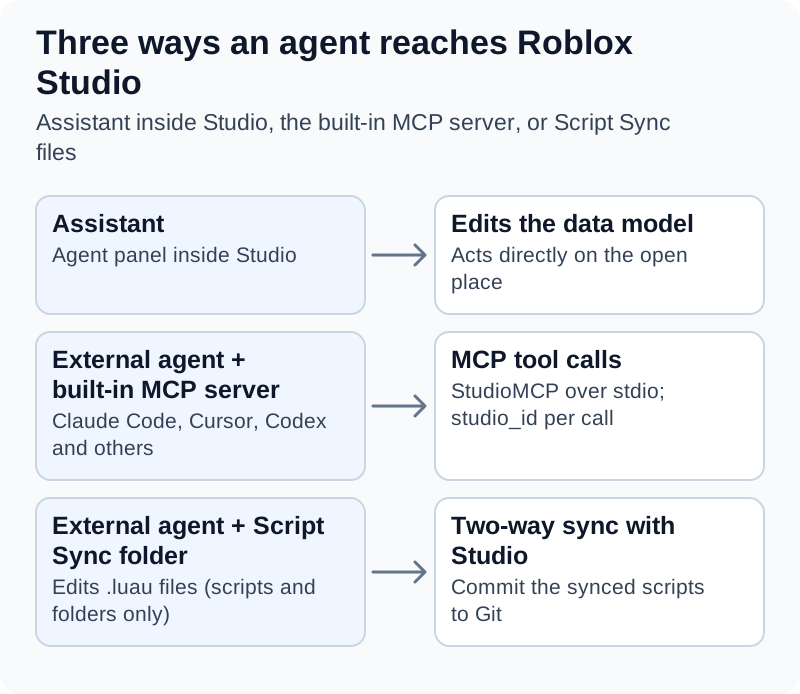
Assistant works inside Studio, while external agents reach the open place through Studio's built-in MCP server or by editing .luau files that Script Sync mirrors into Studio. Script Sync carries only scripts and folders, so other instances need MCP or Studio itself.
Assistant inside Studio
Open Assistant with the Assistant button on the right side of Studio's mezzanine bar.[13] Roblox says that, asked for a remote event, "it can create a local script, a server script, and the event all at once".[13] For larger requests, choose Plan in the input panel's dropdown or type /plan: Assistant writes an editable Markdown plan, and "Plans never auto-execute or time out into acceptance"; nothing runs until you click Build.[13] If a long build stops with "The current response exceeded the maximum output length", click Continue.[24]
Since March 2026 you can accept all script edits per session or per prompt, which Roblox says lets Assistant "apply changes, run verification loops, and iterate" while you are away.[2] Under Assistant > … > Manage API Keys you can swap Roblox's default model for one from Anthropic, OpenAI or Google using your own key.[14] The Roblox pages cited here state no usage quota for the default model; one developer's July 2026 DevForum feature request says they "often reach the usage limit" while prototyping.[25]
Assistant also loads skills, Markdown files with name, description and enabled frontmatter that apply when a request matches the description. Roblox's built-in skills use the reserved rbx- prefix and include rbx-unit-test, rbx-debug and rbx-device-simulator-lua.[26]
The built-in Studio MCP server
Roblox released an open-source Studio MCP server on 13 May 2025 as "a proof of concept".[27] On 5 March 2026 it moved the server into Studio, calling the built-in version "the recommended way to connect external AI tools to Studio".[2] The open-source repository (Roblox/studio-rust-mcp-server) now says "This MCP Server is no longer being actively developed", and its last release entry, dated 3 April 2026, is titled "Product discontinued".[28][15] Guides that tell you to download rbx-studio-mcp.exe or install a Studio plugin called "MCP" describe that older server.[28][27]
To turn the built-in server on, open Assistant, click … > Manage MCP Servers and switch on Enable Studio as MCP server. It runs as a local process that talks to the client over stdio, and Roblox documents three ways to connect:[1]
- Quick connect for Antigravity, Codex CLI, Claude Code, Claude Desktop, Cursor, Gemini CLI and Visual Studio Code: in Assistant Settings > MCP Servers, expand Quick connect and turn the client on. If a client is missing, install it and restart Studio.
- JSON configuration under
mcpServers. The macOS entry is below; on Windows,commandiscmd.exewith the arguments/cand%LOCALAPPDATA%\Roblox\mcp.bat. - CLI command:
/Applications/RobloxStudio.app/Contents/MacOS/StudioMCPon macOS orcmd.exe /c %LOCALAPPDATA%\Roblox\mcp.baton Windows.
{
  "mcpServers": {
    "Roblox_Studio": {
      "command": "/Applications/RobloxStudio.app/Contents/MacOS/StudioMCP"
    }
  }
}
Claude Code's documented form for a local server is claude mcp add --transport stdio <name> -- <command>, so on macOS these lines register Studio by hand and then show server health (illustrative; quick connect does the same).[29]
claude mcp add --transport stdio Roblox_Studio -- /Applications/RobloxStudio.app/Contents/MacOS/StudioMCP
claude mcp list
A green indicator under Enable Studio as MCP server shows how many clients are connected.[1] Roblox's tutorial then asks the agent to "List what's in Workspace"; for a fresh Baseplate place the answer should name Camera, Terrain, Baseplate and SpawnLocation.[6]
| Group | Tools listed by Roblox[1] |
|---|---|
| Scripts | script_read, multi_edit, script_search, script_grep |
| Data model | search_game_tree, inspect_instance, subagent (types explore and playtest) |
| Luau | execute_luau (Edit, Client or Server data model) |
| Playtest and input | get_studio_state, start_stop_play, get_console_output, screen_capture, character_navigation, user_keyboard_input, user_mouse_input |
| Assets | generate_mesh, generate_material, generate_procedural_model, wait_job_finished, search_asset, insert_asset, upload_image, store_image |
| Docs and sessions | http_get (allowed Roblox documentation URLs), skill, list_roblox_studios |
Since 19 August 2026 every tool call takes a studio_id naming the Studio window it targets; set_active_studio was removed, and list_roblox_studios returns each window's name, instance ID and place ID.[30][1] Prompts or scripts written around set_active_studio need updating.
Script Sync for file-based agents
Script Sync, a public beta from 12 November 2025 that Roblox fully released on 17 June 2026, "synchronizes the scripts in your data model to text files on your local disk" in both directions.[31][71][7] Right-click a folder or service in the Explorer and choose Sync to…; Studio resumes syncing when you reopen the place.[7][71] Roblox's coding-harness tutorial still starts by enabling a Script Sync beta under File > Beta Features; if Sync to… is missing, update Studio and check that menu.[6] File names decide what Studio creates:[7]
| On disk | In Studio |
|---|---|
name.luau | ModuleScript |
name.server.luau | Script with Server RunContext |
name.client.luau | Script with Client RunContext |
name.local.luau | LocalScript |
name/ and name/init.server.luau | Folder, or a script with children |
Tell the agent these rules, because breaking them fails quietly:
- Script Sync only syncs Script, LocalScript, ModuleScript and Folder instances and ignores everything else in a synced folder.[7] RemoteEvents, parts and user interface must be made through MCP, in Studio, or by a script at run time.
- "Don't sync scripts that have attributes or tags"; Script Sync ignores them, which can lose data.[7]
- A
Client-RunContext script in StarterPlayerScripts or StarterCharacterScripts runs twice, because "the original script and the copy run". Roblox recommends LocalScripts in starter containers, so a client file there should bename.local.luau.[9] - On a conflict, a dialog asks you to choose Keep Studio or Keep Disk; Studio's debugger cannot be driven from an external editor.[7]
Script Sync handles up to 10,000 scripts per top-level synced instance and works with Team Create, though people editing the same synced script at once "can overwrite each other's changes".[7] Roblox recommends the community-maintained Luau Language Server extension with its companion Studio plugin, selene for linting and StyLua for formatting.[7]
Rojo for a file-first project
Roblox's guidance is that Script Sync suits code in an outside editor and version control and "works with Roblox's built-in collaboration tools, which third-party tools often do not", while tools like Rojo are "a better choice" for keeping an entire project in version control.[7] Rojo runs a local server that a Studio plugin connects to; Roblox's page installs it with the Rokit toolchain manager and uses rojo plugin install, rojo init, rojo build -o <name>.rbxl and rojo serve, noting that such tools "are not maintained by Roblox".[8] The Luau language server can read a Rojo sourcemap (rojo sourcemap --watch default.project.json --output sourcemap.json) to understand the instance tree.[32] The MCP server acts on a place open in Studio rather than on files, so it can also be used with a Rojo-synced place (this guide's inference; Roblox's MCP page does not mention Rojo).
Security checks before you connect
- Roblox warns: "MCP clients can read and modify content in your open Roblox places. Make sure to only connect clients you trust."[1]
execute_luauruns arbitrary Luau. Claude Code permission rules take the formmcp__<server>__<tool>, so an ask rule formcp__Roblox_Studio__execute_luaumakes it prompt before each call.[33]- Save a named version (see Set up a recoverable project) before allowing auto-accept, and work on a copy of the place, not the released game.
- Inserted Creator Store assets may contain scripts. Roblox lets you right-click an object and choose Disable Scripts, and it restricts store assets that use
require(assetId),loadstring()or obfuscated code, because a useful-looking asset can load a malicious one at run time.[34] - The built-in server is new. DevForum users reported that the generated
mcp.batfailed when the Windows user path contained a space (30 May 2026) and that Studio stopped authenticating with StudioMCP (27 October 2026, with Roblox staff asking for logs).[35][36] Recheck the connection after Studio updates.
Set up a recoverable project
These steps follow Roblox's coding-harness tutorial:[6]
- Install an AI-enabled editor (Roblox names Visual Studio Code with an extension such as Claude Code, or Cursor), Roblox Studio and Git.
- Download Roblox's WaveSurvival starter repository. It contains
ServerScriptService/,ReplicatedStorage/andStarterPlayerScripts/folders and a.gitignorethat keeps.rbxlxplace files out of Git. - Create a place in Studio and use File > Save to File to save it into the project folder.
- Enable Script Sync and sync each of the three services to the top-level project folder; "Because the folders already have the correct names, Script Sync matches each service to the right one automatically."
- Ask the agent to create
ServerScriptService/Test.server.luauthat prints a message, and check thatTestappears in Studio. - Connect the agent through the MCP server and run the Workspace check above. The tutorial's fuller check has the agent call
game:GetService("InstanceFileSyncService"):GetStatus(instance)on synced scripts. - Commit with
git add .andgit commit -m "Script sync connected and MCP verified".
Git here holds scripts only. Parts, lighting, user interface and RemoteEvents made in Studio live in the place, which the starter .gitignore excludes. Studio's Version History covers them: File > Save to Roblox with Notes (Ctrl+Alt+S, or Cmd+Option+S on macOS) saves a named checkpoint that Window > Version History can restore.[37] Save one before any long agent run that edits the place through MCP.
Write Roblox-specific project instructions
Put Roblox's folder and networking rules in the instructions file your agent reads; the hub explains which file each agent uses. The WaveSurvival starter also includes a WAVE_SURVIVAL.md that Roblox suggests giving the agent as context.[6] An illustrative block, with each rule taken from a Roblox page cited in this guide:
Project: Roblox place. Scripts sync to this folder with Script Sync. Language: Luau.

Files
- ServerScriptService/: server Scripts named name.server.luau
- ReplicatedStorage/: shared ModuleScripts named name.luau
- StarterPlayerScripts/: client LocalScripts named name.local.luau.
  Never use name.client.luau here; it would run twice.
- Script Sync only syncs scripts and folders. Create RemoteEvents, parts and
  UI with the Studio MCP tools or from a server script, and say which.
- Do not add attributes or tags to synced scripts.

Networking
- The server is authoritative. Treat every FireServer argument as hostile.
- The first OnServerEvent parameter is the Player. Check the type and range
  of every other argument, and reject NaN and inf with math.isfinite.
- Keep prices, currency and game rules on the server.
- Client code gets replicated objects with WaitForChild.

Checks
- Start new scripts with --!strict.
- After edits run selene and stylua --check, then playtest and read
  get_console_output before reporting success.
Build one mechanic with the server in charge
A LocalScript asks the server to act by calling RemoteEvent:FireServer(); the server handles OnServerEvent, and "the first parameter of the event handler on the server is always the Player object of the client that calls it".[38] The RemoteEvent must be where both sides can see it, such as ReplicatedStorage.[38] Roblox's security guide uses a shop as its example: before approving a purchase, "the server must know the item's true price, the player's money, and the player character's physical distance from the shop".[10]
A bounded prompt (illustrative):
Plan first, then build. Add a shop purchase for an item called SpeedBoost that
costs 50 Coins. The client only sends the item name through a RemoteEvent in
ReplicatedStorage. The server owns the price list and each player's Coins
attribute, validates the item name and the balance, and deducts the price.
Write ServerScriptService/Shop.server.luau and
StarterPlayerScripts/ShopClient.local.luau, then playtest with two clients.
A minimal result (illustrative; it uses only APIs shown on Roblox's remote events, attributes, type checking and security pages).[38][39][40][41] The server script:
--!strict
local Players = game:GetService("Players")
local ReplicatedStorage = game:GetService("ReplicatedStorage")

local requestPurchase = Instance.new("RemoteEvent")
requestPurchase.Name = "RequestPurchase"
requestPurchase.Parent = ReplicatedStorage

-- Prices live only on the server
local PRICES: { [string]: number } = { SpeedBoost = 50 }

Players.PlayerAdded:Connect(function(player: Player)
	player:SetAttribute("Coins", 100)
end)

requestPurchase.OnServerEvent:Connect(function(player: Player, itemName: unknown)
	if typeof(itemName) ~= "string" then
		return
	end
	local price = PRICES[itemName]
	if price == nil then
		return
	end
	local coins = player:GetAttribute("Coins")
	if typeof(coins) ~= "number" or not math.isfinite(coins) or coins < price then
		return
	end
	player:SetAttribute("Coins", coins - price)
	-- grant the item here, on the server
end)
The client script only sends the request:
local ReplicatedStorage = game:GetService("ReplicatedStorage")
local requestPurchase = ReplicatedStorage:WaitForChild("RequestPurchase") :: RemoteEvent

requestPurchase:FireServer("SpeedBoost")
The server creates the RemoteEvent itself, which sidesteps Script Sync's limit on non-script instances. The client uses WaitForChild because Roblox does not guarantee replication order, which makes it "essential for accessing objects in client scripts".[39] The client's argument is typed unknown, which Luau will not let code use as another type until it has been checked.[42] Under --!strict, mismatches appear in the Script Editor and the Script Analysis window, and Workspace.LuauTypeCheckMode sets a default mode for all scripts.[40]
When reviewing agent-written networking code, look for:
- Values the client decides, such as prices, damage or currency used by the server unchanged. Roblox says to assume client data "has been manipulated, fabricated, or sent with malicious intent".[10]
- Missing type checks. Exploiters can send tables that imitate Instances; Roblox's example rejects them with
typeof(item) ~= "Instance" or not item:IsDescendantOf(...).[41] - NaN and infinity. NaN has type
numberbut fails every comparison, so range checks let it through; Roblox recommendsmath.isfinite().[41] - No server-side rate limit on remotes that award currency or teleport players.[41]
RemoteFunction:InvokeClient()on the server: if the client never returns a value, "the server yields forever".[38]- Robux purchases granted on a client signal. Developer products must be granted in the server's
ProcessReceiptcallback, not on a client event such asPromptProductPurchaseFinished.[41]
For competitive games, Roblox's server authority model goes further: with Workspace.AuthorityMode set to Server, clients send only inputs and predict locally, and the server corrects mispredictions. Roblox suggests it for shooters, racing, sports and combat games.[43][10]
Test in Studio and outside it
Playtest with several clients
Studio's playtest modes include Test (F5), Test Here and Run (F8). In a solo test the Client/Server toggle switches views, shown by a blue (client) or green (server) viewport border.[44] For code that uses remotes, choose Server & Clients, pick the number of clients (Roblox says one or two is usually enough, and up to eight are possible) and press Play or F7.[44] Buy the item on one client, check what the other sees, and confirm that a request with a nonexistent item name changes nothing.
Let the agent playtest through MCP
An agent can start and stop a session (start_stop_play), read the log (get_console_output), capture the viewport (screen_capture) and press keys or click (user_keyboard_input, user_mouse_input).[1] Roblox notes that character_navigation "bypasses the input system", so a test that relies on it does not prove the controls work.[2]
DevForum users have reported limits: a playtest started through MCP in Server and Clients mode that could not be stopped without restarting Studio (25 July 2026); execute_luau seeing only the Edit state during a Server & Clients test (4 September 2026); and, on Studio 0.741.19, execute_luau running in a "capability-restricted" thread that could not require unsandboxed ModuleScripts (2 October 2026).[45][46][47] Until these are fixed, let the agent drive solo Test sessions and run multi-client checks yourself.
Static checks and unit tests
- Types. Add
--!strictand read Script Analysis.[40] The Luau language server also runs standalone asluau-lsp analyzeto report type and lint warnings in CI.[32] - Lint. selene needs
std = "roblox"inselene.toml; without it, Roblox globals produce errors such as "gameis not defined".[48] - Format.
stylua --checkexits with status code 1 if any file needs formatting.[49] - Unit tests. TestEZ is Roblox's BDD-style framework (
describe,it,expect), though its last tagged release, v0.4.2, dates from January 2022.[50][51] Jest Lua, a Lua port of Jest, says "Roblox uses Jest Lua internally" and that it "can currently only run inside of Roblox"; from a command line it needsrun-in-roblox.[52][53] Assistant'srbx-unit-testskill detects either framework, falls back to a built-in harness and runs tests in Play.[26]
Headless runs with Open Cloud
Roblox's Open Cloud Luau Execution API runs a Luau script against a specific place version, so CI can test without Studio. Physics does not run, the place's own server and local scripts do not start, and data model changes stay inside the task, but engine APIs that touch cloud data such as DataStores still work, which Roblox says calls for caution. Scripts can be up to 4 MB and run up to 5 minutes; at most ten incomplete tasks are allowed per place, and more return HTTP 429. The API key needs the universe.place.luau-execution-session:write scope.[19]
Roblox's place-ci-cd-demo repository, a sample that "has not been battle tested", shows a GitHub Actions pipeline for a Rojo project: lint with selene, check format with StyLua, build with Rojo, upload to a separate test place and run tasks/runTests.luau through Luau Execution, then deploy with rojo upload.[54] Point automated tests at a test place, as the sample does.
Generate and insert assets
General asset workflows, licensing and provenance are in Creating Game Assets with AI. Roblox's in-Studio generators:
| Generator | How to use it | Documented limits |
|---|---|---|
| Mesh | /generate_mesh in Assistant or generate_mesh over MCP; a selected Part acts as a bounding box[13][1] | Text or image prompt, not both; maximum triangles default 10,000[13] |
| Procedural model | /generate_procedural_model; builds a ProceduralModel from an OnGenerate(params, targetContainer) module[13][55] | 50 per rolling 24 hours[13] |
| Segmentation | Offered with text prompts; /segment_mesh for imported meshes[13] | Up to eight parts; /segment_mesh is an early preview[13] |
| Texture | Select a mesh, then Model tab > Texture; also /generate_texture and MCP[17] | Fast mode 1K diffuse; Quality mode 4K PBR, a beta since 16 October 2026[17][73] |
| Material | Window > 3D > Material Generator[18] | Saves as MaterialVariants[14] |
| Avatar Auto-Setup | Rigs, cages and segments a model into an animatable avatar[14] | Inputs must meet the Avatar Setup specifications[56] |
Mesh generation is built on Cube, the 3D foundation model Roblox announced on 17 March 2025; TechCrunch reported that Roblox was also releasing "an open source version".[57][58] Check the license before using the weights outside Roblox: the Roblox/cube repository's license file is titled "CUBE3D RESEARCH-ONLY RAIL-MS LICENSE", while the Hugging Face card for cube3d-v0.5 lists openrail.[59][60]
Procedural models can change a place permanently at edit time, so Roblox sets Sandboxed = true on the generator module of any procedural model inserted from the Creator Store.[55] For assets the agent inserts with insert_asset, apply the script checks in Security checks before you connect.
Publish and follow the AI rules
Release checks common to every engine are in Testing and Releasing AI-Assisted Games. On Roblox:
- Games start private. New games are open only to you, users with Edit access and permitted group members, and you can invite up to 10 similar-aged friends to preview. On release, answering No to the age-restricted content question gives a Content May Vary label and releases the game only to age-checked users aged 16 and over; reaching younger players takes further steps, including the full questionnaire.[61]
- Disclose AI that players use, not AI that built the game. The content maturity questionnaire asks whether users can interact with generative AI, and Roblox says the answer "should not consider whether you used generative AI to help develop the game".[62] Other stores differ; see Steam AI disclosure.
- You are responsible for AI output. All content, "including content created by or using generative AI", must follow the Community Standards.[63]
- Terms of Use. Under the terms in force on 30 October 2026, as between you and Roblox you keep any rights in your prompts and outputs but grant Roblox a license to use them, you must not lead others to think that Output "was created by a human", and creators using AI in an experience must disclose that the "AI is not human".[64] Revised terms take effect on 1 November 2026: they keep the license, the deception ban and the disclosure rule, say you keep your rights in your prompts, and add that Roblox "does not assert any ownership rights in any new intellectual property created in your Outputs".[72]
- Training data. Sharing data for AI training is on by default for games, avatar items and paid assets published on or after 10 July 2024, and free Creator Store assets are always shared. Change the default in Creator Hub under Settings > Data Sharing; Roblox says data you stop sharing leaves the training set within 30 days.[65]
Generative AI inside an experience
Using a model while players are in the game is covered in general terms in Adding Generative AI Features to Games. On Roblox:
TextGeneratorgives a game an LLM for features such as NPC dialogue, with requests "initially limited to 100 per minute" and scaling with concurrent users.[66] Roblox says generated text "must be processed through theTextService:FilterStringAsync()method".[14]GenerationServicegenerates 3D objects in-game with Cube.GenerateModelAsynctakes a text prompt, an image or both plus a schema such as the predefinedCar5vehicle chassis, and Roblox recommends wrapping it inpcall(); the olderGenerateMeshAsyncis "scheduled for future deprecation".[67]- Speech.
AudioTextToSpeechspeaks text at run time, and speech-to-text turns microphone input into text.[14]
Roblox moderates its own APIs' inputs and outputs; with third-party models you are responsible for outputs, and text must still go through TextChatService. Games with "extended interactions" (continuous chatbot-style conversation, or AI memory across sessions) need a Restricted label, which bars users under 18, and players must see a notice such as "This is an AI-powered conversation, not human. It may make mistakes."[63]
Common problems and fixes
| Problem | Fix |
|---|---|
| A client script runs twice | It is a .client.luau script in a starter container. Rename it .local.luau or move it to ReplicatedStorage.[9] |
| A RemoteEvent, part or GUI the agent described in files never appears | Script Sync only syncs scripts and folders. Create it through MCP or from a server script.[7] |
| Assistant changed the place instead of adding behavior | Ask for "a script that" makes the change at run time.[12] |
| The client finds no Studio, or tool calls fail | Restart Studio and the client, check the path and JSON commas, and look for the green indicator. Since August 2026 calls need studio_id.[1][30] |
| Assistant stops with a maximum output length message | Click Continue.[24] |
| Players can buy items free or set their own damage | Move the values to the server and validate every remote argument, including NaN.[10][41] |
| An agent-started playtest cannot be stopped | Reported in Server and Clients mode; restart Studio and use solo Test for agent runs.[45] |
| A conflict dialog appears when the place reopens | Disk and Studio differ; check git status, then choose Keep Studio or Keep Disk.[7] |
| Luau Execution returns HTTP 429 | Either ten tasks for that place are still incomplete, or the API key owner has passed the task-creation limit (5 per minute in the API reference); wait and retry.[19] |
selene says game is not defined | Add std = "roblox" to selene.toml.[48] |
What research and Roblox's evaluations show
OpenGameEval, a benchmark by Roblox researchers released on arXiv on 1 October 2026, runs models as agents in Studio with eight tools split into observation tools (such as search_game_tree and inspect_instance) and editing tools (such as multi_edit and execute_luau), and scores runs with executable checks on the scene and in a simulated play session.[68] On 84 tasks with 16 attempts each, the best of 13 models solved 51.7% on a single attempt and 39.4% in five out of five attempts, and no model solved six of the tasks. Holding task and model fixed, a run that inspected every object the reference solution touches before acting passed 13.4 percentage points more often on scene-only tasks, and 9.8 points more often on script-only tasks, than a run that inspected none.[68] The tasks and a Studio plugin are released under the MIT license.[69] Telling the agent to inspect the relevant instances before editing is consistent with this result.
Roblox's engineers described in October 2026 how they evaluate games made with Build: a specification score, a static review in Studio edit mode covering "client/server boundaries", a playtest pass rate from an agent using "real player-like input", and a visual score. They note that "Static checks can miss game-crashing runtime blockers, while automated playtests struggle with complex physics."[11] The same applies in Studio: clean analysis and a passing agent playtest do not replace playing the game.
Adoption figures also come from Roblox, which said in April 2026 that 44% of its top 1,000 creators had used Assistant or third-party AI tools through MCP between 6 March and 7 April 2026.[3] The Next Web described that update as turning Assistant "from a code-suggestion tool into something closer to a junior development partner".[70] Both studies above were written by Roblox staff.
Continue reading
- Developing Games with AI(series overview)Mentioned twice above
- Creating Game Assets with AICreating game assets with AI is a production workflow in which generated images, meshes, sound or text are reviewed, edited and imported into a game.Mentioned twice above
- Developing Unreal Engine Games with AIDeveloping Unreal Engine games with AI means using assistants to help with source code, Blueprint work, editor operations or asset production while validating the result in the actual project.Listed in See also
- Adding Generative AI Features to GamesAdding generative AI features to games means shipping a game in which a generative AI model runs while people play: a non-player character (NPC) that answers free-form speech or text, generated quest or flavor…Listed in See also
- Testing and Releasing AI-Assisted GamesTesting and releasing AI-assisted games means checking the project and the distributed build against written requirements, then preparing an accurate release.Listed in See also
- Model Context ProtocolModel Context Protocol (MCP) is an open protocol for exchanging context and invoking capabilities between applications that use large language models and external programs or data sources.Listed in See also

More from See also
- Developing Browser Games with AI
- Developing Godot Games with AI
- Developing Unity Games with AI
- AI game development
More to read
Topics:AI in GamingDeveloper ToolsGenerative AISoftware Development
References
- ^1 ^2 ^3 ^4 ^5 ^6 ^7 ^8 ^9 ^10 ^11Roblox. Connect to the Roblox Studio MCP server. Roblox Creator Hub documentation, accessed 30 October 2026.
- ^1 ^2 ^3 ^4 ^5Roblox Studio Team. Assistant Updates: Studio Built-in MCP Server and Playtest Automation. Roblox DevForum announcement, 5 March 2026, accessed 30 October 2026.
- ^1 ^2Nick Tornow. Roblox Studio is Going Agentic. Roblox Newsroom, 15 April 2026, accessed 30 October 2026.
- ^luau-lang. Luau. GitHub README, accessed 30 October 2026.
- ^Roblox. Client-server runtime. Roblox Creator Hub documentation, accessed 30 October 2026.
- ^1 ^2 ^3 ^4 ^5 ^6Roblox. Build with a coding harness. Roblox Creator Hub documentation, accessed 30 October 2026.
- ^1 ^2 ^3 ^4 ^5 ^6 ^7 ^8 ^9 ^10 ^11 ^12 ^13Roblox. Script Sync. Roblox Creator Hub documentation, accessed 30 October 2026.
- ^1 ^2Roblox. Third-party tools. Roblox Creator Hub documentation, accessed 30 October 2026.
- ^1 ^2 ^3Roblox. Script types and locations. Roblox Creator Hub documentation, accessed 30 October 2026.
- ^1 ^2 ^3 ^4 ^5Roblox. Security and cheat mitigation tactics. Roblox Creator Hub documentation, accessed 30 October 2026.
- ^1 ^2Tiantian Zhang, Mengsha Sun and Nishchaie Khanna. How Roblox Evaluates Build Game Creation. Roblox Newsroom, 8 October 2026, accessed 30 October 2026.
- ^1 ^2Roblox. Assistant prompt guide and examples. Roblox Creator Hub documentation, accessed 30 October 2026.
- ^1 ^2 ^3 ^4 ^5 ^6 ^7 ^8 ^9 ^10 ^11 ^12Roblox. Assistant for Studio. Roblox Creator Hub documentation, accessed 30 October 2026.
- ^1 ^2 ^3 ^4 ^5 ^6 ^7Roblox. AI on Roblox. Roblox Creator Hub documentation, accessed 30 October 2026.
- ^1 ^2Roblox. studio-rust-mcp-server releases. GitHub release list ("Product discontinued", 3 April 2026), accessed 30 October 2026.
- ^1 ^2Roblox. Script Editor. Roblox Creator Hub documentation, accessed 30 October 2026.
- ^1 ^2 ^3Roblox. Texture Generator. Roblox Creator Hub documentation, accessed 30 October 2026.
- ^1 ^2Roblox. Material Generator. Roblox Creator Hub documentation, accessed 30 October 2026.
- ^1 ^2 ^3Roblox. Luau Execution. Open Cloud API reference, accessed 30 October 2026.
- ^1 ^2Nick Tornow and Vlad Loktev. Build Without Limits on Roblox. Roblox Newsroom, 16 July 2026, accessed 30 October 2026.
- ^1 ^2David Baszucki. RDC 2026: The World Needs More Play. Roblox Newsroom, 11 September 2026, accessed 30 October 2026.
- ^Rachit Agarwal. Roblox's AI Build tool wants to make game development as easy as texting. Digital Trends, 17 July 2026, accessed 30 October 2026.
- ^Roblox. Create games with Build. Roblox Creator Hub documentation, accessed 30 October 2026.
- ^1 ^2Roblox. Build your first game with Assistant. Roblox Creator Hub documentation, accessed 30 October 2026.
- ^T0nkus. Studio Assistant Limits and Reliability. Roblox DevForum feature request, 18 July 2026, accessed 30 October 2026.
- ^1 ^2Roblox. Skills. Roblox Creator Hub documentation, accessed 30 October 2026.
- ^1 ^2Roblox. Introducing the Open Source Studio MCP Server. Roblox DevForum announcement, 13 May 2025, accessed 30 October 2026.
- ^1 ^2Roblox. studio-rust-mcp-server. GitHub README, accessed 30 October 2026.
- ^Anthropic. Connect Claude Code to tools via MCP. Claude Code documentation, accessed 30 October 2026.
- ^1 ^2Roblox Studio Team. Studio MCP: Multi-Agent Improvements and Connected AI Clients. Roblox DevForum announcement, 19 August 2026, accessed 30 October 2026.
- ^1 ^2Roblox. Studio Script Sync - Now In Beta!. Roblox DevForum announcement, 12 November 2025, accessed 30 October 2026.
- ^1 ^2JohnnyMorganz. luau-lsp. GitHub README, MIT license, accessed 30 October 2026.
- ^Anthropic. Configure permissions. Claude Code documentation, accessed 30 October 2026.
- ^Roblox. Creator Store. Roblox Creator Hub documentation, accessed 30 October 2026.
- ^Quenty. Generated mcp.bat has invalid batch syntax: MCP server fails to start when the Windows path contains a space. Roblox DevForum bug report, 30 May 2026, accessed 30 October 2026.
- ^zebronr. Studio MCP: Studio always gets 401 Unauthorized from StudioMCP. Roblox DevForum bug report with staff reply, 27 October 2026, accessed 30 October 2026.
- ^Roblox. Version History. Roblox Creator Hub documentation, accessed 30 October 2026.
- ^1 ^2 ^3 ^4Roblox. Remote events and callbacks. Roblox Creator Hub documentation, accessed 30 October 2026.
- ^1 ^2Roblox. Properties and attributes. Roblox Creator Hub documentation, accessed 30 October 2026.
- ^1 ^2 ^3Roblox. Type checking. Roblox Creator Hub documentation, accessed 30 October 2026.
- ^1 ^2 ^3 ^4 ^5 ^6Roblox. Securing the client-server boundary. Roblox Creator Hub documentation, accessed 30 October 2026.
- ^Luau. Primitives and simple types. Luau language documentation, accessed 30 October 2026.
- ^Roblox. Server authority model. Roblox Creator Hub documentation, accessed 30 October 2026.
- ^1 ^2Roblox. Studio testing modes. Roblox Creator Hub documentation, accessed 30 October 2026.
- ^1 ^2RealChuube. MCP Start/Stop Play tool playtest session unable to be stopped while Server and Clients mode is selected. Roblox DevForum bug report, 25 July 2026, accessed 30 October 2026.
- ^Pharao13. MCP Server can't access running module state of "Server & Clients". Roblox DevForum bug report, 4 September 2026, accessed 30 October 2026.
- ^Sle_l. Studio's MCP execute_luau can no longer require ModuleScripts. Roblox DevForum bug report, 2 October 2026, accessed 30 October 2026.
- ^1 ^2Kampfkarren. selene: Roblox Guide. selene documentation, MPL-2.0, accessed 30 October 2026.
- ^JohnnyMorganz. StyLua. GitHub README, MPL-2.0, accessed 30 October 2026.
- ^Roblox. TestEZ. GitHub README, Apache-2.0, accessed 30 October 2026.
- ^Roblox. TestEZ releases. GitHub release list, accessed 30 October 2026.
- ^jsdotlua. Jest Lua. GitHub README, MIT license, accessed 30 October 2026.
- ^jsdotlua. Getting Started. Jest Lua documentation, accessed 30 October 2026.
- ^Roblox. place-ci-cd-demo. GitHub README and .github/workflows/cicd.yml, MIT license, accessed 30 October 2026.
- ^1 ^2Roblox. Procedural models. Roblox Creator Hub documentation, accessed 30 October 2026.
- ^Roblox. Avatar Setup specifications. Roblox Creator Hub documentation, accessed 30 October 2026.
- ^Anupam Singh and Nick Tornow. Introducing Roblox Cube. Roblox Newsroom, 17 March 2025, accessed 30 October 2026.
- ^Lauren Forristal. Roblox releases its open source model that can create 3D objects using AI. TechCrunch, 17 March 2025, accessed 30 October 2026.
- ^Roblox. cube LICENSE. GitHub repository license file, accessed 30 October 2026.
- ^Roblox. cube3d-v0.5. Hugging Face model card, accessed 30 October 2026.
- ^Roblox. Create and publish games and places. Roblox Creator Hub documentation, accessed 30 October 2026.
- ^Roblox. Content maturity and compliance. Roblox Creator Hub documentation, accessed 30 October 2026.
- ^1 ^2Roblox. Games with Generative AI. Roblox Creator Hub documentation, accessed 30 October 2026.
- ^Roblox. Roblox Terms of Use. Roblox Help Center, accessed 30 October 2026.
- ^Roblox. AI data sharing. Roblox Creator Hub documentation, accessed 30 October 2026.
- ^Roblox. TextGenerator. Engine API reference, accessed 30 October 2026.
- ^Roblox. GenerationService. Engine API reference, accessed 30 October 2026.
- ^1 ^2Eray Turkel, Mengsha Sun, Kartik Ayyar et al. OpenGameEval: Benchmarking Agentic Programming and Exploration in a Stateful Game Engine. arXiv:2610.02563, 1 October 2026, accessed 30 October 2026.
- ^Roblox. open-game-eval. GitHub repository, MIT license, accessed 30 October 2026.
- ^Cristian Dina. Roblox gives its AI assistant the ability to plan, build, and test games on its own. The Next Web, 16 April 2026, accessed 30 October 2026.
- ^1 ^2 ^3Roblox Studio Team. [\[Full Release\] Studio Script Sync](devforum.roblox.com/...4688454). Roblox DevForum announcement, 17 June 2026, accessed 30 October 2026.
- ^Roblox. Roblox is Updating our Terms of Use. Roblox Help Center, revised Terms of Use effective 1 November 2026, accessed 30 October 2026.
- ^Roblox. [\[Beta\] Introducing Quality Mode for Texture Generation](devforum.roblox.com/...4938282). Roblox DevForum announcement, 16 October 2026, accessed 30 October 2026.
Improve this article
Add missing citations, update stale details, or write a clearer explanation. Anyone can edit: changes go live when you publish, and every edit is checked by an editor.
1 revision · v1 · 6,355 words · full history
Fact-checks are independent of edits: a reviewer re-verifies the article against its sources and stamps the date. How we verify
Research and drafting on this wiki are AI-assisted, under named human editorial standards. How AI is used here
Reviewer note: Independent full verification of new article (VP_roblox, 96 sources): 3 material (Script Sync release status) + 6 minor fixed before publication
Cite this page: AI Wiki. "Developing Roblox Games with AI." aiwiki.ai, updated 30 Oct 2026, fact-checked 30 Oct 2026. CC BY 4.0. https://aiwiki.ai/wiki/developing_roblox_games_with_ai