

Developing Games with AI
This is a step-by-step guide. For background, research, industry surveys, case studies and store rules, see AI game development.
Developing games with AI means using generative AI during game design and production, or incorporating a model into the game itself. These are different engineering tasks. A coding assistant can help change a project without becoming part of the released game; an image generator can supply an asset that ships with it; a dialogue model used during play creates an ongoing runtime dependency. Research on AI for games distinguishes design assistance from roles inside the game, such as NPC behavior.[32]
This guide follows a practical route from a small playable prototype to a tested build: choosing a stack, connecting a coding agent to the engine, writing project instructions, letting the agent run and inspect the game, producing assets, controlling cost and preparing a release. The workflow and templates are recommendations, not a benchmark or a promised schedule. Tool versions and commands come from each project's own documentation as of 30 October 2026 and change often; check the linked source before running anything. A developer still decides what the game should do, inspects the changes and judges how it plays.
Follow the guide series
Use this page for the shared workflow and choose one engine guide for implementation. Read the asset and testing guides when the prototype reaches those stages; a first project does not require learning four engines.
| Guide | Use it when | What you will work toward |
|---|---|---|
| Developing Browser Games with AI | You want a small JavaScript or TypeScript game that players open in a browser | A versioned web project with working input, resizing and a tested hosted build |
| Developing Godot Games with AI | You want Godot's scene and node workflow | A small project with connected scenes, explicit input actions and an export you can run |
| Developing Unity Games with AI | You are using a Unity project and C# | A reviewed gameplay change with editor, test and build evidence appropriate to the installed tools |
| Developing Unreal Engine Games with AI | You need an Unreal project using Blueprints, C++, or both | A bounded feature checked in the editor and packaged game |
| Creating Game Assets with AI | Your placeholder game works and needs an art or audio pipeline | Imported assets with technical acceptance checks and records of their origin and permitted uses |
| Testing and Releasing AI-Assisted Games | You are preparing a build for other players | A release candidate with repeatable checks, playtest evidence and applicable disclosures |
A practical order: define one game loop here, follow the chosen engine guide, accept a small asset set, then test and release. With a working game already, enter at the relevant stage. The outcomes are learning goals, not results a prompt guarantees.
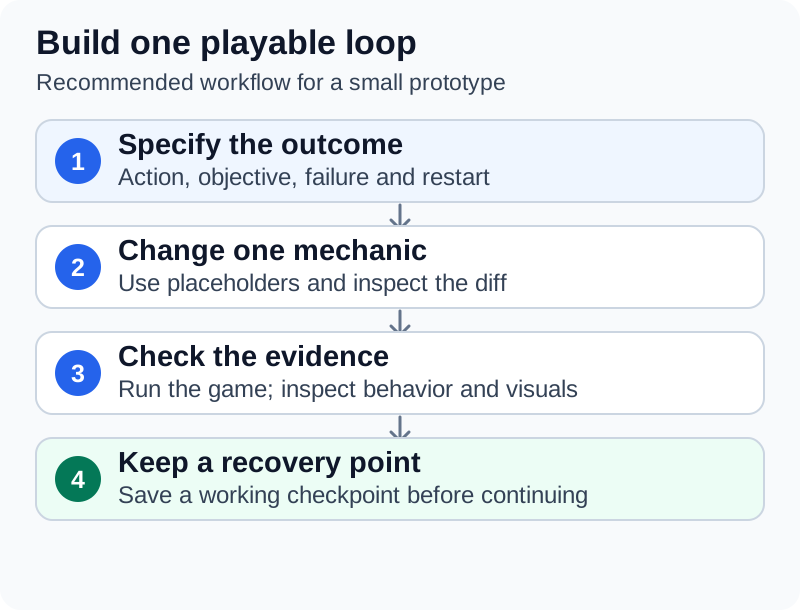
A small change is easier to judge when its expected behavior, evidence and recovery point are explicit. This diagram summarizes the guide's recommended workflow.
Quick start
For a first project, choose one complete interaction, not an entire commercial game. A one-room game in which the player collects objects while avoiding an enemy exercises movement, collision, scoring, failure and restarting. Godot's official first-game tutorial similarly teaches a complete small 2D project, while Phaser's introductory tutorial builds a small platform-and-collection game.[2][3]
| Stage | Ask AI to help with | Keep as the acceptance check |
|---|---|---|
| Define the game | Turn a short concept into explicit rules and exclusions | The player action, objective, failure condition and restart are specified |
| Create a baseline | Explain the engine's starter project and file structure | The unmodified project runs and produces a build |
| Build one mechanic | Implement one bounded change | The mechanic works in the actual game |
| Inspect the result | Explain the diff and suggest edge cases | A person reviews the change and tests the relevant cases |
| Improve presentation | Produce or revise a limited set of assets | Assets remain readable, consistent and technically suitable after import |
| Release a test build | Prepare the build, instructions and disclosure checklist | Another person can start, play, finish and restart the exported build |
Use placeholder shapes until the rules work, so a change in visual style does not become entangled with a broken movement or collision system.
Pick a starting path
The table below pairs common kinds of project with a documented engine bridge and a safe first request. "Bridge" means an MCP server, plugin or command-line tool that lets an agent act inside the engine rather than only editing files. Requirements are those stated by each project as of 30 October 2026.
| Kind of game | Engine or framework | How the agent reaches it | Try first |
|---|---|---|---|
| Small 2D or 3D browser game | Phaser or three.js, static HTML and JavaScript | No bridge required: the agent edits files and the game runs in a browser[53] | A one-sentence brief such as "Build a mobile-friendly three.js game where...", then move to a coding agent once the idea works[53] |
| Scene-based 2D or 3D game | Godot | Godot MCP by Coding-Solo (Node.js 18 or newer): launches the editor, runs the project and captures debug output[34] | Ask the agent to run the unmodified project and report the debug output |
| Unity project | Unity 6.0 or later for Unity's own agent tools | Unity CLI with the Unity Pipeline package, Unity's MCP server in the CLI, and Unity's plugin for Claude Code, Codex and Grok[35][36][37] | Confirm the CLI can see the open Editor, then ask a read-only question about the scene |
| Unity project (community bridges) | Unity 2022.3 or later (Funplay); 2021.3 LTS to 6.x (MCP for Unity) | Funplay MCP for Unity, CoplayDev's MCP for Unity, or Ivan Murzak's Unity-MCP[40][41][42] | "Call get_scene_info and tell me what scene is open." (Funplay's suggested check)[40] |
| Unreal project | Unreal Engine 5.8, where Unreal MCP is Experimental | Epic's Unreal MCP plugin with the All Toolsets plugin[43]; community unreal-mcp for Unreal Engine 5.5 or later[44] | "What actors do I have selected?" (Epic's suggested first question)[43] |
| 3D assets for any engine | Blender | Community MCP for Blender (Blender 3.0 or newer) or Blender Lab's MCP Server (Blender 5.1 or newer)[45][46] | Inspect a simple placeholder model from several angles before generating anything |
Browser games (Phaser or three.js)
Full guide: Developing Browser Games with AI.
A small browser project needs no engine-editor integration. Simon Willison wrote in October 2026 that all of his games so far had been "HTML and JavaScript using static hosting (generally GitHub Pages or Cloudflare Pages)" and that "Frontier models already know libraries like three.js and Phaser". He suggested starting with a one-sentence prompt in an ordinary chat interface and to "Switch to Codex or Claude Code once your project passes the proof-of-concept phase."[53] His RTS Battle Drones used Phaser in its early versions and was later ported to three.js, with 3D models "entirely constructed by Claude in TypeScript code".[52] Pieter Levels built his flight simulator fly.pieter.com with Cursor as a single HTML file, reverting to earlier versions when fixes failed.[54] Both are self-reported accounts, not reproducible schedules.
To start from an official template instead of a blank page, Phaser documents an interactive project generator:[57]
npm create @phaserjs/game@latest
Commit the generated template before the first agent change, then ask for one mechanic at a time. Because the game is a static page, an agent with a browser or screenshot tool can open it and check the result directly; see Let the agent see and play the game.
Engine projects and Blender
A bridge gives the agent editor access; it does not replace independent build and play checks. Connect the agent to the engine gives each documented setup. Note the maturity labels: Unity calls its CLI experimental, Epic warns that in Unreal MCP "many features are incomplete or missing", and the community unreal-mcp project says "Production use is not recommended at this time".[69][43][44] Read the security checks before installing any of them.
Separate development tools from runtime AI
| Use | What is produced | Practical consequence |
|---|---|---|
| Development assistance | Suggested code, explanations, editor operations or test scripts | Review the resulting project; the assistant need not run for players |
| Pre-generated content | Images, meshes, audio, dialogue or other material prepared before release | Review the retained files, their suitability and their permitted uses |
| Runtime generation | Content produced while someone plays | Plan service access, cost, response time, validation and failure behavior |
| Conventional game AI | Authored decision rules, navigation or other game systems | This does not automatically require a generative model |
Unreal Engine's Behavior Trees, for example, choose behavior from authored logic and Blackboard values, so an "AI enemy" need not use an LLM.[4] Steam's disclosure guidance likewise separates content prepared before release from live-generated content.[5]
Choose an engine and an assistant
Choose the engine around the platform, the game's requirements and the skills available to maintain it, not around an assistant. Phaser is a web-focused 2D framework for JavaScript or TypeScript;[6] Godot organizes games as scenes composed of nodes;[7] Unity documents an in-editor assistant, generators and support for external agents;[8] Unreal's Blueprints provide node-based gameplay scripting that can extend systems written in C++.[9] Tell the assistant the installed version and the structures it must respect, such as the scene tree or whether a task concerns C++, Blueprint graphs or both.
A chat interface is useful for explanations and for reviewing material pasted into it. A coding agent such as Claude Code, OpenAI Codex or Cursor can edit files and run commands when its harness provides those tools. Instructions supplied to an agent are not the same as tools that control an editor: Unity's official plugin, for example, supplies skills, and its editor-control skills depend on the separately installed Unity CLI.[10][37] Test a candidate assistant on a small task from the actual project, checking whether it can inspect the required files, use documentation for the installed version, run the relevant checks and show what changed.
Set up a project that can be recovered
Create a working baseline before the first generated change. Record the engine version, important packages, target platform and how to run the project. Save a version-control checkpoint, then make changes in a branch or another isolated working copy.
Use the engine's own version-control guidance rather than a generic ignore file. Godot documents different exclusions for older versions and for Godot 4.1 onward, and its project manager can generate Git metadata.[11] The Unity CLI's guided unity vcs setup creates a repository and pushes the first commit.[35] Keep the source assets and configuration needed to reproduce the project; exclude generated caches and credentials.
For an agent with command or editor access, limit permissions to the project and the tasks it needs. Review new dependencies, scripts and editor extensions before executing them. Keep service keys and signing credentials outside prompts and source control. GitHub's documentation warns that generated suggestions can be inaccurate or insecure and calls for review and testing.[12]
Write down project-specific constraints, such as the permitted asset directories, the rendering pipeline and the command that actually builds this project. A written preference still needs a technical control if violating it would matter. Claude Code's permission settings are one such control: deny and ask rules in a settings file block or require confirmation for matching tools, and a single rule such as Bash(git push *) refuses commands that begin with git push, though not a push written another way, such as git -C . push.[49] An illustrative project .claude/settings.json for a game repository, built from the documented rule syntax, might be:
{
  "permissions": {
    "allow": [
      "Bash(npm run *)",
      "Bash(git commit *)"
    ],
    "ask": [
      "mcp__blender__execute_blender_code"
    ],
    "deny": [
      "Bash(git push *)",
      "Read(./.env)",
      "Edit(/ProjectSettings/**)"
    ]
  }
}
The rule names use Claude Code's documented forms (Bash(...), Read(...), Edit(...) and mcp__<server>__<tool>).[49] Here execute_blender_code is the code-execution tool of the community MCP for Blender.[45] Replace ProjectSettings with the folder to protect. The documentation notes that a Bash rule does not match every way of writing a command, so treat such rules as a guard rail, not a sandbox.[49]
Write a project instructions file
Coding agents read a Markdown file of project instructions, but file names and loading rules differ by tool. Claude Code reads CLAUDE.md (or .claude/CLAUDE.md). Reading AGENTS.md directly requires Claude Code v2.1.277 or later, and by default Claude reads it only when no CLAUDE.md, .claude/CLAUDE.md or CLAUDE.local.md exists in the working directory or a directory above it. The Project instructions setting changes that default, and a CLAUDE.md can also import the shared file with an @AGENTS.md line.[27] The AGENTS.md maintainers describe "a simple, open format for guiding coding agents" and list supporting tools that include Codex, Cursor, Gemini CLI and GitHub Copilot's coding agent; check each tool's own discovery rules rather than assuming they match Claude Code's.[48]
Anthropic suggests a target of "under 200 lines per CLAUDE.md file" and instructions "concrete enough to verify", holding only what Claude "couldn't work out from the code itself"; it calls the command that runs the project's checks "the single most useful line" in such a file.[27][13] /init generates a starting file from the codebase.[27] Claude treats the file "as context, not enforced configuration", so hard limits belong in permission rules or hooks.[27][13]
The following is an illustrative template for a small Unity game, not an official format (in a real file the section labels would usually be Markdown headings). Every command in it must be replaced with the ones that actually work in the project:
Game: [working title]

Engine and versions:
- Unity [exact Editor version], render pipeline: [URP/HDRP/Built-in]
- Key packages: Input System [version], TextMeshPro [version]
- Target: Windows desktop, 1920x1080 and 1280x720

How to build and test:
- Compile check: `unity recompile`
- Batch tests (only when no Editor has this project open): `unity test`
  - Exit code 8 means tests failed: fix them before another run.
- Tests in an already open Editor: use the installed Pipeline test
  command after checking that Play Mode is stopped.
- Headless build: `unity build` with the profile in Assets/Settings/Build
- After any gameplay change: enter Play Mode through the MCP bridge,
  take a game-view screenshot and read the console log before reporting.

Folder rules:
- Gameplay code: Assets/Scripts/Gameplay/
- Generated art goes to Assets/Art/_incoming/ until a human approves it.
- Do not edit: ProjectSettings/, Packages/manifest.json, Assets/Plugins/
  (ask first).

Acceptance checks for every task:
- The task's listed checks pass, with the command output in the report.
- No new compiler warnings.
- Existing tests still pass.
- Report files changed and anything that still needs manual play-testing.

Art direction:
- Low-poly, flat-shaded, palette in Assets/Art/palette.png.
- Readable from the gameplay camera (top-down, 12 m height).
- UI: one accent color, no decorative borders; fewer elements, not more.

Working notes:
- Backlog: docs/backlog.md (one task per card; update status when done).
- Design decisions: docs/design.md. Do not change rules without asking.
The three Unity commands are documented but run in different contexts. unity recompile needs a running Editor with the Pipeline package. unity test starts its own batch Editor, so it refuses a project already open in an Editor (exit code 6); for an open Editor, Unity's skill reference says to use the Pipeline's run_tests command, only after editor_status shows that Play Mode is stopped. Exit code 8 means "The tests ran, and one or more failed".[38][70] Keep the backlog and design notes in files the agent can read: the Ashen Crown developer said that structured task descriptions let "work continue across sessions without losing track of which version we are building".[29]
Connect the agent to the engine
What a bridge adds
Without a bridge, an agent edits files and has to guess what the editor will do with them. The Just Farm developer described Funplay MCP with Unity 6 as letting Claude "inspect scenes, change values, take screenshots and play the game, so it can see what it built instead of guessing".[28] The table summarizes each bridge's own documentation; test an installed connection rather than assuming every listed capability works.
| Bridge | Requirements (as documented) | Documented capabilities | Exposure noted by the project |
|---|---|---|---|
| Godot MCP (Coding-Solo, MIT) | Godot, Node.js 18 or newer, an MCP client | Launch the editor, run projects in debug mode, capture debug output, start and stop projects, create scenes, add nodes, load sprites | Simple operations use Godot's CLI; complex ones a bundled GDScript file[34] |
| Unity CLI and Pipeline package (Unity, official; CLI experimental[69]) | Unity 6.0 LTS or later to drive an Editor; CLI on Windows 10 21H1+, macOS 14+, or Linux with glibc 2.34+ | unity command and unity eval drive the Editor directly; unity build, unity test, unity recompile; unity mcp starts an MCP server | The local pipeline server "accepts connections on localhost only"[35][36][38] |
| Funplay MCP for Unity (FunplayAI, MIT) | Unity 2022.3 or later; Editor-only | 185 tools, 40 exposed by default: play mode, simulated keyboard and mouse input, game-view capture and silent MP4 recording, logs, tests, C# execution | "All exposed MCP tools run directly. There is no extra approval toggle"; the code guard "is not a complete sandbox"[40] |
| MCP for Unity (CoplayDev, MIT) | Unity 2021.3 LTS to 6.x, Python 3.10+ through uv | 48 tool entrypoints to create scenes and GameObjects, edit C#, manage assets, run tests, profile and build | Not affiliated with Unity Technologies[41] |
| Unity-MCP (Ivan Murzak) | Unity; its CLI install path signs in to ai-game.dev | Game-view, scene-view and camera screenshots, EditMode and PlayMode test runs; can also run inside a compiled game | Supports local stdio and remote HTTP[42] |
| Unreal MCP (Epic Games) | Unreal Engine 5.8, Experimental; Unreal MCP and All Toolsets plugins | Spawn actors, configure lighting, create material instances, run automation tests; custom tools in Python or C++ | HTTP on 127.0.0.1; "no authentication layer"; "not safe to expose beyond the local machine"[43] |
| unreal-mcp (chongdashu, MIT) | Unreal Engine 5.5+, Python 3.12+ | Actor management, Blueprint classes and node graphs, viewport control | Experimental; native TCP server in a C++ plugin[44] |
| MCP for Blender (ahujasid, MIT) | Blender 3.0+, Python 3.10+, uv | Nine tools, including execute_blender_code, look (viewport, camera, multi-angle, wireframe or rendered views), get_scene_info and generate_3d | Socket server with "no authentication or encryption"; by default "the AI can run any Python code in Blender"[45] |
| Blender Lab MCP Server (Blender Foundation) | Blender 5.1 or newer | Natural-language access to Blender's Python API and documentation, inspection of existing setups | Executes LLM-generated code "without any guards"; recommends a virtual machine[46] |
The commands below are copied from each project's README or documentation as of 30 October 2026; these projects change quickly, so re-check the source if a command fails.
Godot: Godot MCP
Full guide: Developing Godot Games with AI.
The README's quick start for Claude Code is the first command; the second passes the Godot executable's path (and optional debug logging) when the server cannot find it:[34]
claude mcp add godot -- npx @coding-solo/godot-mcp
claude mcp add godot -e GODOT_PATH=/path/to/godot -e DEBUG=true -- npx @coding-solo/godot-mcp
Restart Claude Code after adding it. For Cursor or other MCP clients, the README gives an equivalent mcpServers JSON entry with "command": "npx" and "args": ["@coding-solo/godot-mcp"]. Its project path must be a directory containing project.godot.[34] A good first request is read-only: ask for the Godot version and project information, then ask the agent to run the project and summarize the debug output.
Unity: the official CLI and plugin
Full guide: Developing Unity Games with AI.
-
Install the Unity CLI with Unity's script,
curl -fsSL https://unity.com/install.sh | bashon macOS or Linux orirm https://unity.com/install.ps1 | iexin Windows PowerShell, or with Homebrew (brew install --cask unity-cli) or winget (winget install Unity.CLI). Check it withunity --version.[35] -
Open the project in the Unity Editor, then in a terminal run
unity auth loginandunity pipeline install. Wait for the project to recompile and rununity pipeline list; Unity's documentation says to look for Pipeline: Installed.[39] -
Install Unity's plugin inside a Claude Code session:[37]
/plugin marketplace add Unity-Technologies/unity-agent-plugin
/plugin install unity@unity-agent-plugin
Type
/unity:to see the plugin's skills, and rununity statusto confirm the CLI can reach the Editor.[37] -
For an agent that needs MCP rather than shell commands, run
unity mcp configure <client>(for exampleclaude,cursor,vscodeorwindsurf), andunity mcp configure --listto see supported clients.[36]
Unity says the direct unity command and unity eval commands are "faster and use fewer tokens than MCP" when an agent can run shell commands, and that the CLI "is free and separate from Unity AI".[36] With the plugin installed, "the agent asks questions before making changes rather than assuming", which can block automated pipelines unless prompts carry enough detail; Unity also notes that "For simple uGUI work, the plugin makes little difference".[10][37]
Unity: Funplay MCP for Unity
In Unity, open Window > Package Manager, choose + > Add package from git URL, and enter https://github.com/FunplayAI/funplay-unity-mcp.git (OpenUPM is an alternative: openupm add com.gamebooom.unity.mcp). Start the server from Funplay > MCP Server: each project gets its own port, and the window shows the exact URL. Its one-click configuration writes that URL into supported clients; for Claude Code, the documented general form for an HTTP server also works:[40][47]
claude mcp add --transport http funplay <project-url>
Replace <project-url> with the full URL shown in the window. The Just Farm developer, who wrote of having tested several MCP servers, called Funplay "the best one IMO".[28] CoplayDev's separate MCP for Unity installs from the git URL https://github.com/CoplayDev/unity-mcp.git?path=/MCPForUnity#main and configures clients from Window > MCP for Unity > Configure All Detected Clients; it needs Python 3.10 or newer through uv.[41]
Unreal Engine: Epic's Unreal MCP
Full guide: Developing Unreal Engine Games with AI.
In Edit > Plugins, enable Unreal MCP and All Toolsets, then restart the editor. Turn on Auto Start Server under Edit > Editor Preferences > General > Model Context Protocol, or start the server once from the editor console, then generate a client configuration:[43]
ModelContextProtocol.StartServer
ModelContextProtocol.GenerateClientConfig ClaudeCode
The server binds to http://127.0.0.1:8000/mcp. GenerateClientConfig writes .mcp.json; launch the agent from the directory that holds it (the project root in installed builds, the workspace root in source builds). Epic warns that tool invocations run "on the game thread serially, meaning clients should not issue overlapping Tool calls". If a tool fails to appear, Epic suggests pointing the MCP Inspector (npx @modelcontextprotocol/inspector) at the server, and running ModelContextProtocol.RefreshTools after authoring or changing a toolset.[43] The community unreal-mcp route instead combines a C++ plugin with a Python server run through uv, with --directory pointing to its Python folder.[44]
Blender: MCP for Blender
Full guide to the asset stages: Creating Game Assets with AI.
With uv installed, these documented forms add the server to Claude Code (the first also turns on the project's optional safe mode) and install the add-on:[45][47]
claude mcp add blender --env BLENDER_MCP_SAFE_MODE=1 -- uvx mcp-for-blender
uvx mcp-for-blender install-addon
Then enable Interface: MCP for Blender under Edit > Preferences > Add-ons. The add-on starts its server when Blender opens; if it is not running, press N in the 3D viewport, open the MCP for Blender tab and click Start MCP Server. The README also documents a one-step uvx mcp-for-blender setup, and warns that clients launched from a GUI may fail with spawn uvx ENOENT, in which case the full path to uvx goes in the configuration.[45] Blender Lab's official server installs differently (an add-on plus a separate MCP server, with an .mcpb bundle option); follow its own page.[46] The Blender MCP article explains the two projects.
Check the connection
After adding a server to Claude Code, claude mcp list shows a status for each one, such as "Connected" or "Failed to connect", and /mcp shows the same inside a session. A server committed in a project's .mcp.json stays at "Pending approval" until it is approved in an interactive session.[47] Ask a read-only question (the open scene, the selected actors, the Godot version) before letting the agent change anything.
Security checks before connecting a bridge
An engine bridge is code execution with the editor's privileges. Before installing one:
- Read what it exposes (see the bridge table). Blender Lab warns that its server runs generated code "without any guards in place to protect your data from removal or being sent to a remote location".[46]
- Keep it local. Keep unauthenticated editor services on localhost. The community Blender project advises an SSH tunnel rather than pointing the server at a remote machine directly.[45]
- Use the documented checks. Funplay keeps its code-safety checks on by default and can narrow its tool exposure.[40] Blender's
BLENDER_MCP_SAFE_MODE=1checks every script and blocks reading or writing files directly, running other programs, network access and code that keeps running after the script ends, while ordinary modeling, rendering, saving and import/export still work.[45] Treat these as code checks, not a verified sandbox. - Add agent-side limits. Use
askordenypermission rules for the riskiest tools, and run model-driven Blender sessions in a virtual machine or on a system without access to sensitive information, as Blender Lab recommends.[49][46] - Treat fetched content as untrusted. Claude Code's documentation warns that servers which fetch external content can expose the user to prompt injection.[47]
These risks are not hypothetical. In 2026 several CVE records were published against the community Blender project, including a code-injection report against execute_blender_code (CVE-2026-10688) and a path-traversal flaw in its Poly Haven download tool, fixed in blender-mcp 1.6.5 (CVE-2026-66004); the Blender MCP article lists them all.[67][68] Keep bridges updated and review their release notes.
Work through one complete prototype
The following is an illustrative project specification. The numbers are design choices for this example, not research findings or recommended defaults for every game:
Build a single-player 2D game in one room. The player moves with the selected input controls, collects five objects and wins. Touching the enemy loses. A visible restart control starts a clean run. Use placeholder shapes. Exclude networking, accounts, purchases, procedural levels and generated dialogue.
Build it in separate increments:
- Room and player. The player can move, stop and stay inside the boundary with the supported input device.
- Collectible and score. Add one collectible, then five; each counts once and the displayed score matches.
- Enemy and loss. The collision boundary is right and losing stops the run.
- Win and restart. Restart after both winning and losing resets score, objects, enemy state and timers.
- Presentation. Add a small coherent asset set and feedback, then retest collision and readability.
- Export and external playtest. Someone unfamiliar with the project plays the distribution build without verbal instructions; record where they become confused.
Complete and save each increment before adding the next. If one breaks the game, investigate that change before layering more generated systems over it.
Record a milestone before moving on
For the illustrative collect-and-avoid project, accept one checkpoint at a time:
| Milestone | Check in the running game | Keep with the checkpoint |
|---|---|---|
| Recoverable baseline | Unmodified project opens and its first export launches | Engine and package versions, launch command, source commit and build path |
| Complete greybox loop | Movement, five unique pickups, loss, win and restart follow the brief | Tested input sequence, observed result and remaining defects |
| Integrated presentation | Replaced art and audio remain readable and correctly aligned in play | Approved asset list, import settings and comparison captures |
| Candidate for feedback | Another person can launch, understand and complete the distributed game | Tested package, target device, feedback notes and issue list |
Define the result of simultaneous events, such as a final pickup and a hazard hit, before delegating implementation. When handing work to another agent or a later session, leave a short record: the last accepted commit, current task, files changed, checks run with results (separating passed from not run), known failures and the next bounded step.
A bounded feature prompt
This template expresses a task and its checks; it is not a special command:
Project: [engine and exact version], [target platform].
Task: Add one collectible that increments the existing score once.
Inspect the current implementation before proposing changes.
Keep the existing movement, art and input behavior.
Use the project's existing dependencies and conventions.
Acceptance checks: collection removes the object; score rises once;
restart restores the object and clears the score.
Implement the change, run the available checks, and report the files
changed, the checks performed and anything that still needs manual testing.
Describe visible behavior and constraints rather than asking for an unspecified "polish pass", and supply a screenshot or recording when layout, animation or timing matters. Anthropic's guidance on verification loops describes pairing an explicit expected result with a way to run or inspect it.[14]
For an asset-bearing task, add the material the agent needs to judge the result. The Ashen Crown developer said a unit task "needs a visual reference, dimensions, export requirements, and a way to check the result", and that "Make me an orc leaves too many decisions unresolved".[29] An illustrative brief:
Task: Create the "Watchtower" building for the RTS.
Reference: art/concepts/watchtower_v3.png (approved).
Dimensions: footprint 4 x 4 m, height 9 m; pivot at ground center.
Budget: under 3,000 triangles; one 1024 px texture set.
Export: FBX to Assets/Art/_incoming/watchtower.fbx, Y-up, meters.
Check: render front, side and top views and the gameplay-camera view;
compare silhouette and proportions with the reference; list differences.
Do not import into the main scene until I approve the renders.
Keep creative decisions explicit
For a design task, decide which parts are open for exploration. Ask for alternatives before implementation when the tradeoff is unclear:
Suggest three ways to make collecting objects more satisfying while
keeping the current controls and rules. For each, describe the player
effect and the implementation work. Do not change the project yet.
Choose a proposal, then make it a bounded implementation task, so a request for ideas does not become an unreviewed redesign. For visual work, say what must stay unchanged (composition, readable areas, palette, intentionally empty space). For a change that touches several established rules, ask for research and critique first: Willison's long design prompt for a new Battle Drones map included the instruction "First research and then critique this design. Only build after we have agreed on any modifications".[52]
Open-ended prompts can also work. Willison wrote that Battle Drones became "actually fun to play" after he told Claude Opus 5.5 to "Make it a LOT more fun" in an overnight run, while also admitting to feeling guilty "at how little actual design input" he had contributed.[52] Others keep those calls for themselves: Thariq Shihipar wrote "don't outsource that to AI. Use AI to work with you to bring your vision to life", and the Just Farm developer said "I still made every taste call: how it feels, how it looks, what's fun."[25][28] Decide in advance which decisions a task delegates, and still review the result against the intended audience and rules.
Let the agent see and play the game
An agent that can only edit files cannot observe how its change looks or plays. Give it the evidence a human tester uses: screen captures, a way to provide input, logs and explicit tests. The GameDevBench authors introduced "two simple image and video-based feedback mechanisms" and reported that they consistently improved performance, raising GPT-5.4 from 41.1% to 52.0% in their setup.[58]
Give it eyes, hands and a judge
| Need | Browser game | Godot | Unity | Unreal | Blender |
|---|---|---|---|---|---|
| See the screen | Screenshot through a browser tool; Claude Code's /verify builds and runs an app and looks at the result[13] | --write-movie <file> writes frames, with --quit-after to stop after a number of frames[56] | Funplay capture_game_view and record_game_view; Unity-MCP screenshot-game-view[40][42] | Automation framework screenshot comparisons[20] | MCP for Blender look (multi-angle, wireframe, rendered)[45] |
| Give input | Scripted or bot players in the game code | No input tool in Godot MCP, which runs and stops the project; script input in the game or test code[34] | Funplay simulate_key_press, simulate_mouse_click, simulate_mouse_drag[40] | Automation Driver simulates user input in automation tests, which Unreal MCP can run[20][43] | Not applicable |
| Read logs | Browser console | Godot MCP get_debug_output[34] | Funplay get_console_logs; unity recompile reports compile errors[40][38] | Output Log; LogModelContextProtocol category for the bridge[43] | Keep execution output; a scene summary is a separate inspection |
| Run tests | The project's test runner | --headless --script <script>; --check-only parses a script for errors[56] | unity test for a closed project in batch mode; installed Pipeline tests for an open Editor[38][70][19] | Automation tests, which Unreal MCP exposes as a tool[20][43] | Not applicable |
Recommended loop
- Ask for evidence, not a claim. Anthropic's guidance is to ask for "the command it ran and its output, or the screenshot", because "All tests pass" on its own "tells you very little".[13] Put this requirement in the project instructions file.
- Inspect before and after. Capture the same view before and after a visual change and compare it with the approved reference. For Blender assets, the Ashen Crown developer described the loop as "the agent renders it, compares it with the concept, and revises it".[29]
- Drive the built game, not just the editor. The Just Farm runner "drives the built game to measure handling".[28] A measurement such as distance travelled during a fixed input interval is something an agent can check repeatedly; keep the build, input sequence and result.
- Let the game play itself. Battle Drones gained an "AI vs. AI" mode in its second version so Willison could watch the game "without having to directly control it myself". During the overnight "fun update", he wrote, Claude "ran over a thousand simulated playtest sessions, and used the results to rebalance the existing units"; release notes the agent wrote reported that in 1,200 AI-versus-AI matches, games still undecided after 25 minutes fell from 14% to 0.9%.[52] Keep a bot scenario's seed and rules fixed during a comparison; bot results do not show whether people enjoy the game.
- Keep the simulation deterministic if replays, multiplayer or automated balance tests matter. Willison reported that Claude had to replace
Math.sin()andMath.cos()with custom versions because different browsers "returned very slightly different numbers", which desynchronized replays.[52] Test equivalent runs on each supported platform; a repeatable local run alone does not establish cross-platform determinism. - Play it yourself. The Ashen Crown developer said: "The agents help automate checks and I still have to play and test the game myself."[29] Check clarity, timing and whether the intended interaction is satisfying.
Unattended and overnight runs
The Just Farm developer described the most automated workflow among these accounts: "A runner script takes one card at a time while I'm away (like sleeping), with a hard time and money budget per card. It works in its own branch, builds the game headlessly, runs tests, drives the built game to measure handling, takes screenshots, and only lands the change if everything passes."[28] That is one developer's account, not a published tool. A comparable setup using documented features looks like this:
-
Write cards. One task per file in a backlog folder, each with its acceptance checks, in the format of the asset or feature prompts above.
-
Isolate each card. Create a branch or git worktree per card. Claude Code's
--worktreeoption starts a session in an isolated worktree under.claude/worktrees/.[50] -
Run the agent non-interactively with caps. Claude Code's print mode (
claude -p) accepts--max-budget-usd, which stops the run "once estimated spend on API calls reaches this amount", and--max-turns, which limits agentic turns;--allowedToolslists tools that run without a permission prompt.[50] An illustrative call, using the documented flag forms:claude -p "Implement the task in cards/042.md and run its acceptance checks" --max-budget-usd 5.00 --max-turns 40 --allowedTools "Read" "Edit" "Bash(npm run *)"The budget figure is an example. Anthropic notes that the cap is checked against a client-side estimate that "can differ from your bill" and that "Spend can pass the cap".[50]
-
Gate the merge on the engine's own checks. Build headlessly (
unity build, or Godot's--headless --export-release), run the tests, and treat a test failure as final. Unity's CLI reference says a CI job should retry a failedunity testrun "only exit code 6 or 7", never 8; an exit 6 can also mean the project is open in another Editor, which a retry will not fix.[38][56][70] -
Keep the evidence (screenshots, logs, the agent's report) next to the branch, and review before merging anything that changes game feel, art or rules, even when the checks pass.
Willison ran his large Battle Drones updates overnight in Claude Code's "Ultracode" mode, which he said "burns tokens like there's no tomorrow".[52] Keep a wall-clock stop in the runner as well as the agent's own caps.
Debug with evidence
Give the assistant a reproducible observation rather than only "the game is broken": the engine and package versions and device, the starting state, the exact reproduction steps (for example, start a run, collect one object, lose, then restart), the expected result (score is zero), the actual result (score still shows one), the log, stack trace or capture, and the commit after which the behavior appeared. Ask it to investigate the existing logic, explain the cause and propose the smallest relevant fix. After applying it, repeat the reproduction and an adjacent case, such as restarting after a win, and record what was actually tested: a plausible explanation or a generated test file is not a passed check. If the assistant cannot observe a scene, device or build process, perform that check directly.
Bring generated assets into a production pipeline
Full guide: Creating Game Assets with AI.
An image or mesh that looks convincing in a generator still has to work inside the game. Write the asset brief before generating (purpose, view, style references, technical target, budget) and inspect the imported result in the intended camera, lighting and interface; the full guide covers sprites, meshes, audio and dialogue and gives an example brief, acceptance checks and a handoff record. Import settings matter. Godot's documentation distinguishes disk compression from video-memory use for images, recommends glTF 2.0 for 3D scenes and notes that OBJ lacks skeletal animation support, and documents format-specific tradeoffs for audio.[15][16][17]
A concrete 3D pipeline
The two most detailed public accounts, Just Farm (Unity) and Ashen Crown (Unreal), follow similar stages. The steps below combine them; tool capabilities are each vendor's own description.
| Step | What to do | Tools named in the accounts or documented for this step | Check before moving on |
|---|---|---|---|
| 1. Concept | Generate concept images, pick one, and keep accepted images as references for the next design | Just Farm used Magnific; Ashen Crown's creator describes starting with concept art[28][29] | Silhouette, proportions and materials read correctly at the game's camera distance |
| 2. Model | Turn the chosen concept into a mesh, or have the agent build it in Blender with Python from the reference | Tripo (exports GLB, FBX, OBJ or USD for Unity, Unreal, Godot and others)[63]; Meshy (PBR texturing, auto-rigging, Low Poly Mode)[64]; Hunyuan 3D[60]; TRELLIS.2 (open, 4-billion-parameter image-to-3D model with PBR materials, needs an NVIDIA GPU with at least 24 GB)[61] | Shape matches the reference; triangle count fits the budget |
| 3. Clean up | Split, rescale, fix normals and pivots, simplify meshes and textures | Blender, optionally driven by MCP for Blender; Just Farm used "Blender + MCP, driven by scripts, to clean up, split, rescale and fix those models"[28][45] | Real-world scale, pivot location, clean topology where the mesh deforms |
| 4. Rig and animate | Rig humanoids automatically and apply library animations | Mixamo (automatic character rigging and a library of full-body animations)[62]; Tripo and Meshy also advertise auto-rigging[63][64] | Walk and attack read clearly from the gameplay camera |
| 5. Export and import | Export in the engine's preferred format and import | glTF 2.0 is Godot's recommended format; check the target engine's supported features before exporting[16] | Scale, orientation, materials and movement in the game: "This is where the asset has to prove itself", in the Ashen Crown developer's words[29] |
The Ashen Crown developer also decided what not to model: rocks, ground and trees came from Poly Haven scans, which Claude downloaded and which were then simplified in Blender to fit the game's camera and art direction. The developer judged art "from the camera you play with", noting that at RTS distance "a readable walk and a convincing attack matters more than tiny facial details".[29]
For 2D sprites, an agent can call an image service directly. Willison gave Claude Code for Web an OpenAI API key in an environment variable and told it to use OpenAI's image generation API; he wrote that Claude "can view the images it has generated and iterate on the prompts".[52] Keep such keys out of the repository, and check each file's dimensions, transparency, style and permitted use before import.
Keeping a consistent style
Accept a small reference set before generating a large batch. Keep a reference sheet (approved palette, materials, proportions and example images) and attach it to every asset task; generate related assets in one session from the same references; and review them side by side in the engine, at gameplay distance, before accepting any one. Where you have suitable source art and permission to use it, a style-trained model is another option: Scenario advertises custom model training and an MCP integration for coding agents.[65]
Record provenance and check terms
Record the generator, model where known, date, reference inputs, applicable terms, edits and whether the file is a placeholder or intended for release, and check the rights to inputs as well as outputs. Unity's AI principles, for example, place responsibility for appropriate use and third-party rights on the user; a tool's ownership wording is not proof that every output is cleared for every use.[18]
Licence terms differ sharply between sources:
| Source | Term to check (as of 30 October 2026) |
|---|---|
| Poly Haven | CC0: "You can use our assets for any purpose, including commercial work", and credit is not required[59] |
| Hunyuan 3D 2.0 (Tencent) | The community licence excludes the European Union, the United Kingdom and South Korea from its territory and forbids using the model or its outputs outside it; licensees with more than 1 million monthly active users in the month before the model's release must request a separate licence[60] |
| TRELLIS.2 (Microsoft) | The README says the model and code are MIT-licensed; its nvdiffrast and nvdiffrec dependencies have their own licences[61] |
| Commercial generators (Tripo, Meshy, Scenario, image models) | Read each service's current terms and plan for output ownership, commercial use and training on inputs; they are not summarized here |
Do not assume that access to a fan project's assets, a recognizable character or a generated imitation grants permission to redistribute it. Prefer original material, permitted reference inputs and assets whose intended use can be documented.
Test the build, the experience and the performance
Full guide: Testing and Releasing AI-Assisted Games.
Compile checks, logic tests, engine tests, visual inspection, external playtests, profiling and an exported-build smoke test answer different questions. Unity Test Framework separates Edit Mode and Play Mode tests; Play Mode tests can run in the editor or a standalone player.[19] Unreal Engine documents automation for unit, feature and content-stress testing, along with screenshot comparisons.[20] Give an assistant the test facilities that actually exist in the project, rather than accepting an invented test command.
The engines' command-line tools make these checks scriptable. Unity's unity test runs a project's Edit Mode and Play Mode tests in a batch Editor and writes an NUnit report, unity build builds in batch mode, and unity recompile reports compile errors from a running Editor without a full build. If unity recompile cannot reach an Editor (exit code 7), whether the code compiles is unknown, not successful.[38][70] Godot's documentation gives this headless export example:[56]
godot --headless --export-release "Linux/X11" /var/builds/project
The preset name must match one in export_presets.cfg, and the target directory must exist.[56] Put whichever commands work for the project in its instructions file so the agent runs the same checks a person would.
Play the game after changing movement, animation, collision or input. For performance, capture a representative slow scene before asking for optimization (Godot's profiler reports frame, physics and script timings[21]), change one suspected cause and compare equivalent runs. Test an export early, because distribution builds have their own packaging rules; Godot's export documentation describes presets, templates and which resources are included.[22]
If the game uses a model during play
Treat runtime generation as a separate feature with its own acceptance criteria. Decide what happens when a request is slow, fails, returns unsuitable output or exceeds a budget. Keep game rules and authoritative state in code, and validate model output before it changes inventory, awards items or charges an account. No prompt or moderation setting prevents every failure.
Estimate usage from the actual interaction design. For a hypothetical text service with 1,000 players making 20 requests each, at 800 input tokens and 200 output tokens per request, the workload is 16 million input tokens and 4 million output tokens. If the provider charges p_in and p_out per million tokens, the token-only estimate is 16 * p_in + 4 * p_out. It excludes retries, extra calls, caching, hosting and other services; substitute measured usage and current rates.
Research surveys treat latency, integration and evaluation as separate issues: generating a playable example offline does not establish acceptable response times or reliable state in a live game.[1]
Costs and usage limits
Development cost and runtime cost are separate budgets. Development cost is what the coding agent and asset generators consume while the game is made; runtime cost is what players' sessions consume after release (see the worked example above).
For development, the main choice is between a subscription and pay-per-token API billing. Anthropic's documentation says Claude Code "charges by API token consumption", while Pro and Max subscribers "have usage included in their subscription" and see plan usage bars in /usage; usage credits can extend a subscription past its plan limit. Anthropic also reports that across enterprise deployments "the average cost is around $13 per developer per active day and $150-250 per developer per month", figures for those deployments rather than a game-development budget.[51] Limits and resets vary by provider and plan; see AI usage limits.
Developer accounts give a sense of scale, though none is an audited budget:
| Project | What the developer reported about usage |
|---|---|
| Ashen Crown | "3.5 weeks and 23.1 billion tokens"; the creator said they were happy to use Claude Code on a subscription "and not pay the API prices"[29] |
| Battle Drones | Ultracode "burns tokens like there's no tomorrow"; one version exists because Willison had "only used 75% of my weekly allowance and it was resetting in 45 minutes"[52] |
| Quarter Sun Cove | Willison had Opus 5.5 Ultracode "burn millions of tokens and nearly two days building it"[53] |
| Just Farm | "a hard time and money budget per card" for each unattended task[28] |
Practical controls:
- Cap every unattended run. Use the agent's own budget and turn limits (
--max-budget-usd,--max-turnsin Claude Code print mode) and a wall-clock timeout in the runner script.[50] - Match the model to the task. The Ashen Crown developer used "Claude Code with Opus 5.5 as orchestrator and Sonnet 5.5 for clearly defined features".[29] Treat that as one creator's workflow and compare options on your own project.
- Prefer cheap channels to the engine. Unity says its direct CLI commands use fewer tokens than MCP.[36] Epic's Unreal MCP defaults to a tool-search mode that returns three discovery tools instead of every tool schema, keeping responses small.[43]
- Count asset generation separately. Image and 3D services bill on their own plans or credits.
- Plan hosting. A static browser game can be served from services such as GitHub Pages; Willison estimated that the WebSockets relay he added for Battle Drones multiplayer, on a single Fly.io shared-cpu-1x instance, "should cost me no more than $2.19/month".[53][52] That estimate covers his stated setup, not arbitrary game traffic.
Common mistakes and fixes
Rows marked "general advice" are this guide's recommendations; the others cite the source that describes the problem or the fix.
| Symptom | Likely cause | Fix |
|---|---|---|
| The agent says a feature works, but it does not in play | It edited files without running or seeing the game | Connect an engine bridge or browser tool and require the command output or screenshot in every report[13][58] |
| Interface screens are cluttered | Agents tend to add detail; Shihipar wrote that "one of my frustrations of UI with agents is that it adds too many details"[26] | State what to leave out, give one reference screen, and review one screen at a time (general advice) |
| Assets drift in style | Each asset generated from a fresh prompt | Reuse approved images as references and keep a reference sheet (general advice); a style-trained model is another documented option[65] |
| A one-prompt game looks right but is not fun | Rules and feel were never tested or iterated | Work in bounded increments and play each one; Willison's first Battle Drones version "wasn't any fun to play"[52] |
| Fixes keep regressing earlier work | No checkpoint between attempts | Commit before each task and revert when a fix goes wrong; Levels "had to go back to previous versions" several times[54] |
| The agent forgets decisions between sessions | Plans live only in chat history | Keep a backlog and design file in the repository and reference it from the project instructions file[27][29] |
| Imported models are the wrong size, face the wrong way or are too dense | Generator output is not game-ready | Clean up and rescale in Blender before import; check scale, orientation and materials in-engine[28][29] |
| Replays or multiplayer desynchronize | Non-deterministic math across platforms | Use deterministic simulation code and compare a fixed replay on each platform; Willison's game needed custom trigonometry functions[52] |
| The agent cannot find the MCP server | Agent started from the wrong folder, or a GUI client cannot see uvx or the engine | Launch from the folder holding .mcp.json (Unreal); put the full uvx path in the configuration after spawn uvx ENOENT (Blender); set GODOT_PATH (Godot)[43][45][34] |
| Two editors interfere | Two projects or MCP servers on one port | Use the per-project URL Funplay's window shows; give each extra Blender instance its own port (--port) and run one client per server[40][45] |
| An automated run stalls waiting for an answer | Unity's plugin makes the agent ask clarifying questions | Write prompts with enough detail that no follow-up is needed, as Unity's documentation advises[10] |
| A CI job retries failing tests forever | Test failure treated as a transient error | Retry a failed unity test run only on exit code 6 or 7, never 8, and for exit 6 fix the cause first (for a project already open in an Editor, run the tests through that Editor's Pipeline instead)[38][70] |
| An overnight run uses a week's allowance | No per-task cap | Set a budget and turn limit per task and stop on failure[50][28] |
Prepare for distribution and public feedback
Full guide: Testing and Releasing AI-Assisted Games.
Review the actual release build and store materials, including retained generated art, audio and text, and describe how AI was used accurately. A platform's rules, a community's posting rules and a generator's terms answer different questions.
As checked on 30 October 2026, Steam's Content Survey says: "Efficiency gains through the use of these tools is not the focus of this section. Instead, it is concerned with the use of AI in creating content that ships with your game, and is consumed by players."[5] GameSpot reported the revision on 19 January 2026.[66] The survey distinguishes pre-generated content from live generation; for live generation, developers must also describe the "guardrails" that keep the AI from generating illegal content. Completing the survey does not override Steam's content rules.[5] For how disclosures appear on store pages, see Steam AI disclosure. Just Farm's store page, for example, states that "Generative AI tools were used during development to assist in the production of pre-generated visual and audio content" and that "No generative AI is used during gameplay".[55]
itch.io asks creators to use its AI Disclosure field accurately for generated material. Its quality guidelines specifically state strict enforcement for game asset pages, a narrower category than all games, so a rule for selling assets is not automatically the rule for every finished game.[23] The full guide covers the distributed build, store materials, disclosures, runtime services and release review in more detail.
What the research establishes
A 2025 qualitative synthesis of ten studies by Ternar and colleagues found continued human refinement and pipeline integration to be recurring themes, while efficiency claims were contested; it is not a controlled estimate of how much faster a project will ship.[24] A 2026 exploratory preprint tested GPT-4o on six tasks in one Python/Pygame endless runner: three selected refactorings worked, but only one of three gameplay additions integrated correctly, and the two failures passed unit tests while failing manual gameplay assessment. The authors caution that one project does not establish general model performance.[33] A September 2026 survey by Luo and colleagues argues that capabilities and outputs need validation in their target game context.[1] Together these support keeping compilation, gameplay correctness, asset suitability, performance and player experience as separate checks.
The GameDevBench paper (ICML 2026) evaluates 333 tasks derived from web and video tutorials. In its tested configurations the best agent and method solved 53.8% of tasks, and average success fell from 51.4% on gameplay-oriented tasks to 33.0% on 2D graphics tasks.[58] The authors' separate leaderboard, which adds later evaluations, listed a top pass@1 score of 70.6% (claude-opus-5.5 in Claude Code) as of 30 October 2026.[71] A score applies to its model, harness, feedback and task set; it does not show whether an assistant will finish a different game. The practical measure is an assistant's contribution to a reviewed, working project, so keep your own records of time spent implementing, checking and repairing changes.
Developer examples and community resources
These are reported workflows and prototypes, not controlled comparisons or audited budgets.
| Example | What the source supports | Limit of the evidence |
|---|---|---|
| fly.pieter.com (Pieter Levels) | In February 2025 Levels said he had "never ever made a game before" and built the flight simulator "100% with Cursor in I'd say 3 hours", in one HTML file.[54] | A self-reported build time for a small browser game; he also described going back to previous versions to fix problems. |
| Battle Drones (Simon Willison) | A browser RTS built from July to October 2026 over "12 major iterations (and 321 commits by coding agents, mainly Claude Code)", with overnight Ultracode runs and simulated playtests; released under the Apache 2.0 License.[52][53] | Willison calls it "heavily vibe coded" and says he has "reviewed almost none of the code"; the balance metrics come from release notes the agent wrote. See vibe coding. |
| Thariq Shihipar's fighting-game prototype | In September 2026 Shihipar said the part he most wanted to iterate on was "the 'feel' of the characters"; on 29 October he posted a "vibe UI" exploration made with Claude and GPT images.[25][26] | He called the work "prototype quality"; no completed game or measured time savings. |
| Just Farm (Dasi Games) | The developer, posting on Reddit as u/SirKnighty, reported using Claude Code, Unity 6 with Funplay MCP, Magnific, Tripo and Blender, together with a backlog of cards, budgeted overnight runs, headless builds and tests.[28] The game's Steam page, from Dasi Games, lists a "coming soon" date of November 2026 and carries a pre-generated AI content disclosure.[55] | This is a developer's account. The post's claim about moderation does not establish why moderators removed material or a policy shared by game-development communities. |
| Ashen Crown | An October 2026 showcase by Coding Crash Courses describes an unofficial fan RTS in Unreal Engine 5 and C++, built with coding agents and a concept-art, Blender-script, render-and-revise workflow.[29] | An independent fan project, not an official Warcraft sequel; its production metrics are not independently audited. |
For sharing work and asking workflow questions, r/aigamedev and r/TopologyAI are relevant communities. Read their current rules and explain what was made, how and what feedback is needed; they are discussion venues, not authorities on technical correctness or distribution rights.[30][31]
Continue reading
- AI game developmentThis article is an overview. For a step-by-step guide to making a game with AI tools, from setup and prompts to testing and release, see Developing Games with AI.Linked in the introduction
- Claude CodeClaude Code is an agentic software development product made by Anthropic. It uses models from the Claude family to inspect software projects, propose and apply changes, run development tools, and report…Mentioned 27 times above
- Blender MCPBlender MCP refers to software that connects large language model clients and AI agents to Blender, the free and open-source 3D creation suite, through the Model Context Protocol (MCP).Mentioned 3 times above
- Creating Game Assets with AICreating game assets with AI is a production workflow in which generated images, meshes, sound or text are reviewed, edited and imported into a game.Mentioned 3 times above
- Testing and Releasing AI-Assisted GamesTesting and releasing AI-assisted games means checking the project and the distributed build against written requirements, then preparing an accurate release.Mentioned 3 times above
- Developing Browser Games with AIDeveloping browser games with AI combines ordinary web game development with an assistant that helps plan, edit and check the project.Mentioned twice above


More to read
- Developing Godot Games with AI
- Developing Unity Games with AI
- Developing Unreal Engine Games with AI
- Vibe coding
- Steam AI disclosure
- Coding agent
Topics:AI in GamingDeveloper ToolsGenerative AISoftware Development
References
- ^1 ^2Luo, Meng, et al. AI for Games in the Foundation Model Era. arXiv preprint, 15 September 2026.
- ^Godot Engine. Your first 2D game. Stable documentation.
- ^Phaser. Making your first Phaser Game. Official tutorial.
- ^Epic Games. Behavior Trees in Unreal Engine. Unreal Engine documentation.
- ^1 ^2 ^3Valve. Content Survey. Steamworks documentation, Generative Artificial Intelligence Content section. Checked 30 October 2026.
- ^Phaser. What is Phaser?. Official documentation.
- ^Godot Engine. Nodes and Scenes. Stable documentation.
- ^Unity. Unity's AI tools. Official documentation. Checked 30 October 2026.
- ^Epic Games. Introduction to Blueprints. Unreal Engine documentation.
- ^1 ^2 ^3Unity. About Unity's plugin. Official documentation.
- ^Godot Engine. Version control systems. Stable documentation.
- ^GitHub. Application card: GitHub Copilot inline suggestions. Responsible-use documentation.
- ^1 ^2 ^3 ^4 ^5Anthropic. Best practices for Claude Code. Official documentation.
- ^de Oliveira, Delba. Building verification loops in Claude Code with skills. Anthropic.
- ^Godot Engine. Importing images. Stable documentation.
- ^1 ^2Godot Engine. Available 3D formats. Stable documentation.
- ^Godot Engine. Importing audio samples. Stable documentation.
- ^Unity. Unity AI Guiding Principles. Checked 30 October 2026.
- ^1 ^2Unity. Edit Mode vs. Play Mode tests. Unity Test Framework 1.4.6 documentation.
- ^1 ^2 ^3 ^4Epic Games. Automation Test Framework. Unreal Engine documentation.
- ^Godot Engine. The Profiler. Stable documentation.
- ^Godot Engine. Exporting projects. Stable documentation.
- ^itch.io. Content creator quality guidelines. AI disclosure section. Checked 30 October 2026.
- ^Ternar, Alexandru, et al. Generative AI in Game Development: A Qualitative Research Synthesis. arXiv, version 2, 9 December 2025.
- ^1 ^2Thariq Shihipar (@trq212). Thread on prototyping a video game. X, 30 September 2026.
- ^1 ^2Thariq Shihipar (@trq212). Post on "vibe UI" explorations for an elemental fighting game. X, 29 October 2026.
- ^1 ^2 ^3 ^4 ^5Anthropic. How Claude remembers your project. Claude Code documentation (CLAUDE.md and AGENTS.md). Accessed 30 October 2026.
- ^1 ^2 ^3 ^4 ^5 ^6 ^7 ^8 ^9 ^10 ^11u/SirKnighty. My game got removed from gamedev subs for using AI, so here's exactly how I made it. r/accelerate, Reddit, developer account. Checked 30 October 2026.
- ^1 ^2 ^3 ^4 ^5 ^6 ^7 ^8 ^9 ^10 ^11 ^12Coding Crash Courses. Ashen Crown workflow showcase. YouTube, 12 October 2026. Video description and narration (auto-generated captions) identify the unofficial fan project and its reported workflow; creator-reported figures remain unaudited.
- ^Reddit. r/aigamedev. Community description and rules. Checked 30 October 2026.
- ^Reddit. r/TopologyAI. Community description and rules. Checked 30 October 2026.
- ^Gallotta, Roberto, et al. Large Language Models and Games: A Survey and Roadmap. IEEE Transactions on Games, 2024; arXiv version 5, 9 December 2024.
- ^Wunderlich, Jan, Markus Kleffmann and Sebastian Lempert. An Exploratory Case Study of LLM-Assisted Refactoring and Gameplay Feature Generation in an Endless Runner Game. arXiv preprint, 19 June 2026.
- ^1 ^2 ^3 ^4 ^5 ^6 ^7Coding-Solo. Godot MCP. GitHub README, MIT license. Accessed 30 October 2026.
- ^1 ^2 ^3 ^4Unity Technologies. Use the Unity command-line interface (CLI). Unity documentation. Accessed 30 October 2026.
- ^1 ^2 ^3 ^4 ^5Unity Technologies. Unity CLI as the replacement for the in-Editor MCP server. Unity documentation. Accessed 30 October 2026.
- ^1 ^2 ^3 ^4 ^5Unity Technologies. Unity's plugin for Claude Code. Unity documentation. Accessed 30 October 2026.
- ^1 ^2 ^3 ^4 ^5 ^6 ^7Unity Technologies. Unity CLI reference. Unity documentation (commands and exit codes); CLI release 1.0.0-beta.14, 21 October 2026. Accessed 30 October 2026.
- ^Unity Technologies. Unity Pipeline package. Unity documentation. Accessed 30 October 2026.
- ^1 ^2 ^3 ^4 ^5 ^6 ^7 ^8 ^9FunplayAI. Funplay MCP for Unity. GitHub README (version 0.7.3), MIT license. Accessed 30 October 2026.
- ^1 ^2 ^3CoplayDev. MCP for Unity. GitHub README (v10.0.0), MIT license. Accessed 30 October 2026.
- ^1 ^2 ^3Ivan Murzak. Unity-MCP. GitHub README. Accessed 30 October 2026.
- ^1 ^2 ^3 ^4 ^5 ^6 ^7 ^8 ^9 ^10 ^11Epic Games. Unreal MCP in Unreal Editor. Unreal Engine 5.8 documentation (Experimental feature). Accessed 30 October 2026.
- ^1 ^2 ^3 ^4chongdashu. unreal-mcp. GitHub README (experimental), MIT license. Accessed 30 October 2026.
- ^1 ^2 ^3 ^4 ^5 ^6 ^7 ^8 ^9 ^10 ^11ahujasid. MCP for Blender (formerly blender-mcp). GitHub README, MIT license. Accessed 30 October 2026.
- ^1 ^2 ^3 ^4 ^5Blender Lab. MCP Server. blender.org. Accessed 30 October 2026.
- ^1 ^2 ^3 ^4Anthropic. Connect Claude Code to tools via MCP. Claude Code documentation. Accessed 30 October 2026.
- ^AGENTS.md. Project site for the AGENTS.md format. Accessed 30 October 2026.
- ^1 ^2 ^3 ^4Anthropic. Configure permissions. Claude Code documentation. Accessed 30 October 2026.
- ^1 ^2 ^3 ^4 ^5Anthropic. CLI reference. Claude Code documentation. Accessed 30 October 2026.
- ^Anthropic. Manage costs effectively. Claude Code documentation. Accessed 30 October 2026.
- ^1 ^2 ^3 ^4 ^5 ^6 ^7 ^8 ^9 ^10 ^11 ^12Simon Willison. Battle Drones: a vibe coded RTS with audio-based multiplayer. Simon Willison's Weblog, 20 October 2026.
- ^1 ^2 ^3 ^4 ^5 ^6Simon Willison. The October inflection point for vibe game development. Simon Willison's Weblog, 28 October 2026.
- ^1 ^2 ^3Pieter Levels (@levelsio). Post announcing fly.pieter.com. X, 22 February 2025.
- ^1 ^2Dasi Games. Just Farm. Steam store page, including its AI Generated Content Disclosure. Accessed 30 October 2026.
- ^1 ^2 ^3 ^4 ^5Godot Engine. Command line tutorial. Stable documentation. Accessed 30 October 2026.
- ^Phaser. Installing. Official documentation. Accessed 30 October 2026.
- ^1 ^2 ^3Wayne Chi et al. GameDevBench: Evaluating Agentic Capabilities Through Game Development. Proceedings of ICML 2026, PMLR 306:19395-19423; first preprint 11 February 2026.
- ^Poly Haven. License. Accessed 30 October 2026.
- ^1 ^2Tencent Hunyuan. Tencent Hunyuan 3D 2.0 Community License Agreement. GitHub. Accessed 30 October 2026.
- ^1 ^2Microsoft. TRELLIS.2. GitHub README (Native and Compact Structured Latents for 3D Generation), MIT license. Accessed 30 October 2026.
- ^Adobe. Mixamo. Product site. Accessed 30 October 2026.
- ^1 ^2Tripo. Tripo AI 3D model generator. Product page. Accessed 30 October 2026.
- ^1 ^2Meshy. AI 3D Model Generator. Product page. Accessed 30 October 2026.
- ^1 ^2Scenario. Scenario: AI for creative production and game assets. Archived product page, 17 October 2026.
- ^Alessandro Barbosa. Valve Updates AI Disclosure Guidelines To Allow For AI-Powered Tools. GameSpot, 19 January 2026.
- ^CVE Program. CVE-2026-10688 record. Published 2 June 2026.
- ^GitHub Advisory Database. BlenderMCP path traversal in download_polyhaven_asset allows arbitrary file writes (CVE-2026-66004, GHSA-4h8q-hh2j-755w). Published 24 July 2026.
- ^1 ^2Unity Technologies. Unity command-line interface (CLI). Official documentation, Experimental status. Accessed 30 October 2026.
- ^1 ^2 ^3 ^4 ^5Unity Technologies. Run, test and build: Unity CLI command reference. Official skills repository. Accessed 30 October 2026.
- ^GameDevBench authors. GameDevBench project and leaderboard. Accessed 30 October 2026.
Improve this article
Add missing citations, update stale details, or write a clearer explanation. Anyone can edit: changes go live when you publish, and every edit is checked by an editor.
6 revisions · v6 · 10,697 words · full history
Fact-checks are independent of edits: a reviewer re-verifies the article against its sources and stamps the date. How we verify
Research and drafting on this wiki are AI-assisted, under named human editorial standards. How AI is used here
Reviewer note: xg28 phase 3 verification of all text new or changed since verified v3 (44 sources, ~190 claims) plus consistency with the six sub-guides; 4 minor verifier fixes + 2 sibling-consistency fixes applied pre-publish
Cite this page: AI Wiki. "Developing Games with AI." aiwiki.ai, updated 30 Oct 2026, fact-checked 30 Oct 2026. CC BY 4.0. https://aiwiki.ai/wiki/developing_games_with_ai