

Creating Game Assets with AI
Creating game assets with AI is a production workflow in which generated images, meshes, sound or text are reviewed, edited and imported into a game. The useful deliverable is an asset that meets the project's visual, technical and usage requirements. A preview in a generator is only one stage of that process. Research on 3D generation distinguishes representations such as meshes, radiance fields and 3D Gaussians; these are different outputs, even when their previews depict the same object.[1]

This guide is part of the Developing Games with AI series. It stays engine-neutral and gives recommended briefs, tool choices, cleanup steps, checks and handoff records for assets prepared before release; engine import steps are in the engine guides. A service that generates content while players are playing needs a separate runtime design, including validation and fallback behavior. The series hub covers that distinction, and Testing and Releasing AI-Assisted Games covers release checks. Tool capabilities, plans and terms are taken from each provider's own pages as of 30 October 2026 and change often. The example budgets below are project choices, not engine limits or industry standards.
Define the asset before choosing a generator
Start with its function. A collectible must be recognizable at the gameplay camera; a menu icon must remain legible at its displayed size; a character must perform the required animations. Decide which properties are fixed before asking a tool to invent a design.
| Brief field | Specify |
|---|---|
| Purpose | The action or information the asset supports |
| View | Camera angle, expected screen size and permitted viewpoints |
| Style | Approved references, palette, proportions, lighting and surface treatment |
| Technical target | Engine version, renderer, platform and required file format |
| Variations | Required directions, states, animation clips or language versions |
| Budget | Measurable limits chosen for this project |
| Inputs | Where each reference came from and whether it may be used |
| Acceptance | Who checks the imported result and what passes |
Keep the style guide small enough to use during every task. Include an approved asset beside a rejected example and explain the difference. Preserve reference files and version identifiers, rather than relying on an image link that may change. Ask for a few candidates, compare them together, and revise the brief when every candidate misses the same requirement.
Generation is optional at each stage. A modeled primitive, an authored sprite or an appropriately licensed library asset may solve the task with less cleanup. For example, Poly Haven states that its downloadable HDRIs, textures and models use CC0. That policy does not extend to all website material: its license page separately identifies logos, example renders and text as protected content.[2]
Choose a source for each asset
The tables below list sources in common use, with the outputs and terms each provider documents as of 30 October 2026. They are a starting point for a check, not a legal summary. Plans and terms change, so keep a dated copy of the version relied on with the asset's provenance record (see below).
Libraries that need no generation
| Source | What it provides | Documented terms |
|---|---|---|
| Poly Haven | HDRIs, textures and models | CC0: use for any purpose including commercial work, no credit required, redistribution allowed. Logos, example renders and site text are not CC0[2] |
| Kenney | Game asset packs | Assets on the asset pages are public domain (CC0) and may be used in commercial projects; attribution is not required; the Kenney logo is reserved for the studio's own projects[17] |
| Mixamo (Adobe) | Rigged characters, an automatic rigger and an animation library | Free with an Adobe ID and no Creative Cloud subscription; characters and animations are royalty free for personal, commercial and non-profit projects, including video games. The auto-rigger and animation libraries are for bipedal humanoids only, and Mixamo is not available for Enterprise and Federated IDs[18] |
A library asset still goes through the same import and acceptance checks as a generated one. The Ashen Crown workflow described below used Poly Haven scans this way.
3D generators
| Tool | Documented input and output | Terms to check (as of 30 October 2026) |
|---|---|---|
| Tripo | Text or image to a textured model; exports GLB, FBX, OBJ or USD; also lists AI Remesh to quad topology, Smart Segmentation and rigging[19] | Free plan: "Public Models · Non-Commercial Use"; Pro and higher plans: "Private Models · Commercial Use".[20] The terms of service (last updated 11 July 2025) say Tripo retains all rights in the inputs and outputs of free users[21] |
| Meshy | Exports FBX, GLB, OBJ and USDZ; generates a PBR set (albedo, normal, metallic and roughness); auto-rigging for humanoid and quadruped characters with more than 600 motion presets; a Low Poly Mode with a user-controlled polygon count[22] | Free plan: a CC BY 4.0 licence, with credit to Meshy requested. Paid plans: private ownership, provided the assets are not published to the Meshy Community and the inputs do not infringe others' copyrights[15] |
| Hyper3D Rodin (Gen-2.5; see Rodin Gen-2) | Image or text to 3D. The FAQ lists STL, FBX, OBJ, GLB, GLTF and USDZ export; the Creator plan lists Smart Low-Poly and "Baked normals from high-poly"[23][24] | The FAQ says Hyper3D "can support commercial workflows depending on your plan and license"; read the plan page before relying on it[23][24] |
| Hunyuan 3D 2.1 (Tencent, open weights) | Hunyuan3D-Shape-v2-1 (3.3 billion parameters, image to shape) and Hunyuan3D-Paint-v2-1 (2 billion parameters, PBR texture generation)[25] | The 2.0 and 2.1 community licences do not apply in the European Union, the United Kingdom or South Korea and forbid using the model or its output outside that territory. A licensee whose products had more than 1 million monthly active users in the month before the version's release date must request a separate licence[26][27] |
| TRELLIS.2-4B (Microsoft) | Image to 3D, with a PBR-ready GLB export. The code is tested only on Linux and needs an NVIDIA GPU with at least 24 GB of memory[28] | The README releases the model and code under the MIT licence and notes that the nvdiffrast and nvdiffrec dependencies have their own licences[28] |
| TripoSR (VAST and Stability AI) | Reconstruction from a single image; vertex colours by default, with --bake-texture to output a texture instead; about 6 GB of VRAM with default options[3] | MIT licence, covering the source code and pretrained models[3] |
Expect to reduce what a generator returns. The TRELLIS.2 README's own export example passes a decimation target of 1,000,000 and a texture size of 4,096 to its GLB exporter, and notes that the exported file's alpha channel is not active until it is connected to the material's opacity input in a 3D application.[28] A collectible prop with the example budget used later in this guide needs a much smaller result. Vendor phrases such as "game-ready" are claims to test, not acceptance criteria.
Generators can also be called from Blender. The generate_3d tool in MCP for Blender generates and imports a model with Tripo, Hunyuan3D, Hyper3D Rodin or Meshy, either through the project's Premium service, which needs no API keys, or with the user's own keys. The README notes that a Meshy key needs a paid Meshy plan, and that on the user's own key Meshy will generate a character in an A-pose or T-pose on request.[29] See Blender MCP for the integrations and their security history.
2D image generators
| Tool | Documented capability relevant to game art | Terms and notes |
|---|---|---|
GPT Image 2.5 (OpenAI API models gpt-image-2.5-flare and gpt-image-2.5-sunburst) | Transparent backgrounds with background: "transparent" and PNG or WebP output; custom sizes whose width and height are multiples of 16, up to 3,840 pixels on an edge; an edits endpoint that accepts several reference images[30] | OpenAI's documentation warns that the models "may occasionally struggle to maintain visual consistency for recurring characters or brand elements across multiple generations".[30] Its Services Agreement for business customers says the customer owns all Output[31] |
| Nano Banana family (Google Gemini API image models; see Nano Banana) | Up to 14 reference images. Nano Banana 2.1 and Gemini 3.1 Flash Image accept up to 4 character images to maintain character consistency; Gemini 3 Pro Image (Nano Banana Pro) accepts up to 5 character images and up to 3 style references[32] | Every generated image carries a SynthID watermark.[32] The Gemini API terms say Google will not claim ownership of generated content and may generate the same or similar content for others[33] |
| FLUX.2 (Black Forest Labs, open weights) | Text-to-image and image editing; FLUX.2 [klein] 4B is described as running on consumer GPUs[34] | FLUX.2 [dev] weights use the FLUX Non-Commercial License, and its model card says generated outputs can be used for personal, scientific and commercial purposes as described in that licence.[35] FLUX.2 [klein] 4B is Apache 2.0[34] |
| Scenario | Image, video, 3D and audio generation in one workspace; training a model on a studio's own art; Scenario MCP for Claude Code, Codex or Cursor[36] | Read the plan terms for training data and output use |
| Magnific | Used in the Just Farm workflow for concept art, textures and material maps[37] | Its Terms of Use say AI-generated content is governed by separate AI Products Terms and Conditions[38] |
Audio generators
| Tool | Documented capability | Terms to check (as of 30 October 2026) |
|---|---|---|
| ElevenLabs Sound Effects | Text-to-sound API with a loop option, duration_seconds from 0.5 to 30, and prompt_influence (default 0.3)[39] | The free plan is listed as "Personal use only"; paid plans as commercial.[40] Output may be used in games only combined with other material, not sold or distributed as standalone sounds or sample libraries[16] |
| Suno | Music generation | Free or Basic tier: personal, non-commercial use only. Pro and Premier: Suno assigns its rights in the output to the user, but commercial use requires a permitted download, and Suno makes no warranty that copyright will vest in any output (terms effective 3 September 2026)[41] |
| Udio | Music generation | The terms (last revised 12 November 2025) say users may not download outputs and may not exploit the services or outputs for any commercial purpose[42] |
Keep source files and accepted files separate
Use a staging folder for unreviewed output. Preserve the original generation, an editable working file and the game export as separate versions. Record which source produced which export. Do not overwrite the only accepted asset while experimenting with another prompt.
A useful task for an assistant is a bounded transformation: prepare named files, report their properties and produce a proposed diff or export. Require review before deleting source geometry, flattening layers, applying a destructive operation or replacing every instance in a project.
Check what the chosen tool actually returns. TripoSR's official repository, for example, documents reconstruction from a single image and an optional texture-baking switch.[3] That describes an output route, not proof that the resulting object has the rig, collision, animation or style required by a particular game. Current commercial Tripo features are a separate product topic; do not assume every TripoSR command or license describes the hosted service.
Prepare 2D sprites, icons and animations
For a sprite, specify the canvas dimensions, subject bounds, facing direction, ground contact, transparency and intended display size. Use a temporary background when checking edges, then inspect the alpha channel and the result over light and dark game backgrounds. A checkerboard drawn into an image is not transparency.
Choose an engine-supported format and import configuration. Godot's image documentation, for example, notes that JPEG lacks transparency and that WebP supports it. It also distinguishes storage compression from video-memory use: reducing the downloaded file size alone does not establish a smaller runtime texture.[4]
For a sprite sheet, write down the frame dimensions, grid, ordering, pivot and timing. Inspect every frame before slicing. Check that the character's size, equipment, viewpoint and contact point stay consistent, then play the sequence at the intended speed. Review its first-to-last transition if it loops. Treat any automatic slicing as a result to inspect, not as validation of the poses.
Unity's Sprite import settings provide Single and Multiple modes, pixels per unit and pivot-related controls; Multiple mode allows an image to be divided into separate sprite sub-assets.[5] Supply those settings in the handoff record. The same pixel image can behave differently when its world scale or pivot differs from the rest of the project.
For UI, keep editable text separate from decorative art where practical. Review icons at the actual size and beside their labels, not only enlarged in an image viewer. Test disabled, focused and selected states together. Request alternate states using the same accepted reference instead of independently redesigning each button.
For tiling textures, inspect a repeated grid, then put the texture on its intended surface. Check the join, apparent scale and visible repetition from the gameplay camera. A request for a tileable texture defines a requirement; inspect whether the output meets it.
Worked example: a transparent item icon
This example requests one candidate inventory icon from the OpenAI Images API. The request fields come from OpenAI's image generation guide: background: "transparent" needs output_format set to "png" or "webp", and the quality settings for the 2.5 models are low, medium, high, xhigh, max and auto.[30] The prompt and file name are illustrative. Keep the API key in an environment variable, outside the repository.
curl -X POST "https://api.openai.com/v1/images/generations" \
  -H "Authorization: Bearer $OPENAI_API_KEY" \
  -H "Content-type: application/json" \
  -d '{
    "model": "gpt-image-2.5-flare",
    "prompt": "Inventory icon of a small red health potion in a round glass flask with a cork. Centered, three-quarter view, thick dark outline, flat cel shading, palette of deep red, pale cream and dark brown. No text, no background, no drop shadow.",
    "size": "1024x1024",
    "quality": "medium",
    "background": "transparent",
    "output_format": "png"
  }' | jq -r '.data[0].b64_json' | base64 --decode > staging/icon_potion_red_c01.png
The guide recommends quality: "low" for quick drafts and comparing higher settings for final assets.[30] To match an approved set, send the accepted icons as reference images to the edits endpoint (/v1/images/edits, which accepts several image[] files) and describe what must stay the same.[30] Then check the result as described above: the alpha edge over light and dark backgrounds, the silhouette at the real display size, and whether it reads beside the existing icons. Downscale it in an image editor or the engine's import settings, and keep the 1024-pixel original in the source folder.
A reusable prompt template for a set of items, for a tool or endpoint that accepts reference images:
[Asset type] of [object], [one distinguishing feature].
View: [camera angle], centered, [margin] empty space around the object.
Style: match the attached reference images: [outline], [shading], [palette].
Keep identical to the references: line weight, light direction (upper left), saturation.
Exclude: text, logos, background, cast shadow, extra objects.
Pixel art
A generated image in a pixel-art style is not necessarily drawn on a consistent pixel grid. Check it at the intended canvas size, and correct or redraw stray pixels before slicing. Then make sure the engine does not blur it:
- Use nearest-neighbour filtering. Godot's
TEXTURE_FILTER_NEAREST"reads from the nearest pixel only", and since Godot 4.0 the filter is set on the CanvasItem in 2D, with a project setting as the default.[43][4] Unity's equivalent texture setting is Filter Mode Point (no filter).[5] - Avoid lossy GPU compression. Godot recommends Lossless compression for pixel art and says that even in 3D, pixel-art textures should have VRAM compression disabled.[4]
- Scale by whole numbers. Godot's multiple-resolution guide recommends the
integerstretch scale mode for pixel art, because fractional scaling gives uneven pixel sizes.[44]
Engine-specific import steps are in the engine guides linked from the series hub.
Turn a 3D candidate into an engine asset
Inspect the object from every view the game permits. Compare its silhouette and important parts with the accepted concept. Decide which components must move independently, such as a door, wheel or lid, before simplifying or merging geometry.
Clean geometry and choose topology for its use
Separate unwanted geometry, inspect normals and test the silhouette after reducing detail. Measure the geometry that will actually be exported, including relevant modifiers, rather than trusting only an assistant's summary of the editable mesh.
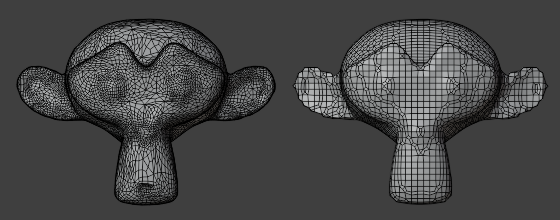
Remeshing reorganizes geometry; suitability for deformation still needs testing. Image: Blender Documentation Team, manual illustration, CC BY-SA 4.0. Unmodified.
Blender's Decimate modifier reduces vertex and face counts; it is one tool for simplifying dense geometry.[6] Remeshing is a different operation. Blender's documentation specifically warns that voxel remeshing does not produce the geometry flow needed for a deforming character and describes manual retopology for that purpose.[7] A lower count therefore is not sufficient evidence that a mesh is ready for skeletal animation.
Use the project's required deformation tests when deciding whether topology is acceptable. A rigid crate and a bending elbow have different needs. Preserve a source version before changing topology, and recheck the UVs, materials and animation after a geometry change.
A cleanup pass in Blender
Blender has an operation for each of the common cleanup steps. The operations below are taken from the Blender 5.2 manual; run them on a copy of the imported candidate, and look at the result after each one.
| Step | Where in Blender | What it does, per the manual |
|---|---|---|
| Merge duplicate vertices | Edit Mode: Mesh > Clean Up > Merge by Distance | Merges selected vertices closer than the Merge Distance; the Sharp Edges option keeps sharp edges sharp on smooth-shaded meshes with custom normals[45] |
| Remove stray geometry and holes | Mesh > Clean Up > Delete Loose and Fill Holes | Deletes unconnected vertices and edges; fills holes up to a chosen number of sides[45] |
| Fix face orientation | Mesh > Normals > Recalculate Outside (Shift-N) | Flips faces where needed so they all point outward; the Face Orientation overlay shows faces pointing the wrong way[46] |
| Reduce the face count | Decimate modifier, Collapse mode, or Mesh > Clean Up > Decimate Geometry | Collapse merges vertices "taking the shape of the mesh into account"; Ratio is the share of faces kept, calculated on triangles[6][45] |
| Rebuild messy topology | Properties > Data > Remesh (Voxel or Quad) | Voxel gives uniform topology without self-intersections but is not for meshes that will deform; Quad uses Quadriflow[7] |
| Freeze scale and rotation | Object Mode: Object > Apply (Ctrl-A) | Resets scale to 1.0 and rotation to zero while keeping the object visually in place[47] |
| Place the pivot | Object > Set Origin | Origin to Geometry, Origin to 3D Cursor and Origin to Center of Mass, among others[48] |
| Lay out UVs | Edit Mode: UV > Unwrap Angle Based (or Unwrap Conformal, Unwrap Minimum Stretch) or UV > Unwrap > Smart UV Project (U) | Unwrap cuts along marked seams and overwrites existing UVs; Smart UV Project cuts along sharp edges and suits mechanical objects; Island Margin sets the gap between islands[49] |
| Bake detail into maps | Cycles, Render > Bake, with Selected to Active | Bakes from a high-poly object onto the active low-poly one; Normal maps default to tangent space, "the right choice in most cases"[50] |
Apply scale before rigging: the manual notes that applying transforms to an armature "does not affect pose locations, animation curves, or constraints" and says "It is recommended to apply transforms before rigging and animation".[47] If a generator painted shadows or highlights into the color texture, rebaking the color map with Cycles' Diffuse bake type and only Color enabled gives the surface color without lighting contributions; the Combined type, by contrast, bakes lighting in.[50]
The same steps can run without the interface. Blender's command line accepts --background, --factory-startup (skip the user's startup file), --python <file>, --python-exit-code <code> (return that code if the script raises an exception) and --, after which arguments are passed unchanged to the script's sys.argv; arguments run in the order given.[51] The script below is illustrative and should be reviewed before use on real assets. Every operator and property in it appears in the Blender Python API reference or the glTF add-on's source.[52][53][54]
"""cleanup_glb.py (illustrative): import a GLB, clean it, decimate, report, export."""
import sys
import bpy

src, dst, ratio = sys.argv[sys.argv.index("--") + 1:][:3]
ratio = float(ratio)

bpy.ops.wm.read_factory_settings(use_empty=True)   # start from an empty scene
bpy.ops.import_scene.gltf(filepath=src)
meshes = [o for o in bpy.context.scene.objects if o.type == 'MESH']

for o in meshes:
    bpy.ops.object.select_all(action='DESELECT')
    o.select_set(True)
    bpy.context.view_layer.objects.active = o
    bpy.ops.object.transform_apply(location=False, rotation=False, scale=True)
    bpy.ops.object.mode_set(mode='EDIT')
    bpy.ops.mesh.select_all(action='SELECT')
    bpy.ops.mesh.remove_doubles(threshold=0.0001)       # Merge by Distance
    bpy.ops.mesh.normals_make_consistent(inside=False)  # Recalculate Outside
    bpy.ops.object.mode_set(mode='OBJECT')
    dec = o.modifiers.new(name="Decimate", type='DECIMATE')
    dec.ratio = ratio                                   # applied on export

depsgraph = bpy.context.evaluated_depsgraph_get()  # count exported triangles
total = 0
for o in meshes:
    ev = o.evaluated_get(depsgraph)
    me = ev.to_mesh()
    me.calc_loop_triangles()
    total += len(me.loop_triangles)
    ev.to_mesh_clear()
print(f"objects={len(meshes)} exported_triangles={total}")

bpy.ops.export_scene.gltf(filepath=dst, export_format='GLB', export_apply=True)
blender --background --factory-startup --python-exit-code 1 \
  --python cleanup_glb.py -- staging/beacon_raw.glb art/export/beacon_01.glb 0.25
The exporter's export_apply option applies modifiers (except armatures) and, per its own description, prevents exporting shape keys; export_yup (on by default) writes the glTF +Y-up convention.[53] Do not run this script on a rigged or shape-keyed character without changing it: decimating and merging vertices on a deforming mesh needs the deformation tests in the rigging section below. A blind ratio also treats every part of a model alike. A face or a hand may need more detail than a back panel, which is what the modifier's Vertex Group option is for.[6]
An assistant can do the same work interactively through MCP for Blender, which lets the model run any Python in a live Blender session and inspect the result from several views, including wireframe.[29] Its README documents an optional safe mode, BLENDER_MCP_SAFE_MODE=1, that checks each script and blocks direct file access, launching programs, network access and code that persists after the script; modelling, materials, rendering, saving and import and export still work.[29] Use it, save the file first, and keep the server current: a path-traversal flaw in its Poly Haven download code (CVE-2026-66004) affected blender-mcp versions before 1.6.5.[55] Setup commands are in the series hub and the Blender MCP article. An illustrative task prompt:
Open art/source/beacon_01.blend. Work only on the object "beacon_raw".
1. Apply scale, merge by distance (0.0001 m), recalculate normals outside.
2. Set the origin to the bottom center of the base; the base must sit at Z = 0.
3. Reduce to at most 2,000 triangles. Keep the light housing's silhouette;
   reduce the base first.
4. Show me front, side, top and wireframe views, and report the exported
   triangle count, dimensions in metres, material count and texture sizes.
Do not delete the original object, do not overwrite any file in art/export/,
and stop and ask before any destructive step you cannot undo.
Check UVs and material channels
Inspect texture placement with a simple test pattern as well as the final artwork. Look for stretching, unexpected overlaps, insufficient detail on visible surfaces and seams that become obvious under the intended lighting. Record which UV sets the export uses.
A painted concept image is not automatically a set of physically based material maps. Match the material convention used by the exporter and engine. In core glTF 2.0 metallic-roughness materials, roughness is sampled from the green channel and metallic from blue, with linear encoding; the normal texture uses tangent-space normals. The specification separately defines base color, occlusion and emissive data.[8] Do not identify maps only by how their thumbnails look or swap their channels without checking the target format.
Import the material and compare it under neutral lighting and the game's lighting. Confirm that transparency, surface roughness and normals behave as intended. Keep these checks distinct from whether the shape matches the concept.
Texture size, packing and compression
Choose texture dimensions with the target platform in mind. The glTF 2.0 specification says clients should resize textures that are not a power of two on platforms with limited support for such dimensions, particularly when the sampler repeats or uses mipmaps.[8] If textures will be shipped as KTX 2.0 with Basis Universal supercompression (the KHR_texture_basisu glTF extension), their width and height must be multiples of 4, and the extension notes that exporters may choose powers of two for maximum compatibility. It also recommends ETC1S for color data and UASTC for non-color data such as normal or roughness-metallic maps.[56]
When packing maps yourself, follow the target format. Blender's glTF exporter expects metallic in the blue channel and roughness in the green channel of one image, and glTF stores ambient occlusion in the red channel, so the three can share an image.[57] Engines also compress textures on import. Godot's VRAM Compressed mode, the default for 3D, usually reduces video memory "by a factor between 4 and 6", while its Basis Universal mode gives smaller files at lower quality than VRAM Compressed.[4] Compare a generated 4,096-pixel texture with a 1,024 or 2,048 version at the gameplay camera before keeping the larger one.
Check scale, pivot and collision
Place the asset beside a known-size object. Rotate and move it using its intended pivot, then instantiate it where the game will use it. Test its interaction boundaries separately from its appearance.
glTF defines +Y as up and metres as its unit for linear distances.[8] Blender's exporter converts to +Y up by default.[53] If a model arrives far too large, too small or lying on its side, check for unapplied transforms and a unit or axis mismatch first. Fix it in the source file (apply scale, set the origin) rather than compensating with a scale value in the engine.
Use collision geometry appropriate to the task. Godot's import documentation distinguishes triangle-mesh and convex collision options and warns that overly complex visual geometry can produce physics glitches or unnecessary cost.[9] A detailed render mesh is not automatically the right collider. Test moving objects and static scenery in their actual roles.
Rig, animate and test the result
If the asset must deform, require a skeleton, skinning and named animation clips in the brief. Inspect joints at the extremes the game uses, check foot contact and attachments, and test transitions between clips. Specify whether movement comes from the animation or the gameplay controller before checking sliding or displacement.
Research is developing animation-aware generation, but output types still matter. The 2026 Rigel3D preprint describes joint generation of mesh geometry and rig structure, including skeletons and skinning weights.[10] Its reported experiments do not establish that an arbitrary generated character will meet another project's animation or engine requirements. Inspect the actual rig and imported clips.
For humanoid characters, Mixamo's automatic rigger is one route. Its FAQ lists requirements for the auto-rigger: a humanoid with distinguishable head, body, arms and legs; no large extra appendages, wings, tails or large hair and clothing; a neutral pose; no other objects in the file; no gaps between parts, such as a floating head; centered at the world origin; and a clean mesh.[18] Ask the generator for a neutral pose and a single connected body, and fix those points in Blender before uploading. Tripo and Meshy also advertise their own rigging.[19][22]
Export, import and compare again
Use a format supported by the target engine and the particular asset features. Godot recommends glTF 2.0 and supports both .gltf and .glb; its documentation lists limitations of OBJ, including the absence of skeletal animation and PBR materials.[11] A successful OBJ export cannot establish that a rig survived.
Run a small import early. Check orientation, scale, materials, names, animation and dependencies before batch conversion. Then change the source once and reimport to establish what is overwritten and what stays project-authored. Engine-specific steps are covered in Developing Godot Games with AI, Developing Unity Games with AI and Developing Unreal Engine Games with AI.
Keep a consistent style across a set
Assets generated one at a time tend to drift apart in style. Several documented features help, but none guarantees consistency:
- Reference images. Gemini's Nano Banana models accept up to 14 reference images, with separate limits for character images and, on Gemini 3 Pro Image, up to 3 style references.[32] OpenAI's edits endpoint accepts several input images.[30] Send the approved assets, not only a text description of them.
- Views of the same character. Google's prompting guide suggests generating a 360-degree view by prompting for each angle in turn and including the previously generated images in each new prompt.[32] Compare the views side by side for changed proportions, equipment or colors before modelling from them.
- A trained model. Where a studio has enough original art and the rights to use it, a model trained on that art can hold a style that prompts cannot. Scenario, for example, offers training on a customer's own art.[36]
- One accepted set before volume. The Ashen Crown developer described establishing materials, proportions and colors in detailed concept images, then using the existing images as references for the next design.[58]
Review the set together in the engine, at gameplay distance and under the game's lighting. A single asset that looks good alone can still clash with its neighbours.
Measure the asset in a representative scene
Profile a scene with the expected number of instances, camera distance and effects. Record texture memory, rendering cost and any relevant loading or physics cost using the project's tools. Choose budgets from those measurements; there is no single triangle limit appropriate to every asset and platform.
Check lower-detail versions visually as well as numerically. Godot, for example, can generate mesh LODs on import, but its documentation notes possible rendering problems, especially for skinned meshes.[12] Compare the transitions and silhouette in the game and measure whether the chosen LOD configuration helps that scene.
Prepare audio, dialogue and localization
For a sound, specify its trigger, duration, variation, loop behavior and place in the mix. Keep a source file suitable for further editing. Listen in the game with overlapping sounds, not only in a generator's preview. Check clipping, clicks, unwanted silence, repetition and whether the effect obscures dialogue or other information.
Use the engine's import settings deliberately. Godot documents different size and decoding tradeoffs for WAV, Ogg Vorbis and MP3, with format-specific loop settings.[13] Confirm the loop boundary after import. Normalizing one file is not a complete mix review.
For generated effects, ask for several short variations of the same event rather than one long file. The ElevenLabs sound-generation endpoint takes the description as text, plus optional duration_seconds (0.5 to 30), loop and prompt_influence, where a higher value follows the prompt more closely and gives less varied results. It returns audio in the requested output_format, which defaults to mp3_44100_128.[39] An illustrative request:
curl -X POST "https://api.elevenlabs.io/v1/sound-generation" \
  -H "xi-api-key: $ELEVENLABS_API_KEY" \
  -H "Content-Type: application/json" \
  -d '{
    "text": "Short bright coin pickup chime, single hit, dry, no reverb tail",
    "duration_seconds": 0.8,
    "prompt_influence": 0.5
  }' --output staging/sfx_coin_pickup_c01.mp3
Run it several times for variants, keep the ones that fit, and convert the accepted files to the format the engine import settings call for. Remember the licence point above: ElevenLabs' terms allow sound effects in a game but not their distribution as a standalone sound library.[16]
For dialogue, define the character, scene, permitted information and branching conditions. Keep stable line identifiers and distinguish text approved for release from draft suggestions. Read lines aloud in sequence and test the state that triggers each one.
For localization, provide context, terminology and placeholders, then obtain review from someone competent in the target language. Test the text in the game. Godot's pseudolocalization can simulate expansion, accented characters and bidirectional layout to expose internationalization problems; it does not judge translation quality.[14] Check font coverage, clipping, reading order, variables and the timing of subtitles against spoken lines.
Two published workflows
Two developer accounts from October 2026 describe complete asset pipelines. Both are first-person descriptions, not independently audited; the series hub summarizes the projects themselves.
Just Farm (Unity). The developer, posting on Reddit as u/SirKnighty, listed "Magnific for concept art, textures and material maps", "Tripo to turn picked concepts into 3D models" and "Blender + MCP, driven by scripts, to clean up, split, rescale and fix those models before they go into the game".[37] The same post describes a runner that takes backlog cards overnight, builds the game headlessly, runs tests and lands a change only if everything passes; the testing guide covers that part.
Ashen Crown (Unreal Engine 5). In a video by Coding Crash Courses, the creator of this unofficial fan real-time strategy game described deciding what not to model: rocks, ground and trees came from Poly Haven scans, which Claude downloaded and which were then simplified in Blender and their textures prepared to fit the game's camera and art direction.[58] For custom units and buildings, the creator started with detailed concept images from OpenAI's image generation model, then had Claude construct the geometry in Blender through Python scripts, render it, compare it with the concept and revise it, with the creator giving specific feedback and adjusting the model by hand. Humanoid characters were rigged and animated through Mixamo. The creator judged results from the RTS camera, where "a readable walk and a convincing attack matters more than tiny facial details", and checked scale, orientation, materials and movement in the game.[58]
Keep a provenance and terms record
Record the source inputs, provider, model where known, date, account or license basis, edits and retained files. For a person's voice or likeness, preserve the applicable permission record. Do not treat a generated appearance or a provider's ownership language as a completed review of third-party material.
Provider conditions vary. As of 30 October 2026, Meshy's ownership guidance distinguishes a CC BY 4.0 license on its free plan from private ownership on paid plans, conditional on lawful inputs and not publishing the assets to its Community.[15] ElevenLabs' October 2026 Sound Effects terms permit use in combined productions, including games, subject to the applicable agreement and commercial-use plan, while restricting standalone distribution of the audio.[16] These examples explain why game use, asset-pack resale and public sharing need separate checks. Read the exact terms applicable to the asset and intended use; this guide does not resolve a project's legal status.
| Record | Keep with the asset |
|---|---|
| Identity | Asset ID, version and source/export filenames |
| Origin | Provider or author, model/version if exposed, generation or acquisition date |
| Inputs | References, uploaded files and permission records |
| Terms | Applicable license or terms URL, dated copy where permitted, plan and required attribution |
| Editing | Material changes, retopology, rigging, cropping, mixing or translation review |
| Validation | Import settings, test scene, build/device and review result |
| Release decision | Approved use, reviewer and unresolved issues |
Copyright in the result is a separate question from a tool's licence. The US Copyright Office's January 2025 report on copyrightability concluded that copyright does not extend to purely AI-generated material, that "prompts do not alone provide sufficient control" with current generally available technology, and that human authors can claim their own expressive inputs that are perceptible in outputs and their creative selection, arrangement or modification of outputs, analysed case by case.[59] Keeping the edit history in the provenance record documents that human contribution. The Copyright and AI article covers the law in more detail.
Distribution platforms ask about the same records. Steam's Content Survey asks about AI-generated content that ships with the game and is consumed by players, such as artwork, sound, narrative and localization; it states that efficiency gains from AI-powered development tools are not its focus, and it separates "Pre-Generated" content made during development from "Live-Generated" content made while the game runs.[60] A provenance record makes those answers straightforward. See Steam AI disclosure for the policy and its history.
Some tools carry part of the record inside the file: MCP for Blender writes Poly Haven IDs, authors and licence onto imports as custom properties,[29] and Blender's glTF exporter can export custom properties as glTF extras.[53] Embedded metadata supplements the record; it does not replace a dated copy of the terms.
Example brief and handoff
The following is an illustrative brief for a static beacon in a small top-down game. It describes work to request, not an asset that has already been generated or approved.
Asset ID: beacon_01
Role: a collectible beacon, readable above the ground from the gameplay camera.
Style: match the attached approved palette and reference sheet.
Shape: one solid base and a clearly distinct light at its top.
No logos, readable lettering, characters or animation.

Target: the project's recorded engine version and renderer.
Height: 1.2 metres in the project's agreed scale.
Pivot: ground centre.
Budget: at most 2,000 exported triangles, one material,
        textures no larger than 512 x 512 pixels.
Delivery: editable source, GLB export, textures if separate,
          provenance record and screenshots in the test scene.

Report measured values and any deviations.
Do not mark the asset approved or replace the current collectible.
These limits are deliberately chosen for this example. Replace them with the real project's measured needs.
| Acceptance check | Evidence to request |
|---|---|
| Recognizable as a collectible | View at the gameplay camera beside existing props |
| Matches the approved style | Side-by-side comparison using the same scene lighting |
| Correct scale and pivot | Import measurements and a rotation/placement check |
| Fits the example budget | Exported triangle, material and texture counts |
| Collision suits collection | A successful approach and collection in the game |
| Survives handoff | Fresh import with all dependencies and provenance present |
A handoff manifest can make missing evidence visible. This YAML is a proposed team format, not an engine-readable configuration. Nulls and pending states mean measurements or approvals have not happened.
asset_id: beacon_01
status: candidate
source_file: art/source/beacon_01.blend
export_file: art/export/beacon_01.glb
export_sha256: null
budget:
  max_triangles: 2000
  max_materials: 1
  max_texture_size: [512, 512]
observed:
  exported_triangles: null
  material_count: null
  texture_sizes: null
provenance_record: art/records/beacon_01.md
checks:
  fresh_import: pending
  gameplay_camera: pending
  collision: pending
  representative_scene_performance: pending
  terms_review: pending
approved_by: null
Keep the accepted version, its manifest and its source together. When an asset changes, repeat the checks affected by that change and retain the earlier release record.
Common problems and fixes
| Problem | Likely cause | Fix |
|---|---|---|
| Far more triangles than the budget allows | The generator's default resolution | Use the generator's low-poly option where it has one, then the Decimate modifier or Decimate Geometry; measure the exported count, not the editable mesh[22][6][45] |
| Cracks along edges, stray fragments, small holes | Duplicate vertices; loose geometry | Merge by Distance with a small distance, Delete Loose, Fill Holes; recheck shading afterwards[45] |
| Black or invisible faces | Faces pointing inward | Face Orientation overlay, then Recalculate Outside (Shift-N)[46] |
| Character deforms badly at elbows and knees | Voxel remesh or decimation on a deforming mesh | Retopologize manually for deformation; voxel remesh is not for animated characters[7] |
| Model far too large or small, or lying on its side | Unapplied scale or rotation; unit or up-axis mismatch | Apply scale and rotation (Ctrl-A) in the source; export with +Y up; glTF units are metres[47][8][53] |
| Object rotates around a distant point | Origin not at the intended pivot | Set Origin, for example to the 3D cursor placed at the base[48] |
| Shadows or highlights painted into the color map | Lighting baked into the albedo by the generator | Rebake color with the Diffuse type and only Color enabled, or repaint; check under neutral and game lighting[50] |
| Metal looks like plastic, or roughness is inverted | Channels packed in the wrong order or color space | glTF reads roughness from G and metallic from B, linear; base color is sRGB[8] |
| Dark fringe around a transparent sprite | Color under transparent pixels blends in with filtering | Godot's Fix Alpha Border (on by default) or Premult Alpha; check over light and dark backgrounds[4] |
| Pixel art looks blurred or uneven | Linear filtering, lossy compression or fractional scaling | Nearest or Point filtering, Lossless compression, integer scaling[43][5][4][44] |
| Visible seams on a tiling or unwrapped texture | UV islands too close; texture not truly tileable | Increase island margin and repeat the tiling test on the real surface[49] |
| Transparency missing on a generated GLB | Alpha not connected in the exported material | Connect the texture's alpha to the material's alpha input; TRELLIS.2 documents this for its GLB export[28] |
| Auto-rigging fails | Posed, asymmetric or disconnected character; extra objects in the file | Neutral pose, one connected body, centered at the origin, nothing else in the file[18] |
| A set of assets drifts in style | Each asset prompted separately from text | Send approved assets as reference images; generate related assets together; consider a trained model[32][30][36] |
Continue reading
- Blender MCPBlender MCP refers to software that connects large language model clients and AI agents to Blender, the free and open-source 3D creation suite, through the Model Context Protocol (MCP).Mentioned 3 times above
- Developing Games with AI(series hub)Listed in See also
- Developing Godot Games with AIDeveloping Godot games with AI means using an assistant to help design, edit and check a Godot project while retaining the engine's scenes, scripts and resources as the working game.Listed in See also
- Developing Unity Games with AIDeveloping Unity games with AI combines assistance with C# and project files with work in Unity's scenes, assets and Editor.Listed in See also
- Developing Unreal Engine Games with AIDeveloping Unreal Engine games with AI means using assistants to help with source code, Blueprint work, editor operations or asset production while validating the result in the actual project.Listed in See also
- Testing and Releasing AI-Assisted GamesTesting and releasing AI-assisted games means checking the project and the distributed build against written requirements, then preparing an accurate release.Listed in See also

More from See also
More to read
Topics:AI in GamingDeveloper ToolsGenerative AISoftware Development
References
- ^Jianfeng Xiang et al. Structured 3D Latents for Scalable and Versatile 3D Generation. arXiv:2412.01506, first submitted 2 December 2024, revised 30 May 2025.
- ^1 ^2Poly Haven. Asset License. Asset license and website terms, accessed 30 October 2026.
- ^1 ^2 ^3VAST-AI-Research. TripoSR. Official repository README, accessed 30 October 2026.
- ^1 ^2 ^3 ^4 ^5 ^6Godot Engine. Importing images. Official documentation, accessed 30 October 2026.
- ^1 ^2 ^3Unity Technologies. Sprite (2D and UI) texture Import Settings window reference. Unity 6.0 manual, accessed 30 October 2026.
- ^1 ^2 ^3 ^4Blender Foundation. Decimate Modifier. Official manual, accessed in a rendering browser, 30 October 2026.
- ^1 ^2 ^3Blender Foundation. Remeshing, including the distinction between voxel remeshing and deformation topology. Official manual, accessed in a rendering browser, 30 October 2026.
- ^1 ^2 ^3 ^4 ^5Khronos Group. glTF 2.0 Specification, materials and texture encoding. Accessed 30 October 2026.
- ^Godot Engine. Node type customization using name suffixes, collision generation. Official documentation, accessed 30 October 2026.
- ^Nikitas Chatzis, Marios Loizou and Evangelos Kalogerakis. Rigel3D: Rig-aware Latents for Animation-Ready 3D Asset Generation. arXiv:2605.13129, preprint, 13 May 2026.
- ^Godot Engine. Available 3D formats. Official documentation, accessed 30 October 2026.
- ^Godot Engine. Mesh level of detail (LOD). Official documentation, accessed 30 October 2026.
- ^Godot Engine. Importing audio samples. Official documentation, accessed 30 October 2026.
- ^Godot Engine. Pseudolocalization. Official documentation, accessed 30 October 2026.
- ^1 ^2Meshy. What Is the Ownership of the Generated Models. Help Center, 27 August 2026, accessed 30 October 2026.
- ^1 ^2 ^3ElevenLabs. ElevenCreative Terms, Exhibit 4: Sound Effects. Updated 9 October 2026, accessed 30 October 2026.
- ^Kenney. Support. Frequently asked questions on asset licensing, accessed 30 October 2026.
- ^1 ^2 ^3Adobe. Mixamo FAQ. Adobe Help Center (page dated 14 September 2021), archived copy of 25 October 2026.
- ^1 ^2Tripo. Tripo AI 3D model generator. Product page and FAQ, accessed 30 October 2026.
- ^Tripo. Pricing. Plan comparison, accessed 30 October 2026.
- ^Tripo. Terms of Service. Last updated 11 July 2025, accessed 30 October 2026.
- ^1 ^2 ^3Meshy. AI 3D Model Generator. Product page, accessed 30 October 2026.
- ^1 ^2Hyper3D. Hyper3D Rodin. Product page and FAQ, accessed 30 October 2026.
- ^1 ^2Hyper3D. Pricing. Plan comparison, accessed 30 October 2026.
- ^Tencent Hunyuan. Hunyuan3D-2.1. GitHub README, accessed 30 October 2026.
- ^Tencent Hunyuan. Tencent Hunyuan 3D 2.0 Community License Agreement. Release date 21 January 2025, accessed 30 October 2026.
- ^Tencent Hunyuan. Tencent Hunyuan 3D 2.1 Community License Agreement. Release date 13 June 2025, accessed 30 October 2026.
- ^1 ^2 ^3 ^4Microsoft. TRELLIS.2. GitHub README (model TRELLIS.2-4B), MIT licence, accessed 30 October 2026.
- ^1 ^2 ^3 ^4ahujasid. MCP for Blender. GitHub README, MIT licence, accessed 30 October 2026.
- ^1 ^2 ^3 ^4 ^5 ^6 ^7OpenAI. Image generation. OpenAI API documentation, accessed 30 October 2026.
- ^OpenAI. OpenAI Services Agreement. Updated 1 December 2025, effective 1 January 2026, accessed 30 October 2026.
- ^1 ^2 ^3 ^4 ^5Google. Nano Banana image generation. Gemini API documentation, accessed 30 October 2026.
- ^Google. Gemini API Additional Terms of Service. Effective 23 March 2026, accessed 30 October 2026.
- ^1 ^2Black Forest Labs. [FLUX.2 [klein] 4B model card](huggingface.co/...FLUX.2-klein-4B). Hugging Face, accessed 30 October 2026.
- ^Black Forest Labs. [FLUX.2 [dev] model card](huggingface.co/...FLUX.2-dev). Hugging Face, accessed 30 October 2026.
- ^1 ^2 ^3Scenario. Scenario home page. Archived copy of 17 October 2026.
- ^1 ^2u/SirKnighty. My game got removed from gamedev subs for using AI, so here's exactly how I made it. r/accelerate, Reddit, October 2026. Developer's first-person account, accessed 30 October 2026.
- ^Magnific. Terms of Use. June 2026, accessed 30 October 2026.
- ^1 ^2ElevenLabs. Create sound effect. API reference, accessed 30 October 2026.
- ^ElevenLabs. AI Sound Effects Generator. Product page with plan comparison, accessed 30 October 2026.
- ^Suno. Terms of Service. Effective 3 September 2026, accessed 30 October 2026.
- ^Uncharted Labs. Udio Terms of Service. Last revised 12 November 2025, accessed 30 October 2026.
- ^1 ^2Godot Engine. CanvasItem, TextureFilter constants. Class reference, accessed 30 October 2026.
- ^1 ^2Godot Engine. Multiple resolutions. Official documentation, accessed 30 October 2026.
- ^1 ^2 ^3 ^4 ^5Blender Foundation. Clean Up (Delete Loose, Decimate Geometry, Merge by Distance, Fill Holes). Blender 5.2 manual, accessed 30 October 2026.
- ^1 ^2Blender Foundation. Editing Normals. Blender 5.2 manual, accessed 30 October 2026.
- ^1 ^2 ^3Blender Foundation. Apply. Blender 5.2 manual, accessed 30 October 2026.
- ^1 ^2Blender Foundation. Object Origin. Blender 5.2 manual, accessed 30 October 2026.
- ^1 ^2Blender Foundation. UV Operators. Blender 5.2 manual, accessed 30 October 2026.
- ^1 ^2 ^3Blender Foundation. Render Baking. Blender 5.2 manual, accessed 30 October 2026.
- ^Blender Foundation. Command Line Arguments. Blender 5.2 LTS manual, accessed 30 October 2026.
- ^Blender Foundation. Blender Python API reference, including bpy.ops.mesh, bpy.ops.object, bpy.ops.import_scene, bpy.ops.wm, bpy.types.Object, bpy.types.Mesh and bpy.types.DecimateModifier. Accessed 30 October 2026.
- ^1 ^2 ^3 ^4 ^5Blender Foundation. Export Scene Operators, `bpy.ops.export_scene.gltf`. Blender Python API reference, accessed 30 October 2026.
- ^Khronos Group. glTF-Blender-IO add-on source, export format options. GitHub, accessed 30 October 2026.
- ^GitHub Advisory Database. BlenderMCP path traversal in download_polyhaven_asset allows arbitrary file writes (CVE-2026-66004, GHSA-4h8q-hh2j-755w). Published 24 July 2026, updated 2 October 2026.
- ^Khronos Group. KHR_texture_basisu. glTF 2.0 extension specification, ratified, accessed 30 October 2026.
- ^Blender Foundation. glTF 2.0 import-export add-on. Blender 5.2 manual, accessed 30 October 2026.
- ^1 ^2 ^3Coding Crash Courses. Ashen Crown workflow showcase. YouTube, 12 October 2026. Video description and narration (auto-generated captions); creator-reported workflow, not independently audited.
- ^US Copyright Office. Copyright and Artificial Intelligence, Part 2: Copyrightability. Report of the Register of Copyrights, January 2025.
- ^Valve. Content Survey. Steamworks documentation, accessed 30 October 2026.
Improve this article
Add missing citations, update stale details, or write a clearer explanation. Anyone can edit: changes go live when you publish, and every edit is checked by an editor.
3 revisions · v3 · 7,903 words · full history
Fact-checks are independent of edits: a reviewer re-verifies the article against its sources and stamps the date. How we verify
Research and drafting on this wiki are AI-assisted, under named human editorial standards. How AI is used here
Reviewer note: xg28 phase 3 independent verification (~72 sources, ~185 claims incl. licence/commercial terms of 17 tools, model names, Blender operators and headless script, ElevenLabs API fields); 4 minor fixes applied pre-publish
Cite this page: AI Wiki. "Creating Game Assets with AI." aiwiki.ai, updated 30 Oct 2026, fact-checked 30 Oct 2026. CC BY 4.0. https://aiwiki.ai/wiki/creating_game_assets_with_ai