

Document AI
Document AI, also called document intelligence, is the area of artificial intelligence concerned with automatically reading, understanding and analyzing documents such as forms, invoices, receipts, reports, contracts and scientific papers.[1] A 2021 survey by researchers at Microsoft Research Asia described it as the automated understanding, classification and extraction of information from webpages, digital-born documents and scanned documents with rich typesetting formats, and placed it at the meeting point of natural language processing and computer vision.[1] Its core tasks include document layout analysis, visual information extraction, document visual question answering and document image classification.[1] The same name is used for Google Cloud's Document AI service, a managed platform that turns unstructured documents into structured data.[2]
The field moved from hand-written layout rules in the early 1990s to statistical machine learning after 2000 and then to deep learning, especially self-supervised pre-training on large collections of unlabeled documents followed by fine-tuning for each task.[1] Models such as LayoutLM combine the text on a page with its two-dimensional position and the page image, while "OCR-free" models such as Donut read the page image directly and generate structured output.[6][13] Work since 2023 has included layout-aware large language models, evaluations of vision language models as document parsers, and parsing tools built to feed retrieval-augmented generation systems.[17][30][31] Commercial services include Google Cloud Document AI, Microsoft's Azure Document Intelligence (formerly Form Recognizer) and Amazon Textract.[1][3][4]
Scope and definitions
Cui, Xu, Lv and Wei's survey "Document AI: Benchmarks, Models and Applications" (arXiv, November 2021) describes Document AI, or Document Intelligence, as a relatively new research topic covering techniques for reading, understanding and analyzing business documents.[1] The survey draws its inputs from four kinds of source: webpages, office files (Word, PowerPoint and Excel), digital PDFs and scanned images.[1] Content extraction tools (HTML or XML extraction, PDF parsers and optical character recognition) first recover the text, layout and visual information, which a pre-trained neural network then uses for downstream tasks.[1]
A central idea in the field is the visually rich document. In the survey's definition, this is text whose meaning depends not only on the words but also on visual elements such as layout, typesetting and the structure of tables and figures; receipts, certificates and insurance files are given as examples.[1] Traditional information extraction works on plain text as a one-dimensional sequence, while document AI has to deal with text arranged in two dimensions, where the position of a word relative to its neighbors (a label to the left of its value, a header above a column) carries meaning.[1]
OCR is closely tied to document AI but is not the whole of it. Most document AI systems take OCR output as their input, and the 2021 survey lists the relationship between OCR and downstream tasks as a research direction because recognition errors carry through to everything that follows.[1] OCR-free approaches, discussed below, were proposed partly to avoid that error propagation.[13]
Tasks
The 2021 survey groups document AI work into four main task types.[1] Later research added page-to-markup conversion and visual document retrieval as distinct problems.[15][30][32]
| Task | What the system does | Example benchmarks |
|---|---|---|
| Document layout analysis | Detects and labels regions such as headings, paragraphs, tables, figures and charts, and their positions[1] | PubLayNet, DocBank, DocLayNet[23][26][27] |
| Table detection and recognition | Finds tables and recovers their row, column and cell structure[1][25] | TableBank, PubTabNet[24][25] |
| Visual information extraction | Extracts entities and their relationships from forms, receipts and other documents, using text, layout and visual cues[1] | FUNSD, SROIE, CORD, XFUND[1][19][20][8] |
| Document visual question answering | Answers natural-language questions about a document page or a multi-page document[1] | DocVQA, InfographicVQA, MP-DocVQA, DUDE[21][22][28][29] |
| Document image classification | Assigns a page to a category such as scientific paper, resume, invoice or receipt[1] | RVL-CDIP[5] |
| Document parsing and conversion | Converts a page into markup such as Markdown, LaTeX or HTML, including formulas and tables[15][16] | OmniDocBench[30] |
| Visual document retrieval | Retrieves the relevant pages from a document collection for a query[32] | ViDoRe[32] |
Document layout analysis is often treated as an object detection problem on page images, in which each heading, paragraph, table or figure is an object to be found.[1] Visual information extraction is sometimes called key information extraction; the ICDAR 2019 SROIE competition, for example, had a task named "Key Information Extraction from Scanned Receipts".[20]
History
Rule-based layout analysis
According to the 2021 survey, researchers mostly used rule-based heuristics for document analysis in the early 1990s, writing rules by hand after observing the layouts of documents and applying them to documents with fixed layouts.[1] The survey divides these methods into top-down approaches, which split a page recursively into blocks or columns, bottom-up approaches, which group pixels or connected components into larger regions, and hybrids of the two.[1] Examples it cites include the X-Y cut algorithm of Nagy and Seth (1984), the Run-Length Smoothing Algorithm of Wong and colleagues (1982), connected-component grouping, and Voronoi-diagram methods for skewed text.[1] Top-down methods were faster on documents in a known format, while bottom-up methods needed more computation but handled more layout types.[1] The survey notes that such rules were labor-intensive to write and did not scale.[1]
Statistical machine learning
From about 2000, machine learning models trained on annotated data became the mainstream approach.[1] Typical pipelines first segmented a page into candidate regions and then classified each region, using support vector machines, multi-layer perceptrons, Gaussian mixture models and similar classifiers.[1] Table detection drew on conditional random fields and hidden Markov models.[1] The survey observes that these systems depended on hand-designed feature templates, generalized poorly, and were costly to adapt to new document types, which limited commercial use.[1]
Deep learning
In 2015, Adam Harley, Alex Ufkes and Konstantinos Derpanis showed that features learned by convolutional neural networks (CNNs) beat hand-crafted alternatives for document image classification and retrieval, and released a labeled subset of the IIT-CDIP collection with 400,000 document images in 16 categories, now known as RVL-CDIP.[1][5] For layout analysis, the survey describes the 2017 application of Faster R-CNN to table detection by Schreiber and colleagues, and notes that progress was held back for years by small training sets until large weakly supervised datasets such as PubLayNet, TableBank and DocBank appeared in 2019 and 2020.[1][23][24][26] For information extraction, graph neural networks were used to model the relationships between text blocks detected by OCR: the survey describes a 2019 graph convolution model by Liu and colleagues that treated each text block as a node in a fully connected graph.[1]
Multimodal pre-training (2019 to 2022)
The pre-training approach that BERT had brought to natural language processing reached documents with LayoutLM, posted to arXiv on December 31, 2019 by Yiheng Xu, Minghao Li, Lei Cui, Shaohan Huang, Furu Wei and Ming Zhou and published at KDD 2020.[6] LayoutLM added two-dimensional position embeddings and image features to a text encoder; the authors described it as the first time text and layout had been jointly learned in a single framework for document-level pre-training.[6] It reported gains on form understanding (from 70.72 to 79.27), receipt understanding (94.02 to 95.24) and document image classification (93.07 to 94.42).[6]
A series of multimodal pre-trained models followed:
- LayoutLMv2 (December 2020, ACL 2021) brought the page image into pre-training through a two-stream multimodal transformer and added text-image alignment and matching tasks plus spatial-aware self-attention.[7]
- LayoutXLM (April 2021) extended the approach to multilingual documents and introduced XFUND, a form-understanding benchmark in seven languages.[8]
- DocFormer (June 2021, ICCV 2021), from AWS AI, combined text, vision and spatial features through a multimodal self-attention layer with spatial embeddings shared across modalities.[9]
- DiT (March 2022, ACM Multimedia 2022) was a self-supervised Document Image Transformer pre-trained on 42 million document images from the IIT-CDIP Test Collection, used as a backbone for classification, layout analysis, table detection and text detection.[11]
- LayoutLMv3 (April 2022, ACM Multimedia 2022) unified text and image masking and added a word-patch alignment objective, aiming at both text-centric and image-centric tasks with one model.[10]
- UDOP (December 2022, CVPR 2023), from researchers at the University of North Carolina at Chapel Hill and Microsoft Azure, unified vision, text and layout in one Vision-Text-Layout Transformer that casts tasks as prompt-based sequence generation and can also generate document images.[12]
By 2021, the survey concluded, large self-supervised document models represented by LayoutLM had become a basic building block for more complex document systems.[1]
OCR-free models
Most pre-trained document models still relied on an external OCR engine to supply words and bounding boxes. In November 2021, researchers at NAVER CLOVA introduced Donut (Document understanding transformer), arguing that OCR-based pipelines suffer from the computational cost of OCR, its inflexibility across languages and document types, and the propagation of OCR errors into later steps.[13] Donut maps a page image directly to output text with a transformer trained end to end, and was published at ECCV 2022.[13] Google Research's Pix2Struct (October 2022, ICML 2023) took a related approach, pre-training an image-to-text model to parse masked screenshots of web pages into simplified HTML; it reported state-of-the-art results on six of nine tasks across documents, illustrations, user interfaces and natural images.[14] On DocVQA, Pix2Struct-Large scored 76.6 ANLS, behind OCR-based single-task methods such as UDOP at 84.7 but nine points ahead of Donut, the previous best purely visual model.[14]
OCR-free models were also applied to converting whole pages into markup. Meta AI's Nougat (August 2023) converts scientific PDFs into a markup language, with particular attention to mathematical expressions.[15] The 2024 General OCR Theory (GOT) paper proposed the label "OCR-2.0" for unified end-to-end models that read plain text, formulas, tables, charts and sheet music, and presented a 580-million-parameter model that outputs plain or formatted text such as Markdown.[16] The OCR models article covers this line of work, including later systems such as DeepSeek-OCR, olmOCR and Mistral OCR.
Large language models and document parsing (2023 to 2026)
The arrival of large language models changed both the methods and the purposes of document AI. JPMorgan AI Research's DocLLM (December 2023) extended a language model with bounding-box information instead of an image encoder, and was instruction-tuned on 16 datasets covering visual question answering, natural language inference, key information extraction and document classification.[17] Its authors reported that it outperformed state-of-the-art LLMs on 14 of the 16 datasets.[17]
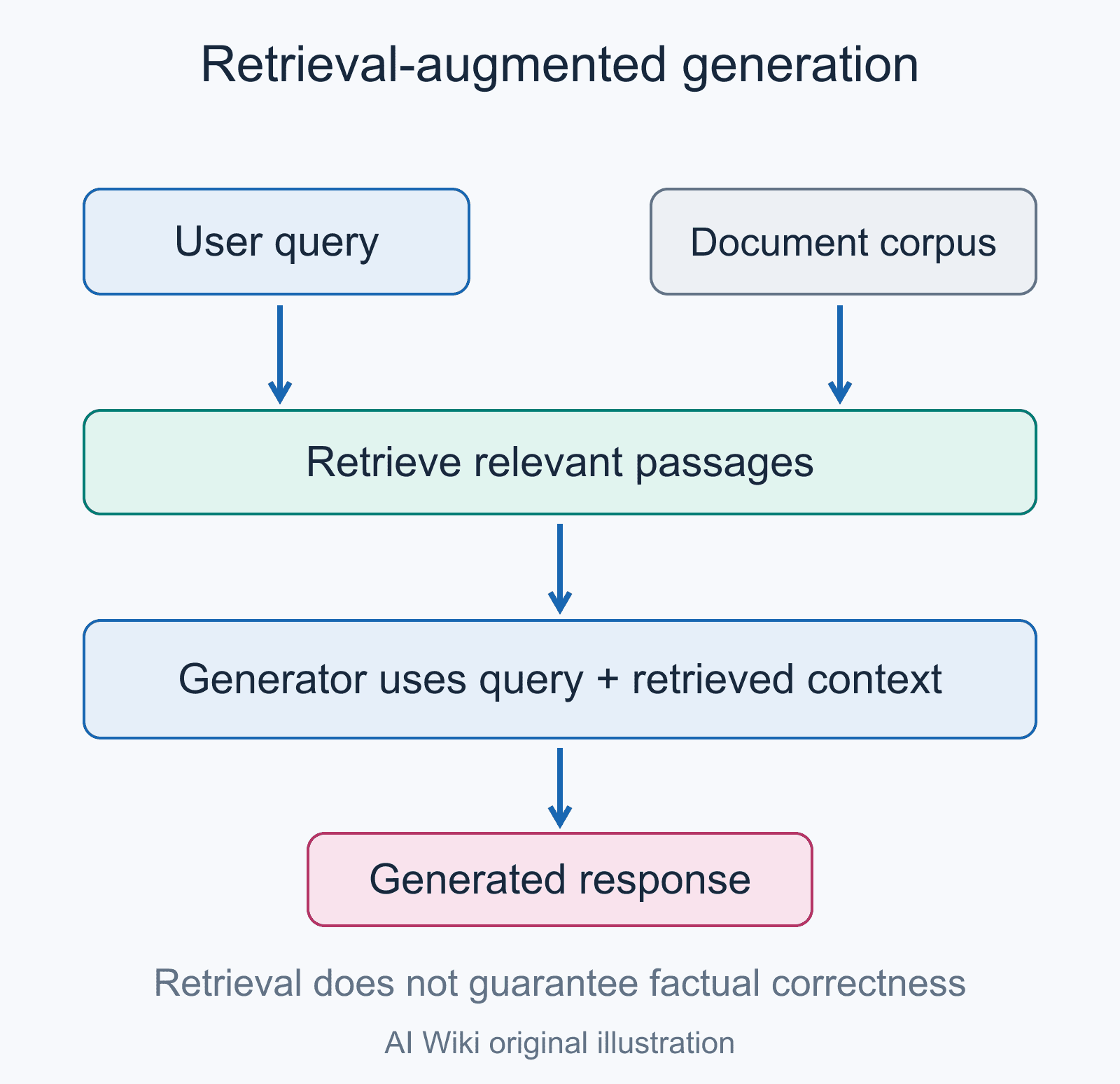
Document parsing also became an ingestion step for retrieval-augmented generation. IBM Research's Docling technical report (August 2024) presented an MIT-licensed open-source package for PDF conversion built on its DocLayNet layout model and TableFormer table-structure model, and stated that LLMs and RAG had made the content of PDFs more relevant than before.[31] The authors of OmniDocBench (December 2024, CVPR 2025), from Shanghai AI Laboratory, described document content extraction as underpinning the data needs of LLMs and RAG systems; their benchmark evaluates PDF parsing across nine document sources and compares pipeline-based methods with end-to-end vision language models.[30] ColPali (June 2024, ICLR 2025) took a different route to retrieval: rather than extracting text, it embeds images of document pages directly with a vision language model built on PaliGemma-3B, using ColBERT-style late interaction, and it introduced the ViDoRe benchmark for visually rich document retrieval.[32]
Benchmarks also moved toward longer and more realistic documents. MP-DocVQA (December 2022) extended DocVQA from single pages to multi-page documents, and DUDE (ICCV 2023) called on the community to build more practically oriented benchmarks with multi-page, multi-domain and multi-industry documents.[28][29]
Notable models
| Model | Main organization | arXiv | Venue | Approach |
|---|---|---|---|---|
| LayoutLM | Microsoft Research Asia | Dec 2019 | KDD 2020 | Text plus 2D layout pre-training[6] |
| LayoutLMv2 | Microsoft | Dec 2020 | ACL 2021 | Text, layout and image in pre-training[7] |
| LayoutXLM | Microsoft | Apr 2021 | Multilingual LayoutLMv2[8] | |
| DocFormer | AWS AI | Jun 2021 | ICCV 2021 | Multimodal self-attention[9] |
| TrOCR | Microsoft | Sep 2021 | Transformer text recognition[18] | |
| Donut | NAVER CLOVA | Nov 2021 | ECCV 2022 | OCR-free image to sequence[13] |
| DiT | Microsoft Research Asia | Mar 2022 | ACM MM 2022 | Self-supervised image backbone[11] |
| LayoutLMv3 | Microsoft | Apr 2022 | ACM MM 2022 | Unified text and image masking[10] |
| Pix2Struct | Google Research | Oct 2022 | ICML 2023 | Screenshot-to-HTML pre-training[14] |
| UDOP | UNC Chapel Hill, Microsoft | Dec 2022 | CVPR 2023 | Unified generation of text, layout and images[12] |
| Nougat | Meta AI | Aug 2023 | Scientific PDFs to markup[15] | |
| DocLLM | JPMorgan AI Research | Dec 2023 | Layout-aware LLM without image encoder[17] | |
| ColPali | Illuin Technology and others | Jun 2024 | ICLR 2025 | Page-image embeddings for retrieval[32] |
| GOT | StepFun and others | Sep 2024 | Unified "OCR-2.0" model[16] |
Datasets and benchmarks
The growth of public datasets drove much of the field's progress. The 2021 survey's benchmark table lists 30 datasets across its four task types, most of them in English, some in Chinese, and one (XFUND) in seven languages.[1]
| Dataset | Task | Size and source | Year |
|---|---|---|---|
| RVL-CDIP | Classification | 400,000 images in 16 categories, from IIT-CDIP[5] | 2015 |
| FUNSD | Form understanding | 199 annotated noisy scanned forms[19] | 2019 |
| SROIE | Receipt OCR and key information extraction | 1,000 scanned receipts (ICDAR 2019 competition)[20] | 2019 |
| PubLayNet | Layout analysis | More than 360,000 page images, matched automatically from PubMed Central articles[23] | 2019 |
| TableBank | Table detection and recognition | 417,000 tables from Word and LaTeX documents[24] | 2019 |
| PubTabNet | Table recognition | 568,000 table images with HTML structure[25] | 2019 |
| DocBank | Layout analysis | 500,000 pages with token-level labels, from arXiv LaTeX sources[26] | 2020 |
| DocVQA | Document question answering | 50,000 questions on more than 12,000 images[21] | 2020 |
| InfographicVQA | Question answering on infographics | Questions on a diverse collection of infographics[22] | 2021 |
| XFUND | Multilingual form understanding | Forms in 7 languages[8] | 2021 |
| DocLayNet | Layout analysis | 80,863 human-annotated pages, 11 classes[27] | 2022 |
| MP-DocVQA | Multi-page question answering | Questions over multi-page documents[28] | 2022 |
| DUDE | Multi-page, multi-domain question answering | Documents from many industries and periods[29] | 2023 |
| OmniDocBench | PDF parsing | Nine document sources, 19 layout categories[30] | 2024 |
Several large datasets were built automatically from existing digital sources rather than by manual labeling. PubLayNet matched the XML and PDF versions of PubMed Central articles,[23] DocBank used arXiv LaTeX sources,[26] and PubTabNet matched XML and PDF representations from the PubMed Central Open Access Subset.[25] IBM's DocLayNet paper argued that datasets of this kind lacked layout variability because they came only from scientific article repositories, and reported that layout models lost accuracy on more diverse documents; DocLayNet was annotated by hand from varied sources to address this.[27]
Evaluation metrics vary by task. DocVQA adopted Average Normalized Levenshtein Similarity (ANLS), a metric first proposed for the ST-VQA dataset, as its primary metric so that small answer mismatches caused by OCR errors are not scored as complete failures.[21] PubTabNet introduced the Tree-Edit-Distance-based Similarity (TEDS) metric for table recognition,[25] and DocLayNet reported layout baselines in mean average precision (mAP).[27]
Google Cloud Document AI
Document AI is also the name of a Google Cloud product. Google's documentation describes it as a document processing and understanding platform that takes unstructured data from documents and transforms it into structured data, built on products within Vertex AI with generative AI.[2]
History
| Date | Event |
|---|---|
| 2020-04-14 | Document AI beta (API v1beta2) parses forms and tables from PDF, TIFF and GIF files; invoice processing offered as a restricted feature[33] |
| 2020-10-16 | Preview (API v1beta3) adds general processors (Document OCR, form parser, document splitter) and lending processors for W9, 1040, W2, 1099-MISC and 1003 forms[33] |
| 2020-10-29 | Procurement DocAI invoice and receipt parsers added to the preview[33] |
| 2021-03-31 | Release notes record Document AI as generally available[33] |
| 2021-04-21 | Google announces general availability of the DocAI platform, Lending DocAI and Procurement DocAI[34] |
| 2022-09-29 | Document AI Workbench Custom Document Extractor moves to public preview[33] |
| 2023-07-17 | All Workbench processors (extractor, classifier, splitter) generally available[33] |
| 2023-08-25 | Workbench gains generative AI: a Summarizer and a custom extractor with generative AI, both in preview[33] |
| 2024-01-09 | Custom extractor with generative AI generally available[33] |
| 2024-06-04 | Layout Parser generally available[33] |
| 2025-02-14 | Custom extractor version powered by Gemini 2.0 Flash in public preview[33] |
| 2025-11-07 | Gemini layout parser in preview[33] |
| 2026-02-17 | Google announces that a set of legacy processor versions will be discontinued on 2026-06-30[33] |
| 2026-09-21 | Custom extractor version powered by Gemini 3.1 Flash Lite in preview[33] |
The April 2021 announcement, written by Sudheera Vanguri, Google Cloud's head of product for language and document AI, said that thousands of customers had tried the products during the preview and that DocAI had already processed tens of billions of pages across lending, insurance, government and other industries.[34] Google described Lending DocAI as speeding up loan applications with specialized parsers for documents such as pay stubs and bank statements, and claimed Procurement DocAI could cut procurement processing costs by up to 60%.[34] The same post said Procurement DocAI used the Google Knowledge Graph to validate and enrich parsed fields.[34]
From 2023 the service shifted toward generative models. The August 2023 custom extractor with generative AI could be used without training, by sending a document and a list of fields, and could be adapted with about five labeled documents through few-shot prediction.[33] Later processor versions were built on named Gemini models, including Gemini 2.5 Flash, Gemini 3 Pro, Gemini 3 Flash and, by July 2026, Gemini 3.5 Flash.[33] The release notes say that some of these Gemini-based versions use the Vertex AI Gemini global endpoint and do not meet data residency standards, so requests sent to US or EU endpoints may be processed elsewhere.[33]
Processors
As of November 2026, Google's overview groups the available processors into three categories.[2]
| Category | Processor | Function |
|---|---|---|
| Digitize | Enterprise Document OCR | Extracts text and layout information, with optional image-quality analysis[2] |
| Extract | Form Parser | Extracts tables and key-value pairs from structured forms[2] |
| Extract | Gemini layout parser | Extracts text, tables and lists and returns context-aware chunks[2] |
| Extract | Custom extractor | Extracts entities from custom documents[2] |
| Extract | Pretrained (specialized) processors | Extract entities from specialized document types; can be uptrained[2] |
| Classify | Custom classifier | Classifies document types[2] |
| Classify | Custom splitter | Splits a file containing several documents and classifies each one[2] |
Google's release notes describe the Layout Parser's context-aware chunks as intended for information retrieval in generative AI and discovery applications.[33] Document AI processors can also be called from BigQuery through the ML.PROCESS_DOCUMENT function, which reads documents from an object table and returns the extracted fields, as listed in Machine learning terms/Google Cloud.[35]
Other commercial services
The 2021 survey named Microsoft Form Recognizer, Amazon Textract and Google Document AI as examples of successful document AI products.[1]
- Azure Document Intelligence. Microsoft announced on July 18, 2023 that Azure Form Recognizer had been renamed Azure AI Document Intelligence.[3] As of 2026, Microsoft's documentation calls the service Azure Document Intelligence in Foundry Tools and describes it as a machine-learning-based OCR and intelligent document processing service; it offers document analysis models (such as read and layout), prebuilt models for documents including invoices, receipts, ID documents, bank statements, pay stubs and US tax and mortgage forms, and custom models.[36]
- Amazon Textract. Amazon Web Services' service detects typed and handwritten text and extracts text, forms and tables; it also offers a Queries feature for asking for specific information, the AnalyzeExpense API for invoices and receipts, the AnalyzeID API for US identity documents, and an Analyze Lending workflow for mortgage loan packages.[4]
Applications
The 2021 survey lists finance, healthcare, insurance, energy and logistics as industries using document AI. Its examples include financial report analysis, digitizing medical records, and extracting information from invoices and purchase orders in accounting.[1] It also identifies document AI as a core technology for robotic process automation, which automates clerical work with electronic documents.[1] Vendor examples follow the same pattern: Google's launch materials focused on mortgage lending and procurement documents,[34] and Amazon's documentation lists search indexes, form data capture and lending-document classification among Textract's use cases.[4] Parsing documents into chunks for retrieval-augmented generation is a more recent use, reflected in both open-source tools such as Docling and cloud features such as Google's Layout Parser.[31][33]
Challenges
The 2021 survey identified several open problems.[1]
- Long documents. The input-length limits of pre-trained models force long documents to be cut into pieces, which makes multi-page and cross-page understanding hard.[1]
- Data mismatch. Real business scans, often affected by scanning equipment, crumpled paper and random placement, differ in quality from annotated training data, so the survey called for more data synthesis and augmentation.[1]
- Isolated tasks. Tasks were usually trained separately even when they share representations, such as information extraction and document question answering, which the survey suggested could be handled with multi-task learning.[1]
- Resources and labels. Limited compute and labeled data made model compression, few-shot learning and zero-shot learning important research directions.[1]
- OCR dependence. Because most systems take OCR output as input, recognition accuracy strongly affects downstream results.[1]
Later work addressed some of these points directly: OCR-free models target OCR cost and error propagation,[13] MP-DocVQA and DUDE target multi-page documents,[28][29] and DocLayNet targets the narrow layout variety of earlier training sets.[27] The Pix2Struct authors also observed that text-only baselines were at or near the state of the art on DocVQA and InfographicVQA, which they attributed partly to how text-heavy the data was, especially in DocVQA, so that visual context played a smaller role.[14]
Continue reading
- LayoutLMLayoutLM is a family of pre-trained multimodal models developed by Microsoft Research for document AI, the task of automatically reading and understanding visually rich documents such as forms, invoices…Mentioned 5 times above
- Donut (Model)Donut (Document understanding transformer) is an OCR-free visual document understanding model introduced by researchers at NAVER CLOVA in the paper "OCR-free Document Understanding Transformer," first posted…Mentioned 5 times above
- Vision language modelVision-language models (VLMs) are artificial intelligence models that learn relationships between visual data and natural language.Mentioned 3 times above
- Retrieval-Augmented GenerationRetrieval-augmented generation (RAG) is a family of methods that retrieves information from an external collection and conditions a generative model on that information when producing an output.Mentioned 3 times above
- OCR ModelsOCR Models are artificial intelligence (AI) systems that convert images of typed, handwritten, or printed text into machine-readable digital text through Optical Character Recognition (OCR).Mentioned twice above
- Nougat (model)Nougat (Neural Optical Understanding for Academic Documents) is a document-understanding model from Meta AI that converts the rendered image of a document page into structured markup text.Mentioned twice above


More from See also
More to read
Topics:Computer VisionEnterprise AIMultimodal AINatural Language Processing
References
- ^1 ^2 ^3 ^4 ^5 ^6 ^7 ^8 ^9 ^10 ^11 ^12 ^13 ^14 ^15 ^16 ^17 ^18 ^19 ^20 ^21 ^22 ^23 ^24 ^25 ^26 ^27 ^28 ^29 ^30 ^31 ^32 ^33 ^34 ^35 ^36 ^37 ^38 ^39 ^40 ^41 ^42Lei Cui, Yiheng Xu, Tengchao Lv, Furu Wei. "Document AI: Benchmarks, Models and Applications". arXiv:2111.08609, 2021-11-16. arxiv.org/...2111.08609
- ^1 ^2 ^3 ^4 ^5 ^6 ^7 ^8 ^9 ^10Google Cloud. "Document AI overview". Google Cloud documentation, accessed 2026-11-18. docs.cloud.google.com/...overview
- ^1 ^2Vinod Kurpad. "Azure Form Recognizer is now Azure AI Document Intelligence with new and updated capabilities". Microsoft Tech Community, 2023-07-18. techcommunity.microsoft.com/...3875765
- ^1 ^2 ^3Amazon Web Services. "What is Amazon Textract?". Amazon Textract Developer Guide, accessed 2026-11-18. docs.aws.amazon.com/...what-is
- ^1 ^2 ^3Adam W. Harley, Alex Ufkes, Konstantinos G. Derpanis. "Evaluation of Deep Convolutional Nets for Document Image Classification and Retrieval". arXiv:1502.07058, 2015-02-25. arxiv.org/...1502.07058
- ^1 ^2 ^3 ^4 ^5Yiheng Xu, Minghao Li, Lei Cui, Shaohan Huang, Furu Wei, Ming Zhou. "LayoutLM: Pre-training of Text and Layout for Document Image Understanding". KDD 2020; arXiv:1912.13318, 2019-12-31. arxiv.org/...1912.13318
- ^1 ^2Yang Xu, Yiheng Xu, Tengchao Lv, Lei Cui, Furu Wei, Guoxin Wang, Yijuan Lu, Dinei Florencio, Cha Zhang, Wanxiang Che, Min Zhang, Lidong Zhou. "LayoutLMv2: Multi-modal Pre-training for Visually-Rich Document Understanding". ACL 2021; arXiv:2012.14740, 2020-12-29. arxiv.org/...2012.14740
- ^1 ^2 ^3 ^4Yiheng Xu, Tengchao Lv, Lei Cui, Guoxin Wang, Yijuan Lu, Dinei Florencio, Cha Zhang, Furu Wei. "LayoutXLM: Multimodal Pre-training for Multilingual Visually-rich Document Understanding". arXiv:2104.08836, 2021-04-18. arxiv.org/...2104.08836
- ^1 ^2Srikar Appalaraju, Bhavan Jasani, Bhargava Urala Kota, Yusheng Xie, R. Manmatha. "DocFormer: End-to-End Transformer for Document Understanding". ICCV 2021; arXiv:2106.11539, 2021-06-22. arxiv.org/...2106.11539
- ^1 ^2Yupan Huang, Tengchao Lv, Lei Cui, Yutong Lu, Furu Wei. "LayoutLMv3: Pre-training for Document AI with Unified Text and Image Masking". ACM Multimedia 2022; arXiv:2204.08387, 2022-04-18. arxiv.org/...2204.08387
- ^1 ^2Junlong Li, Yiheng Xu, Tengchao Lv, Lei Cui, Cha Zhang, Furu Wei. "DiT: Self-supervised Pre-training for Document Image Transformer". ACM Multimedia 2022; arXiv:2203.02378, 2022-03-04. arxiv.org/...2203.02378
- ^1 ^2Zineng Tang, Ziyi Yang, Guoxin Wang, Yuwei Fang, Yang Liu, Chenguang Zhu, Michael Zeng, Cha Zhang, Mohit Bansal. "Unifying Vision, Text, and Layout for Universal Document Processing". CVPR 2023; arXiv:2212.02623, 2022-12-05. arxiv.org/...2212.02623
- ^1 ^2 ^3 ^4 ^5 ^6Geewook Kim, Teakgyu Hong, Moonbin Yim, Jeongyeon Nam, Jinyoung Park, Jinyeong Yim, Wonseok Hwang, Sangdoo Yun, Dongyoon Han, Seunghyun Park. "OCR-free Document Understanding Transformer". ECCV 2022; arXiv:2111.15664, 2021-11-30. arxiv.org/...2111.15664
- ^1 ^2 ^3 ^4Kenton Lee, Mandar Joshi, Iulia Turc, Hexiang Hu, Fangyu Liu, Julian Eisenschlos, Urvashi Khandelwal, Peter Shaw, Ming-Wei Chang, Kristina Toutanova. "Pix2Struct: Screenshot Parsing as Pretraining for Visual Language Understanding". ICML 2023; arXiv:2210.03347, 2022-10-07. arxiv.org/...2210.03347
- ^1 ^2 ^3 ^4Lukas Blecher, Guillem Cucurull, Thomas Scialom, Robert Stojnic. "Nougat: Neural Optical Understanding for Academic Documents". arXiv:2308.13418, 2023-08-25. arxiv.org/...2308.13418
- ^1 ^2 ^3Haoran Wei, Chenglong Liu, Jinyue Chen, Jia Wang, Lingyu Kong, Yanming Xu, Zheng Ge, Liang Zhao, Jianjian Sun, Yuang Peng, Chunrui Han, Xiangyu Zhang. "General OCR Theory: Towards OCR-2.0 via a Unified End-to-end Model". arXiv:2409.01704, 2024-09-03. arxiv.org/...2409.01704
- ^1 ^2 ^3 ^4Dongsheng Wang, Natraj Raman, Mathieu Sibue, Zhiqiang Ma, Petr Babkin, Simerjot Kaur, Yulong Pei, Armineh Nourbakhsh, Xiaomo Liu. "DocLLM: A layout-aware generative language model for multimodal document understanding". arXiv:2401.00908, 2023-12-31. arxiv.org/...2401.00908
- ^Minghao Li, Tengchao Lv, Jingye Chen, Lei Cui, Yijuan Lu, Dinei Florencio, Cha Zhang, Zhoujun Li, Furu Wei. "TrOCR: Transformer-based Optical Character Recognition with Pre-trained Models". arXiv:2109.10282, 2021-09-21. arxiv.org/...2109.10282
- ^1 ^2Guillaume Jaume, Hazim Kemal Ekenel, Jean-Philippe Thiran. "FUNSD: A Dataset for Form Understanding in Noisy Scanned Documents". ICDAR 2019 OST workshop; arXiv:1905.13538, 2019-05-27. arxiv.org/...1905.13538
- ^1 ^2 ^3Zheng Huang, Kai Chen, Jianhua He, Xiang Bai, Dimosthenis Karatzas, Shjian Lu, C. V. Jawahar. "ICDAR2019 Competition on Scanned Receipt OCR and Information Extraction". ICDAR 2019; arXiv:2103.10213, 2021-03-18. arxiv.org/...2103.10213
- ^1 ^2 ^3Minesh Mathew, Dimosthenis Karatzas, C. V. Jawahar. "DocVQA: A Dataset for VQA on Document Images". WACV 2021; arXiv:2007.00398, 2020-07-01. arxiv.org/...2007.00398
- ^1 ^2Minesh Mathew, Viraj Bagal, Rubèn Pérez Tito, Dimosthenis Karatzas, Ernest Valveny, C. V Jawahar. "InfographicVQA". arXiv:2104.12756, 2021-04-26. arxiv.org/...2104.12756
- ^1 ^2 ^3 ^4Xu Zhong, Jianbin Tang, Antonio Jimeno Yepes. "PubLayNet: largest dataset ever for document layout analysis". arXiv:1908.07836, 2019-08-16. arxiv.org/...1908.07836
- ^1 ^2 ^3Minghao Li, Lei Cui, Shaohan Huang, Furu Wei, Ming Zhou, Zhoujun Li. "TableBank: A Benchmark Dataset for Table Detection and Recognition". LREC 2020; arXiv:1903.01949, 2019-03-05. arxiv.org/...1903.01949
- ^1 ^2 ^3 ^4 ^5Xu Zhong, Elaheh ShafieiBavani, Antonio Jimeno Yepes. "Image-based table recognition: data, model, and evaluation". arXiv:1911.10683, 2019-11-25. arxiv.org/...1911.10683
- ^1 ^2 ^3 ^4Minghao Li, Yiheng Xu, Lei Cui, Shaohan Huang, Furu Wei, Zhoujun Li, Ming Zhou. "DocBank: A Benchmark Dataset for Document Layout Analysis". COLING 2020; arXiv:2006.01038, 2020-06-01. arxiv.org/...2006.01038
- ^1 ^2 ^3 ^4 ^5Birgit Pfitzmann, Christoph Auer, Michele Dolfi, Ahmed S Nassar, Peter W J Staar. "DocLayNet: A Large Human-Annotated Dataset for Document-Layout Analysis". KDD 2022; arXiv:2206.01062, 2022-06-02. arxiv.org/...2206.01062
- ^1 ^2 ^3 ^4Rubèn Tito, Dimosthenis Karatzas, Ernest Valveny. "Hierarchical multimodal transformers for Multi-Page DocVQA". arXiv:2212.05935, 2022-12-07. arxiv.org/...2212.05935
- ^1 ^2 ^3 ^4Jordy Van Landeghem, Rubén Tito, Łukasz Borchmann, Michał Pietruszka, Paweł Józiak, Rafał Powalski, Dawid Jurkiewicz, Mickaël Coustaty, Bertrand Ackaert, Ernest Valveny, Matthew Blaschko, Sien Moens, Tomasz Stanisławek. "Document Understanding Dataset and Evaluation (DUDE)". ICCV 2023; arXiv:2305.08455, 2023-05-15. arxiv.org/...2305.08455
- ^1 ^2 ^3 ^4 ^5Linke Ouyang, Yuan Qu, Hongbin Zhou, Jiawei Zhu, Rui Zhang, Qunshu Lin, Bin Wang, Zhiyuan Zhao, Man Jiang, Xiaomeng Zhao, Jin Shi, Fan Wu, Pei Chu, Minghao Liu, Zhenxiang Li, Chao Xu, Bo Zhang, Botian Shi, Zhongying Tu, Conghui He. "OmniDocBench: Benchmarking Diverse PDF Document Parsing with Comprehensive Annotations". CVPR 2025; arXiv:2412.07626, 2024-12-10. arxiv.org/...2412.07626
- ^1 ^2 ^3Christoph Auer, Maksym Lysak, Ahmed Nassar, Michele Dolfi, Nikolaos Livathinos, Panos Vagenas, Cesar Berrospi Ramis, Matteo Omenetti, Fabian Lindlbauer, Kasper Dinkla, Lokesh Mishra, Yusik Kim, Shubham Gupta, Rafael Teixeira de Lima, Valery Weber, Lucas Morin, Ingmar Meijer, Viktor Kuropiatnyk, Peter W. J. Staar. "Docling Technical Report". arXiv:2408.09869, 2024-08-19. arxiv.org/...2408.09869
- ^1 ^2 ^3 ^4 ^5Manuel Faysse, Hugues Sibille, Tony Wu, Bilel Omrani, Gautier Viaud, Céline Hudelot, Pierre Colombo. "ColPali: Efficient Document Retrieval with Vision Language Models". ICLR 2025; arXiv:2407.01449, 2024-06-27. arxiv.org/...2407.01449
- ^1 ^2 ^3 ^4 ^5 ^6 ^7 ^8 ^9 ^10 ^11 ^12 ^13 ^14 ^15 ^16 ^17 ^18Google Cloud. "Document AI release notes". Google Cloud documentation, last updated 2026-11-10. docs.cloud.google.com/...release-notes
- ^1 ^2 ^3 ^4 ^5Sudheera Vanguri. "Customers cut document processing time and costs with DocAI solutions, now generally available". Google Cloud Blog, 2021-04-21. cloud.google.com/...h-docai-and-industry-solutions
- ^Google Cloud. "The ML.PROCESS_DOCUMENT function". BigQuery documentation, accessed 2026-11-18. docs.cloud.google.com/...l-syntax-process-document
- ^Microsoft. "What is Azure Document Intelligence in Foundry Tools?". Microsoft Learn, updated 2026-10-19. learn.microsoft.com/...overview
Improve this article
Add missing citations, update stale details, or write a clearer explanation. Anyone can edit: changes go live when you publish, and every edit is checked by an editor.
1 revision · v1 · 4,718 words · full history
Fact-checks are independent of edits: a reviewer re-verifies the article against its sources and stamps the date. How we verify
Research and drafting on this wiki are AI-assisted, under named human editorial standards. How AI is used here
Cite this page: AI Wiki. "Document AI." aiwiki.ai, updated 18 Nov 2026. CC BY 4.0. https://aiwiki.ai/wiki/document_ai